

Hello, I need help, please.
In my Proxmox cluster, if only one node goes down, all nodes appear offline except for the node I access through the web interface.
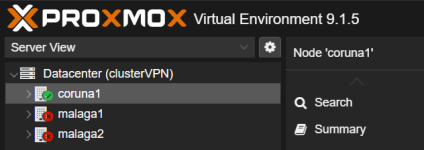
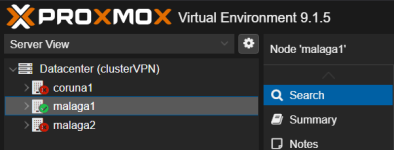
For example, if I access the management interface for the coruna1 node, I only see coruna1 as online, and the rest of the nodes are offline.
I can access the nodes that are marked as offline, but they are actually working.
In the Datacenter > Summary tab, it says that there is quorate: "Cluster: clusterVPN, Quorate: Yes"
/etc/pve/corosync.conf:
In the images, the malaga2 node is offline and the rest are online.
In my Proxmox cluster, if only one node goes down, all nodes appear offline except for the node I access through the web interface.
For example, if I access the management interface for the coruna1 node, I only see coruna1 as online, and the rest of the nodes are offline.
I can access the nodes that are marked as offline, but they are actually working.
In the Datacenter > Summary tab, it says that there is quorate: "Cluster: clusterVPN, Quorate: Yes"
/etc/pve/corosync.conf:
Code:
root@coruna1:~# /usr/bin/cat /etc/pve/corosync.conf
logging {
  debug: off
  to_syslog: yes
}

nodelist {
  node {
    name: coruna1
    nodeid: 1
    quorum_votes: 1
    ring0_addr: 172.16.0.100
  }
  node {
    name: malaga1
    nodeid: 3
    quorum_votes: 1
    ring0_addr: 172.16.0.102
  }
  node {
    name: malaga2
    nodeid: 2
    quorum_votes: 1
    ring0_addr: 172.16.0.103
  }
}

quorum {
  expected_votes: 1
  last_man_standing: 1
  provider: corosync_votequorum
  wait_for_all: 0
}

totem {
  cluster_name: clusterVPN
  config_version: 13
  interface {
    linknumber: 0
  }
  ip_version: ipv4-6
  link_mode: passive
  token: 15000
  secauth: on
  version: 2
}
root@coruna1:~#
In the images, the malaga2 node is offline and the rest are online.
Attachments
Last edited:
