Web GUI unavailable

MP-Skull

New Member
Jan 9, 2026
6
0
1
Hi all,

I'm facing a somewhat strange issue ... let me explain.

I performed an update & upgrade from the proxmox shell. Current version was 8.x.

After the job was completed, the system rebooted.

I can ping the proxmox IP.

All VM's are running perfectly.

BUT, I cannot access proxmox on my browser ... I get a blank page.

It seems to me that the web GUI is corrupted.

Any suggestions how to fix this?

Btw, I rebooted proxmox and my computer. No change.

Thanks in advance.
 
Hi,

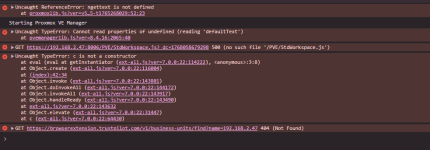
have you checked the developer console in your web browser for any errors?
Was the upgrade successful? How exactly did you perform the upgrades, i.e. which commands?

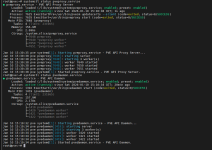
Did you check whether the pveproxy.service and pvedaemon.service are running correctly? And their log, in case there are errors?
 
Hi,

have you checked the developer console in your web browser for any errors?
Was the upgrade successful? How exactly did you perform the upgrades, i.e. which commands?

Did you check whether the pveproxy.service and pvedaemon.service are running correctly? And their log, in case there are errors?
Many thanks for your response.

Both services are running without any errors
 
I am having the same issue; upgraded from 7.4-3 to 8.4.16; webpage loads, but is blank. both pveproxy.service & pvedaemon.service are running without error 1768055482286.png
 
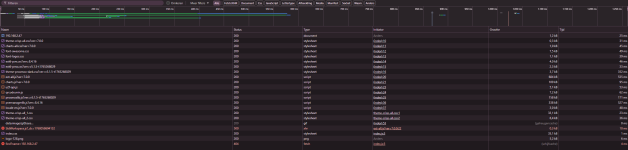
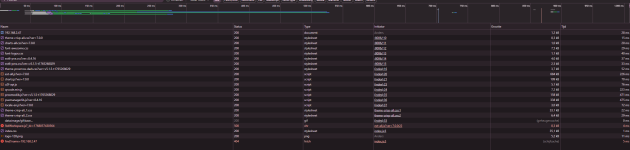
Then please share the output of the commands as well as the Console and Network tabs of the browser's developer tools.
 
Then please share the output of the commands as well as the Console and Network tabs of the browser's developer tools.
root@pve:~# rm -f /etc/apt/apt.conf.d/no-nag-script
root@pve:~# apt install --reinstall pve-manager proxmox-widget-toolkit
Reading package lists... Done
Building dependency tree... Done
Reading state information... Done
Reinstallation of proxmox-widget-toolkit is not possible, it cannot be downloaded.
The following packages were automatically installed and are no longer required:
libfmt7 libthrift-0.13.0
Use 'apt autoremove' to remove them.
0 upgraded, 0 newly installed, 1 reinstalled, 0 to remove and 22 not upgraded.
Need to get 0 B/587 kB of archives.
After this operation, 0 B of additional disk space will be used.
Do you want to continue? [Y/n] y
(Reading database ... 58977 files and directories currently installed.)
Preparing to unpack .../pve-manager_8.4.16_all.deb ...
Unpacking pve-manager (8.4.16) over (8.4.16) ...
Setting up pve-manager (8.4.16) ...
Processing triggers for man-db (2.11.2-2) ...
root@pve:~# systemctl restart pvedaemon pveproxy
root@pve:~# systemctl status pvedaemon pveproxy
● pvedaemon.service - PVE API Daemon
Loaded: loaded (/lib/systemd/system/pvedaemon.service; enabled; preset: enabled)
Active: active (running) since Sat 2026-01-10 16:01:53 CET; 8s ago
Process: 2130 ExecStart=/usr/bin/pvedaemon start (code=exited, status=0/SUCCESS)
Main PID: 2148 (pvedaemon)
Tasks: 4 (limit: 231965)
Memory: 151.6M
CPU: 1.980s
CGroup: /system.slice/pvedaemon.service
├─2148 pvedaemon
├─2149 "pvedaemon worker"
├─2150 "pvedaemon worker"
└─2151 "pvedaemon worker"

Jan 10 16:01:51 pve systemd[1]: Starting pvedaemon.service - PVE API Daemon...
Jan 10 16:01:53 pve pvedaemon[2148]: starting server
Jan 10 16:01:53 pve pvedaemon[2148]: starting 3 worker(s)
Jan 10 16:01:53 pve pvedaemon[2148]: worker 2149 started
Jan 10 16:01:53 pve pvedaemon[2148]: worker 2150 started
Jan 10 16:01:53 pve pvedaemon[2148]: worker 2151 started
Jan 10 16:01:53 pve systemd[1]: Started pvedaemon.service - PVE API Daemon.

● pveproxy.service - PVE API Proxy Server
Loaded: loaded (/lib/systemd/system/pveproxy.service; enabled; preset: enabled)
Active: active (running) since Sat 2026-01-10 16:01:55 CET; 6s ago
Process: 2152 ExecStartPre=/usr/bin/pvecm updatecerts --silent (code=exited, status=0/SUCCESS)
Process: 2162 ExecStart=/usr/bin/pveproxy start (code=exited, status=0/SUCCESS)
Main PID: 2175 (pveproxy)
Tasks: 4 (limit: 231965)
Memory: 156.4M
CPU: 2.673s
CGroup: /system.slice/pveproxy.service
├─2175 pveproxy
├─2176 "pveproxy worker"
├─2177 "pveproxy worker"
└─2178 "pveproxy worker"

Jan 10 16:01:53 pve systemd[1]: Starting pveproxy.service - PVE API Proxy Server...
Jan 10 16:01:55 pve pveproxy[2175]: starting server
Jan 10 16:01:55 pve pveproxy[2175]: starting 3 worker(s)
Jan 10 16:01:55 pve pveproxy[2175]: worker 2176 started
Jan 10 16:01:55 pve pveproxy[2175]: worker 2177 started
Jan 10 16:01:55 pve pveproxy[2175]: worker 2178 started
Jan 10 16:01:55 pve systemd[1]: Started pveproxy.service - PVE API Proxy Server.
root@pve:~#
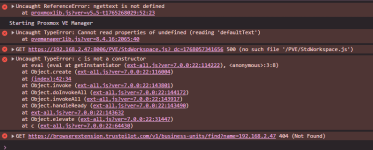


1768057355006.png

1768057446631.png
 
Last edited:
This is not what I consider successfull. What does apt update say.
root@pve:~# apt update
Hit:1 http://security.debian.org bookworm-security InRelease
Hit:2 http://ftp.nl.debian.org/debian bookworm InRelease
Hit:3 http://ftp.nl.debian.org/debian bookworm-updates InRelease
Err:4 https://enterprise.proxmox.com/debian/pve bookworm InRelease
401 Unauthorized [IP: 2a0e:9880:304::184 443]
Hit:5 http://download.proxmox.com/debian/pve bookworm InRelease
Hit:6 http://download.proxmox.com/debian/ceph-reef bookworm InRelease
Reading package lists... Done
E: Failed to fetch https://enterprise.proxmox.com/debian/pve/dists/bookworm/InRelease 401 Unauthorized [IP: 2a0e:9880:304::184 443]
E: The repository 'https://enterprise.proxmox.com/debian/pve bookworm InRelease' is not signed.
N: Updating from such a repository can't be done securely, and is therefore disabled by default.
N: See apt-secure(8) manpage for repository creation and user configuration details.
W: Target Packages (pve-no-subscription/binary-amd64/Packages) is configured multiple times in /etc/apt/sources.list:8 and /etc/apt/sources.list.d/pve-install-repo.list:1
W: Target Packages (pve-no-subscription/binary-all/Packages) is configured multiple times in /etc/apt/sources.list:8 and /etc/apt/sources.list.d/pve-install-repo.list:1
W: Target Translations (pve-no-subscription/i18n/Translation-en_US) is configured multiple times in /etc/apt/sources.list:8 and /etc/apt/sources.list.d/pve-install-repo.list:1
W: Target Translations (pve-no-subscription/i18n/Translation-en) is configured multiple times in /etc/apt/sources.list:8 and /etc/apt/sources.list.d/pve-install-repo.list:1
W: Target Packages (pve-no-subscription/binary-amd64/Packages) is configured multiple times in /etc/apt/sources.list:8 and /etc/apt/sources.list.d/pve-install-repo.list:1
W: Target Packages (pve-no-subscription/binary-all/Packages) is configured multiple times in /etc/apt/sources.list:8 and /etc/apt/sources.list.d/pve-install-repo.list:1
W: Target Translations (pve-no-subscription/i18n/Translation-en_US) is configured multiple times in /etc/apt/sources.list:8 and /etc/apt/sources.list.d/pve-install-repo.list:1
W: Target Translations (pve-no-subscription/i18n/Translation-en) is configured multiple times in /etc/apt/sources.list:8 and /etc/apt/sources.list.d/pve-install-repo.list:1
root@pve:~#

Tried editing the files (im on no-subscription), but they keep trying the subscription one. If you can tell me how to fix that; would be amazing
 
Yeah you need to fix that first. Try this to list the contents of all the files
Bash:
find /etc/apt/sources.list* -type f -exec tail -n +1 {} +
Then either remove the duplicate sections, uncomment the subscription repos, delte the subscription repo file, etc.
Also see here. Please use code blocks when sharing formatted text.
 
Last edited:
This is the only response I get from running the command:

Bash:
root@pve:~# find /etc/apt/ -type f -name "*.list" -o -name "*.sources" -exec tail -n +1 {} +
==> /etc/apt/sources.list.d/proxmox.pbs.sources <==


==> /etc/apt/sources.list.d/proxmox.sources <==
Types: deb
URIs: http://download.proxmox.com/debian/pve
Suites: trixie
Components: pve-no-subscription
Signed-By: /usr/share/keyrings/proxmox-archive-keyring.gpg
Enabled: false

root@pve:~#
 
Sorry, I forgot the () surrounding the operators. I simplified the command above. It should work now.
 
Last edited:
The result of said command :

Bash:
root@pve:~# find /etc/apt/sources.list* -type f -exec tail -n +1 {} +
==> /etc/apt/sources.list <==
deb http://ftp.nl.debian.org/debian bookworm main contrib

deb http://ftp.nl.debian.org/debian bookworm-updates main contrib

# security updates
deb http://security.debian.org bookworm-security main contrib

deb http://download.proxmox.com/debian/pve bookworm pve-no-subscription

==> /etc/apt/sources.list.d/proxmox.pbs.sources <==


==> /etc/apt/sources.list.d/proxmox.sources <==
Types: deb
URIs: http://download.proxmox.com/debian/pve
Suites: trixie
Components: pve-no-subscription
Signed-By: /usr/share/keyrings/proxmox-archive-keyring.gpg
Enabled: false


==> /etc/apt/sources.list.d/pve-enterprise.list <==
#deb https://enterprise.proxmox.com/debian/pve bookworm pve-enterprise

==> /etc/apt/sources.list.d/pve-enterprise.list.dpkg-old <==
# deb https://enterprise.proxmox.com/debian/pve bullseye pve-enterprise


==> /etc/apt/sources.list.d/ceph.list <==
deb http://download.proxmox.com/debian/ceph-reef bookworm no-subscription

==> /etc/apt/sources.list.d/pve-install-repo.list <==
deb https://download.proxmox.com/debian/pve bookworm pve-no-subscription
root@pve:~#
 
Hmm. The enterprise repos are commented out. I don't see a good reason why apt update would try to fetch from there.
Remove deb http://download.proxmox.com/debian/pve bookworm pve-no-subscription from /etc/apt/sources.list to fix the duplicate issue.
 
Last edited:
I have removed all the double lines in the files, currently "apt update" gives this result:

Bash:
root@pve:~# apt update
Hit:1 http://ftp.nl.debian.org/debian bookworm InRelease
Hit:2 http://ftp.nl.debian.org/debian bookworm-updates InRelease
Hit:3 http://security.debian.org bookworm-security InRelease
Hit:4 http://download.proxmox.com/debian/pve bookworm InRelease
Hit:5 http://download.proxmox.com/debian/ceph-reef bookworm InRelease
Reading package lists... Done
Building dependency tree... Done
Reading state information... Done
22 packages can be upgraded. Run 'apt list --upgradable' to see them.
root@pve:~#
 
Commands from link:

Bash:
root@pve:~# rm -f /etc/apt/apt.conf.d/no-nag-script
root@pve:~# apt install --reinstall pve-manager proxmox-widget-toolkit
Reading package lists... Done
Building dependency tree... Done
Reading state information... Done
Reinstallation of proxmox-widget-toolkit is not possible, it cannot be downloaded.
The following packages were automatically installed and are no longer required:
  libfmt7 libthrift-0.13.0
Use 'apt autoremove' to remove them.
0 upgraded, 0 newly installed, 1 reinstalled, 0 to remove and 0 not upgraded.
Need to get 0 B/587 kB of archives.
After this operation, 0 B of additional disk space will be used.
Do you want to continue? [Y/n] y
(Reading database ... 59007 files and directories currently installed.)
Preparing to unpack .../pve-manager_8.4.16_all.deb ...
Unpacking pve-manager (8.4.16) over (8.4.16) ...
Setting up pve-manager (8.4.16) ...
Processing triggers for man-db (2.11.2-2) ...
root@pve:~# systemctl restart pvedaemon pveproxy
root@pve:~# systemctl status pvedaemon pveproxy
● pvedaemon.service - PVE API Daemon
     Loaded: loaded (/lib/systemd/system/pvedaemon.service; enabled; preset: enabled)
     Active: active (running) since Sat 2026-01-10 16:23:38 CET; 6s ago
    Process: 17958 ExecStart=/usr/bin/pvedaemon start (code=exited, status=0/SUCCESS)
   Main PID: 17972 (pvedaemon)
      Tasks: 4 (limit: 231965)
     Memory: 153.4M
        CPU: 2.018s
     CGroup: /system.slice/pvedaemon.service
             ├─17972 pvedaemon
             ├─17973 "pvedaemon worker"
             ├─17974 "pvedaemon worker"
             └─17975 "pvedaemon worker"

Jan 10 16:23:37 pve systemd[1]: Starting pvedaemon.service - PVE API Daemon...
Jan 10 16:23:38 pve pvedaemon[17972]: starting server
Jan 10 16:23:38 pve pvedaemon[17972]: starting 3 worker(s)
Jan 10 16:23:38 pve pvedaemon[17972]: worker 17973 started
Jan 10 16:23:38 pve pvedaemon[17972]: worker 17974 started
Jan 10 16:23:38 pve pvedaemon[17972]: worker 17975 started
Jan 10 16:23:38 pve systemd[1]: Started pvedaemon.service - PVE API Daemon.

● pveproxy.service - PVE API Proxy Server
     Loaded: loaded (/lib/systemd/system/pveproxy.service; enabled; preset: enabled)
     Active: active (running) since Sat 2026-01-10 16:23:41 CET; 4s ago
    Process: 17976 ExecStartPre=/usr/bin/pvecm updatecerts --silent (code=exited, status=0/SUCCESS)
    Process: 17995 ExecStart=/usr/bin/pveproxy start (code=exited, status=0/SUCCESS)
   Main PID: 18034 (pveproxy)
      Tasks: 4 (limit: 231965)
     Memory: 157.3M
        CPU: 2.698s
     CGroup: /system.slice/pveproxy.service
             ├─18034 pveproxy
             ├─18035 "pveproxy worker"
             ├─18036 "pveproxy worker"
             └─18037 "pveproxy worker"

Jan 10 16:23:39 pve systemd[1]: Starting pveproxy.service - PVE API Proxy Server...
Jan 10 16:23:41 pve pveproxy[18034]: starting server
Jan 10 16:23:41 pve pveproxy[18034]: starting 3 worker(s)
Jan 10 16:23:41 pve pveproxy[18034]: worker 18035 started
Jan 10 16:23:41 pve pveproxy[18034]: worker 18036 started
Jan 10 16:23:41 pve pveproxy[18034]: worker 18037 started
Jan 10 16:23:41 pve systemd[1]: Started pveproxy.service - PVE API Proxy Server.
root@pve:~#

Console & Network after hard refresh:
1768058687012.png1768058702684.png