I need help finding out how to connect to my proxmox server.

Frannce

New Member
Dec 11, 2025
12
0
1
Hello,

it's my first time trying to set up proxmox! I've been having issues trying to connect to the ip to configure it on my browser.
I've been trying to connect to it by using 10.0.0.21:8006


(I now get a green dot!)

Screenshot_20251210_220833.png

Instead where the green dot would be is blank, which I am not sure if it means it cant see my Ethernet port.
I am using my old G7 7700 and I know the port works.
 
Last edited:
I want to look on the terminal direct and see what the screen give me, when I write:
Ip a and ping 1.1
 
Last edited:
  • Like
Reactions: Frannce
I want to look on the terminal direct and see what the screen give me, when I write:
Ip a and ping 1.1
Sorry I was asleep.
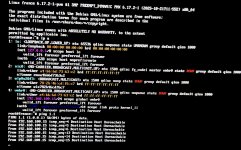
Here is the ip a & 1.1 ping
IMG_0963.jpegI apologize for the quality but this is the best my camera could get.
(Update it says 2 and 4 are UP now but I still can’t ping 1.1)
 
Last edited:
please check ip route show
Just would like to inform that a friend and I changed the IP settings to a correct one after doing a fresh install.
(The installer even showed a green dot this time when I changed the port)

The proxmox: 10.0.0.21
the router: 10.0.0.1
DNS: 9.9.9.9

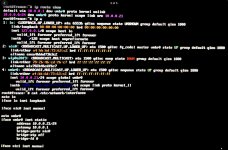
And here is the IP route show.

IMG_0964.jpeg

We’ve also tested with a PS4 on every port to see if the router communicates and it doesn’t.
I’m pretty sure the cable is just fine because the routers port lights green showing that its connected, and on the xfinity portal it shows the LAN port is active.
 
Last edited:
Looks like your network cable is not connected (NO-CARRIER). Proxmox does not support WiFi and it's a pain to setup without a working network connection.
What is the output of cat /etc/network/interfaces? What is the IP address (and subnet) of your local/ISP router?
I am not using WiFi, I am using Ethernet.

IMG_0965.jpeg

Here’s the new ip a (I thought I’d just provide it again just in case)
And the command you sent.

Locally my router is 10.0.0.1
(I’m unsure about the subnet)
 
Do you have another device on these IP's?, try to execute
Code:
arp -a
If you find two ip with the same mac address, you have to devices with the same IP
I wasn’t able to execute this on my proxmox.
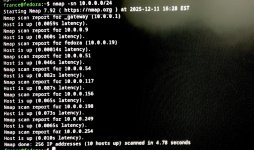
But I was able to execute on my personal computer. nmap -sn 10.0.0.0/24
IMG_0966.jpeg
Nothing should be taking up 10.0.0.21
 
The network and netmasks look right, as well as the route. The MAC OUI of the nic0 is by Dell, so it one could assume that this is the onboard NIC, however your configuration also lists "iface nic1 inet manual" - do you happen to have two ethernet NICs and use the wrong one in your bridge setup?

(I doubt that because nic0 is UP, so unless there are two cables plugged in, you must have used the correct one)

Other than that, this might be caused by a switch configuration for the port which your machine plugs into that uses another VLAN, such that your Proxmox gets an ethernet signal ("UP"), but cannot see the tagged traffic from the other machines.

BTW: You should try to ping these in order:

1. 10.0.0.21 (Proxmox itself)
2. 10.0.0.1 (your router)
3. 1.0.0.1 (a machine on the internet)

If only 1.0.0.1 cannot be reached, it might be a firewall rule blocking internet access.
 
Last edited:
The network and netmasks look right, as well as the route. The MAC OUI of the nic0 is by Dell, so it one could assume that this is the onboard NIC, however your configuration also lists "iface nic1 inet manual" - do you happen to have two ethernet NICs and use the wrong one in your bridge setup?

(I doubt that because nic0 is UP, so unless there are two cables plugged in, you must have used the correct one)

Other than that, this might be caused by a switch configuration for the port which your machine plugs into that uses another VLAN, such that your Proxmox gets an ethernet signal ("UP"), but cannot see the tagged traffic from the other machines.
There is only 1 Ethernet port to be able to plug into on my laptop.
I think the reason it shows two is because it shows it IPv4 and IPv6 as separate NICs.

Little confused by what your saying because I’m very new to this, but I tested other devices such as a PS4 and our TV but those weren’t getting any connection.
I’m not sure if I should call xfinity because perhaps the ports are broken on the router, although they’re lighting up green.
I don’t think it’s the cable but there’s always a chance.
I also doubt it’s the port on my laptop because the other devices couldn’t connect to the internet either.

So my assumption at the moment is the router itself.
 
So what is your problem about? Can each device connect to each other when connected to the router (you seem to use only ports on the router and have no switch?) or can no device access the internet?

Also: I was talking about nic0 and nic1 on your Proxmox host, not the laptop that you use to connect to it.

And no, IPv6 and IPv4 are not two separate NICs.
 
Last edited:
So what is your problem about? Can each device connect to each other when connected to the router (you seem to use only ports on the router and have no switch?) or can no device access the internet?

Also: I was talking about nic0 and nic1 on your Proxmox host, not the laptop that you use to connect to it.
My overall issue is that I can’t connect to the browser interface.

Those other devices can’t connect to the internet, I was just doing a test if it can even connect correctly.

I’m unsure if the router and laptop can connect to each other correctly cause when I ping the router I get no response.
If I ping 9.9.9.9 I get no response from that either.

I didn’t realize my mistake sorry for the misunderstanding.
 
Last edited:
So, what are your IP addresses? I assume:

router 10.0.0.1
laptop 10.0.0.19 (from the sucessful network scan with nmap you posted)
proxmox 10.0.0.21 (from your ping test)

You should repeat the ping test to all three targets I quote in #11, plus to 10.0.0.19.

If the other devices on your network do not have internet access, then why should your proxmox machine have that? And you only showed that it cannot access 1.0.0.1 or 9.9.9.9, which are clearly on the internet.
 
Once you have verified that the machines on your network can see one another, you should also be able to open a browser on your laptop and entering the URL https://10.0.0.21:8006 (note the s in https) from there, regardless of any internet access.

Some routers have special ports that only provide "guest" access which cannot access any devices on the normal "LAN" ports.
 
Last edited:
So, what are your IP addresses? I assume:

router 10.0.0.1
laptop 10.0.0.19 (from the sucessful network scan with nmap you posted)
proxmox 10.0.0.21 (from your ping test)

You should repeat the ping test to all three targets I quote in #11, plus to 10.0.0.19.

If the other devices on your network do not have internet access, then why should your proxmox machine have that? And you only showed that it cannot access 1.0.0.1 or 9.9.9.9, which are clearly on the internet.
Router is correct
The 10.0.0.19 is my desktop, I was just scanning all the devices on my network to check if anything has taken 10.0.0.21
Proxmox is correct

For the earlier post
10.0.0.21 is unreachable
10.0.0.1 had a successful ping
10.0.0.156 had a successful ping (this was a random machine on the internet)

The TV and PS4 do have internet access with WiFi, but testing the Ethernet port they didn’t get any.
Which makes me question myself if something is broken either the router or my new cable.
 
Once you have verified that the machines on your network can see one another, you should also be able to open a browser on your laptop and entering the URL https://10.0.0.21:8006 (note the s in https) from there, regardless of any internet access.

Some routers have special ports that only provide "guest" access which cannot access any devices on the normal "LAN" ports.
I believe my router isn’t seeing my proxmox machine and that’s why I can’t connect.

I tested all 4 ports on the back of the router, unless they’re all guest I’m unsure on how to change that.
 
Did you try those pings from your PVE host? I assume not, since 10.0.0.21 is your proxmox (which is on the laptop?), so it must be able to ping itself, but you say it is unreachable.

I must assume you did this from your desktop at 10.0.0.19, since the nmap scan already shows you can reach the router from there.

Please do the tests from your proxmox machine.

And: 10.0.0.156 is a random client on your network, not on the internet, since 10/8 is not routed there.

You do not need your router to connect between your desktop and your proxmox, that traffic is on the same subnet and thus the ony thing the router must provide are DHCP addresses to most clients (probably your desktop), but not proxmox, which is configured statically.
 
Last edited:
The tests should show connectivity on your LAN between proxmox and other targets, first to itself, then to the router, then to your desktop.

A successful ping to itself is indispensable, a ping to the router should be possible (because other machines are able to ping it), your desktop may be protected by a firewall and not repsond to pings.

And as said, we do not care about the internet, because other devices cannot reach that, either.
 
Last edited: