I need help finding out how to connect to my proxmox server.

Frannce

New Member
Dec 11, 2025
6
0
1
Hello,

it's my first time trying to set up proxmox! I've been having issues trying to connect to the ip to configure it on my browser.
I've been trying to connect to it by using 10.0.0.21:8006


(I now get a green dot!)

Screenshot_20251210_220833.png

Instead where the green dot would be is blank, which I am not sure if it means it cant see my Ethernet port.
I am using my old G7 7700 and I know the port works.
 
Last edited:
I want to look on the terminal direct and see what the screen give me, when I write:
Ip a and ping 1.1
 
Last edited:
  • Like
Reactions: Frannce
I want to look on the terminal direct and see what the screen give me, when I write:
Ip a and ping 1.1
Sorry I was asleep.
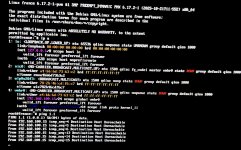
Here is the ip a & 1.1 ping
IMG_0963.jpegI apologize for the quality but this is the best my camera could get.
(Update it says 2 and 4 are UP now but I still can’t ping 1.1)
 
Last edited:
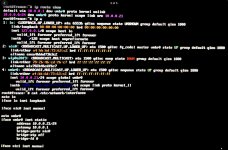
please check ip route show
Just would like to inform that a friend and I changed the IP settings to a correct one after doing a fresh install.
(The installer even showed a green dot this time when I changed the port)

The proxmox: 10.0.0.21
the router: 10.0.0.1
DNS: 9.9.9.9

And here is the IP route show.

IMG_0964.jpeg

We’ve also tested with a PS4 on every port to see if the router communicates and it doesn’t.
I’m pretty sure the cable is just fine because the routers port lights green showing that its connected, and on the xfinity portal it shows the LAN port is active.
 
Last edited:
Looks like your network cable is not connected (NO-CARRIER). Proxmox does not support WiFi and it's a pain to setup without a working network connection.
What is the output of cat /etc/network/interfaces? What is the IP address (and subnet) of your local/ISP router?
I am not using WiFi, I am using Ethernet.

IMG_0965.jpeg

Here’s the new ip a (I thought I’d just provide it again just in case)
And the command you sent.

Locally my router is 10.0.0.1
(I’m unsure about the subnet)
 
Do you have another device on these IP's?, try to execute
Code:
arp -a
If you find two ip with the same mac address, you have to devices with the same IP
I wasn’t able to execute this on my proxmox.
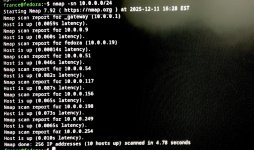
But I was able to execute on my personal computer. nmap -sn 10.0.0.0/24
IMG_0966.jpeg
Nothing should be taking up 10.0.0.21