

I am in the process of migrating my VMs from my old host to my new Cluster. So far this has been easy with PBS. On the new Cluster hosts I have ZFS-Local and Ceph setup as I am labing out Ceph. One of the things I was hoping I would be able to do was when I migrate from one host to the other I could choose a different storage target on the host I am migrating to. I was happy to see this when I did my first migration of a recovered VM.
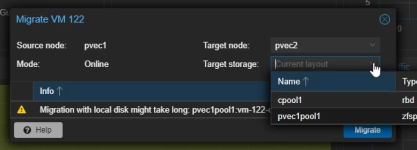
So I tried it and migrated the storage from pvec1pool1 to cpool1. It worked great!
But ever since that first migration I no longer have that option on any other migrations. I have tried reproducing it in every way possible but Target Storage: is just not an option. Nothing has changed on Cluster or Storage on the Cluster. And every migration looks like this now:
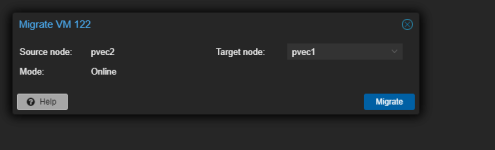
I feel like I am missing something but for the life of me I can't find it.
Cluster Details are 2 Nodes:
I am aware that I can go into the hardware setting and manually move the VM Volume to new storage but I am looking to do it from the Migration interface.
Thanks ahead of time!
So I tried it and migrated the storage from pvec1pool1 to cpool1. It worked great!
But ever since that first migration I no longer have that option on any other migrations. I have tried reproducing it in every way possible but Target Storage: is just not an option. Nothing has changed on Cluster or Storage on the Cluster. And every migration looks like this now:
I feel like I am missing something but for the life of me I can't find it.
Cluster Details are 2 Nodes:
| Kernel Version Linux 6.8.4-3-pve (2024-05-02T11:55Z) |
| Boot Mode Legacy BIOS |
| Manager Version pve-manager/8.2.2/9355359cd7afbae4 |
I am aware that I can go into the hardware setting and manually move the VM Volume to new storage but I am looking to do it from the Migration interface.
Thanks ahead of time!
