Proxmox Backup

mohammed ben

New Member
Jan 27, 2024
7
0
1
Hello , I Hope You are well ,
This Is the second time i make a copy, and This error appears in the same status 86%

1706351337834.png

#uname -r
4.13.13-2-pve
 
Hi,
Hello , I Hope You are well ,
This Is the second time i make a copy, and This error appears in the same status 86%

View attachment 62149
this indicates an IO error, so either the storage where the VM disk is on or the backup storage might have a problem. Please check the logs for any related errors and your physical disk's health. Should it really be failing, you can try using a tool like ddrescue to recover data to a new disk.
#uname -r
4.13.13-2-pve
This kernel was released six years ago and is end of life since a very long time. After you fixed the disk issue, you should upgrade to a current version which still gets (security) fixes:
https://pve.proxmox.com/wiki/Upgrade_from_5.x_to_6.0
https://pve.proxmox.com/wiki/Upgrade_from_6.x_to_7.0
https://pve.proxmox.com/wiki/Upgrade_from_7_to_8 (version 7.x will be end-of-life this summer)
 
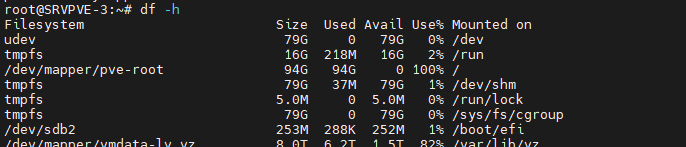
I would simply use du -sh /* to check what is taking up so much storage space. You have to first find the cause, then you can find a solution.