

Hi,
New to proxmox here, running Virtual Environment 7.1-7. I downloaded Ubuntu's 20.04 cloudimg directly onto the ISO Images section in Web UI. I was able to download and create VM successfully.
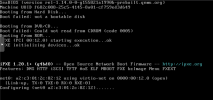
During boot, it says that the boot failed: not a bootable disk.
Tried searching here on forums, one of the possible reasons is that the file downloaded is in .img format instead of .qcow2.
I tried doing it in CLI, executed this command:
qm importdisk 9000 focal-server-cloudimg-amd64.img local -format qcow2

but receive an error of: "storage local does not support vm images"
Any help on what to do? thanks!
*cloudimg downloaded: https://cloud-images.ubuntu.com/focal/20220215.1/focal-server-cloudimg-amd64.img
New to proxmox here, running Virtual Environment 7.1-7. I downloaded Ubuntu's 20.04 cloudimg directly onto the ISO Images section in Web UI. I was able to download and create VM successfully.
During boot, it says that the boot failed: not a bootable disk.
Tried searching here on forums, one of the possible reasons is that the file downloaded is in .img format instead of .qcow2.
I tried doing it in CLI, executed this command:
qm importdisk 9000 focal-server-cloudimg-amd64.img local -format qcow2
but receive an error of: "storage local does not support vm images"
Any help on what to do? thanks!
*cloudimg downloaded: https://cloud-images.ubuntu.com/focal/20220215.1/focal-server-cloudimg-amd64.img
Last edited:

