Latest activity
-
TSchau dir mal cat /etc/pve/replication.cfg an. Man kann die Datei direkt editieren. Dabei arbeitet man ohne Sicherheitsmechanismen am offenen Herzen --> Vorsicht! Und erst ein Backup woanders hin kopieren...! ;-)
-
TBist du sicher, dass das sauber funktioniert hat? https://pve.proxmox.com/pve-docs/pve-admin-guide.html#pvecm_remove_node Kontrolle mit cat /etc/pve/.members
-
MThanks for the information Indeed, there were a user who stayed on this page. Best regards
-
MI believe it's only run when you're on the VM's summary page, as Proxmox VE gets the guest IP address information using the guest agent. I'm not sure you can (or should) disable guest-agent logging messages.
-
JJ-Rod replied to the thread Dirty Bitmap Backups are Wearing on Me.For purposes of discussion, even if you increased your performance by a factor of ten, there will still be issues. 9TB of data can be smoothed over by a huge performance boost, but what if you had 100TB? 1PB? And there are going to be...
-
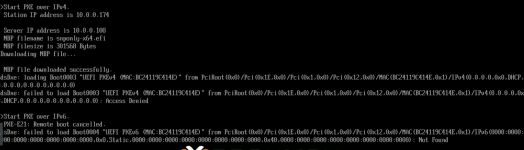
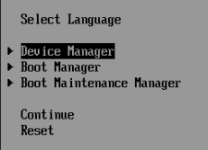
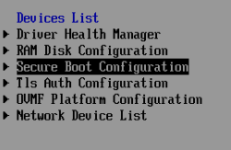
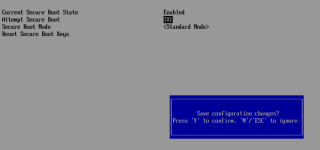
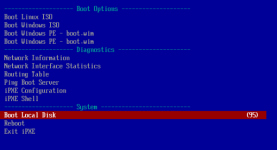
Sshodan posted the thread How to disable Secure Boot easily for iPXE when you get NBP file downloaded successfully / failed to load Boot / Access Denied in Proxmox VE: Installation and configuration.Hi, It took me a while to figure out what I was doing wrong. I was trying to boot with iPXE, but it just wouldn't ! And the bios firmware should be a lot clearer about the problem not just say "Access Denied" On this already very difficult...
-
-
MMarroniJohny reacted to Bu66as's post in the thread Wasserdichtes System für kleine Multi Teant Anwendung with
 Like.
Mit drei Nodes pro Standort bist du das QDevice-Thema los, das reicht fürs Quorum. Und ja, OEM-Geräte mit vPro sind völlig okay, wenn du eh drei Hosts hast. Der BMC ist hauptsächlich dafür da, dass du remote hart aus- und wieder einschalten...
Like.
Mit drei Nodes pro Standort bist du das QDevice-Thema los, das reicht fürs Quorum. Und ja, OEM-Geräte mit vPro sind völlig okay, wenn du eh drei Hosts hast. Der BMC ist hauptsächlich dafür da, dass du remote hart aus- und wieder einschalten... -
Ccyruspy posted the thread Centralized scheduling for non PVE clients in Proxmox Backup: Installation and configuration.Currently proxmox-backup-client is a stateless, outbound-only CLI, and PBS operates purely as a passive storage endpoint. For non-PVE / standalone Linux hosts, backups must be scheduled locally per-host (e.g. cron or systemd timers). This creates...
-
Pparadox55 replied to the thread ARM64 CT templates.I'm not sure about this specific link but the problem I ran into with using third party container images is that the networking didn't use the right IP address assigned. Works fine with the arm64 image proxmox included though.
-
J...also ich finde für das "klicki&bunti" TrueNAS doch recht anfängerfreundlich, dafür das es auch im Enterprise Umfeld unterwegs ist: 1. Benutzer anlegen, TrueNAS fragt gleich ob auch die SMB Berechtigung un der Dienst dazu gesetzt und gestartet...
-
JUnd auf jedem ZFS Pool nicht vergessen diesen anzupassen und sich immer ein Quota anlegen. Denn, man darf nie den ZFS Pool "voll" schreiben. Je nach Speichertechnologie HDD, SSD sind da andere oder ähnlich Grenzen sinnvoll!
-
JDie Idee ist ja nicht schlecht, aber warum erst Debian installieren, dann die Repos einbinden um dann OMV reinzubügeln, welches ich out of the box als ISO bekomme? Und das erzählst du einem Anfänger? Klar den prozesskillen ist schwierig…. Das...
-
JOder irgendeine andere NAS-S/W. Jedenfalls ist PVE nix in dem Fall. :rolleyes:
-
JIch würde schon wissen wollen, warum IPv6 zum Bluescreen führt. Das ist absolut ungewöhnlich. Ich würde mindestens versuchen, eine Debian-Trixie Standard VM zu installieren. Darauf basiert OMV nämlich.
-
Ccarles89 reacted to cwt's post in the thread Can NUMA node be a reason for ESXi vs Proxmox Performance differences? with Like.
VMware has or had sophisticated NUMA scheduling for many years, afaik. In many cases it intentionally hides NUMA from smaller VMs because the VM can be kept entirely within one physical NUMA node. Once a VM exceeds certain thresholds, ESXi...
-
BUnd auf jedem ZFS Pool nicht vergessen diesen anzupassen und sich immer ein Quota anlegen. Denn, man darf nie den ZFS Pool "voll" schreiben. Je nach Speichertechnologie HDD, SSD sind da andere oder ähnlich Grenzen sinnvoll!
-
Eet1000 reacted to naffhouse's post in the thread [SOLVED] CT backs up fine but all VM's fail with Like.
for anyone wondering, under my mergerFS fount options, I had to use the option - cache.files-partial in /etc/fstab -- for the mergerFS mount.. now it works successfully
-
 news replied to the thread Grundsatz für Shared Storage.Und auf jedem ZFS Pool nicht vergessen diesen anzupassen und sich immer ein Quota anlegen. Denn, man darf nie den ZFS Pool "voll" schreiben. Je nach Speichertechnologie HDD, SSD sind da andere oder ähnlich Grenzen sinnvoll!
 -
Bberprinzess replied to the thread Grundsatz für Shared Storage....also ich finde für das "klicki&bunti" TrueNAS doch recht anfängerfreundlich, dafür das es auch im Enterprise Umfeld unterwegs ist: 1. Benutzer anlegen, TrueNAS fragt gleich ob auch die SMB Berechtigung un der Dienst dazu gesetzt und gestartet...
-
 cwt replied to the thread Can NUMA node be a reason for ESXi vs Proxmox Performance differences?.Regarding „NUMA or not“ please see also this thread: https://forum.proxmox.com/threads/multiple-cpu-motherboard-settings-for-windows-vms.169476/post-864964