Latest activity
-
 SteveITS replied to the thread Best practice: Upgrade from PVE 8 to 9 with Ceph.Of course, follow the guides for Ceph posted previously. But in general for PVE updates we: 1) in Ceph set checkboxes for: (any node > Ceph > OSD > Manage Global Flags) nodeep-scrub noout norebalance norecover noscrub 2) run ha-manager...
 -
66equj5 replied to the thread Vorgehen PVE Neuinstallation.Oder die neue NVME mit USB anschließen und die alte Disk klonen. So bin ich kürzlich von einer verbrauchten Boot Disk umgezogen.
-
SteveITS replied to the thread Best practice: Upgrade from PVE 8 to 9 with Ceph.^that. How many nodes do you have? We update PVE/kernels all the time without issue. I’ll post our process shortly.
-
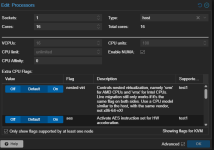
Ggkuyuk replied to the thread NVME Passthrough performance.That did not make much difference but "pci=pcie_bus_perf" this. For future reference to others: 1- CPU Type: Host and NUMA enabled 2- Check the nvme afinity and put it in CPU Affinity under CPU settings (---for d in /sys/bus/pci/devices/*/nvme...
-
 DamienDye replied to the thread NVME Passthrough performance."pcie_aspm=off" ??
 -
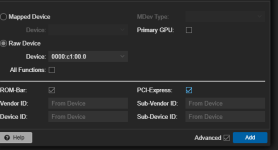
Ggkuyuk replied to the thread NVME Passthrough performance.It is on q35 otherwise it dos not let me do pcie option on the passthrough. this last change did it. Read Test: Jobs: 32 (f=32): [R(32)][2.5%][r=9684MiB/s][r=2479k IOPS][eta 01m:57s] Jobs: 32 (f=32): [R(32)][4.2%][r=9630MiB/s][r=2465k IOPS][eta...
-
DamienDye replied to the thread VMware OVA Appliances on Proxmox !.you can also use the vmware pvscsi option to emulate there scsi controller to so the VM should not know its running on KVM in proxmox rather than VMware
-
DamienDye replied to the thread Error Connecting Drive using NBD CephCluster.Building on what Francois asked -- that error "unable to get monitor info from DNS SRV with service name: ceph-mon" is a DNS resolution issue. When you don't specify the cluster or monitors explicitly, the Ceph client library tries to...
-
OThe Bugreport for the topic: https://bugzilla.proxmox.com/show_bug.cgi?id=7825
-
WWolveraptor replied to the thread Troubleshooting - LXC TTY Terminal Login Prompt Shows Gibberish.@vociferous, I apologize for the tardy reply. This was indeed the culprit! Great find and thank you! In the interim, I have switched to console mode to mitigate it however it would be great to have this addressed upstream, or, as you said, just...
-
DamienDye replied to the thread NVME Passthrough performance.Check your VM is on chipset Q35 if not change it to Q35. Your lspci show your drive MaxPayload is 128 bytes at the moment but the drive supports 512. so lets add "pci=pcie_bus_perf" to the vm kernel command line ASPM policy is default try...
-
Ggkuyuk replied to the thread NVME Passthrough performance.Here is the ouput for the affinity: root@test1:~# for d in /sys/bus/pci/devices/*/nvme; do echo "$(dirname $d): NUMA $(cat $(dirname $d)/numa_node)"; done /sys/bus/pci/devices/0000:c1:00.0: NUMA 0 /sys/bus/pci/devices/0000:c3:00.0: NUMA 0 I am...
-
-
DamienDye replied to the thread Kernel 7.0.x - Windows VMs freezing with cpu high 60-70%, newer cpus?.Can you post the actual Windows build numbers for the affected VMs? Run winver or check Settings > System > About inside the guest. The specific build matters because Microsoft changed how VBS and Hyper-V enlightenments behave in certain updates...
-
 Francois Baillargeon replied to the thread Error Connecting Drive using NBD CephCluster.Do you have the URI of what your vendor passes? It's probably just not passing the keyring correctly
 -
DamienDye replied to the thread Optimizing Windows VM performance on older hardware - settings advice needed.Have you done owt inside the guest to tune Windows for running in a VM? Things like disabling the visual effects, killing hibernation and Fast Boot, setting the power plan to High Performance, deferring TRIM, and stripping out the background I/O...
-
DamienDye replied to the thread Windows Server 2025 CPU suddenly at 100%.This issue is not specific to Proxmox. Microsoft have acknowledged the same problem on their own platforms. On Azure, VMs with VBS enabled stopped booting after the July 2025 updates. Microsoft released out-of-band patches KB5061977 and...
-
 Hallo @UdoB gute Zusammenfassung. Und die erweiterten ZFS Kommandos muss man immer über die Konsole absetzen.
 -
Nn0cturne replied to the thread [SOLVED] NVIDIA DKMS driver failure on Proxmox VE 9.2.4 with kernel 7.0.x (Quadro P2000) — seeking guidance.Thanks @a3a :cool: I'm using kernel 7.0.14-8 and it works like a charm.
-
DamienDye replied to the thread NVME Passthrough performance.Run this on the host to check which NUMA node each NVMe sits on: for d in /sys/bus/pci/devices/*/nvme; do echo "$(dirname $d): NUMA $(cat $(dirname $d)/numa_node)"; done Then check which NUMA node your vCPUs are pinned to -- if they don't...
-
SSupaman replied to the thread Problem mit VPN Container als Gateway für einen anderen Container.Das würde ich grundsätzlich anders aufziehen: #1 VM mit OpenWRT und dann Wireguard Client als Paket nachinstallieren Dann hast Du einen kompletten Software Router und kannst nach belieben den Traffic routen. NAT für management dazu etc...