Latest activity
-
 fiona replied to the thread [SOLVED] Live migration occasionally fails with QEMU assertion failure.Hi @getcom, pve-qemu-kvm: 10.1.2-7+vitastor1 this is not a package shipped by Proxmox, but by a third-party vendor. Please report the issues there.
 -
Eerick26 reacted to fiveangle's post in the thread How to install Win11 in Proxmox | Quick guide | And fix problems of network search with
 Like.
As of today (Win11 24H2), the Virtio-SCSI storage driver is: virtio-win/vioscsi/w11/amd64 And the memory ballooning driver is: virtio-win/Ballon/w11/amd64
Like.
As of today (Win11 24H2), the Virtio-SCSI storage driver is: virtio-win/vioscsi/w11/amd64 And the memory ballooning driver is: virtio-win/Ballon/w11/amd64 -
Eerick26 reacted to nomnompewpew's post in the thread How to install Win11 in Proxmox | Quick guide | And fix problems of network search with Like.
Just another route to getting past the network issue with Win 11...You can install the full qemu guest agent package from CMD since you've already pulled it up with Shift + F10. Instead of killing that process you can just navigate to your ISO...
-
Eerick26 reacted to luixal's post in the thread How to install Win11 in Proxmox | Quick guide | And fix problems of network search with Like.
Great guide! I got stuck at the network step as I wasn't able to open the special features, but found another way around here that worked perfectly for me: You can open another prompt and you can change to drive D: and you can run the VirtIO...
-
Eerick26 reacted to Bl1c's post in the thread How to install Win11 in Proxmox | Quick guide | And fix problems of network search with Like.
To get started, we need: virtio-win ISO win11 ISO Next create VM, We need this: OS — use w11 image System — use SCSI controller — VirtIO SCSI | Bios OVMF (UEFI) and add TPM Disk — VirtIO Block and minimal disk size 64 Gb Add CD/DVD Drive to...
-
Eerick26 replied to the thread How to install Win11 in Proxmox | Quick guide | And fix problems of network search.Fantastic guide and help ! I used a mix of some of the notes above with a Mac and Chrome. Quick summary below from June 2026 - NOTE: If this is the first VM on new hardware make sure virtualization is turned on in BIOS or the VM won’t boot...
-
MMartin.B. replied to the thread [SOLVED] Cluster 2 node + qdevice, different pvecm status.corosync.conf: pve3:~# cat /etc/pve/corosync.conf logging { debug: off to_syslog: yes } nodelist { node { name: cdppve2 nodeid: 1 quorum_votes: 1 ring0_addr: 192.168.2.2 ring1_addr: 172.16.5.95 } node { name...
-
 shanreich replied to the thread [SOLVED] Can't get SDN VLAN Isolation to work.Generally it's recommended to enable VLAN-awareness on bridges that back VLAN zones, which avoids creating a lot of additional virtual network interfaces. You'll need to reapply the SDN configuration afterwards. Did you try using tcpdump to...
 -
Ddaanw replied to the thread [SOLVED] Cluster 2 node + qdevice, different pvecm status.While configured on both nodes now, your Qdevice is not voting. If one node goes down your cluster won't be quorate anymore. Is SSH working correctly between the nodes and the qdevice? journalctl is your best friend to see what is actually...
-
Wwattcheck_lab replied to the thread Intel_Idle C-States in Proxmox with Intel Series 200 CPUs.The Ubuntu vs Proxmox split on the same 6.17 is the useful clue here. The same kernel version reaching C10 on Ubuntu but only C3 on Proxmox almost always means a config or boot-param difference, not the kernel build itself. Two things worth...
-
Kkidoly replied to the thread NVMe's dropping off.I have the exact same issue, did you fix it? If yes how?
-
Qquantumjump replied to the thread Device mismatch detected for <disk> which is accessing /dev/sdc instead of /dev/mapper/mpath2.In my case there was a much simpler solution: I only run: apt install multipath-tools-boot apt runs update-initramfs automatically after installing. Reboot, and voila, everything came up in the right state. No changes in multipath.conf...
-
 Pawel Salkiewicz posted the thread TPM State problems with CEPH / Proxmox 9.2 in Proxmox VE: Installation and configuration.Hi, Proxmox version 9.2.3, CEPH Tentacle 20.2.1 I've came across an issue with CEPH and TPM State disks. I've created a VM that is located on ceph rbd pool. The VM has an additional 4MB disk with tpm state. The vm doesn't start with following...
 -
AAristonPost replied to the thread [SOLVED] Can't get SDN VLAN Isolation to work.Noone seen this behaviour before or got an idea where to check next? I know pushing Threads is kinda... but I'm lost somehow.
-
MMartin.B. replied to the thread [SOLVED] Cluster 2 node + qdevice, different pvecm status.yes, i did install it on both nodes. I now did: pvecm qdevice remove Then uninstalled all corosync packages with purge on the qdevice. Re-installed those packages and did another setup (this time from node pve3). Got no error message. Status is...
-
MMadscientist posted the thread Ceph Squid to Tentacle in Proxmox VE: Installation and configuration.As i understand that the new proxmox 9.2 ISo has ceph tentacle 20.x is default, but as i go through the upgrade process of "Ceph Squid to Tentacle" i found the following lines , kindly clarify ...
-
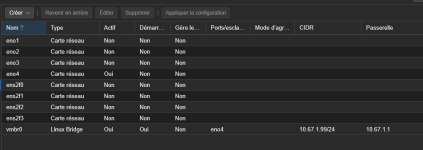
AArnOCP replied to the thread Dispite migrating VM they don't response.Correct No yes, before the reboot of the "original" node sorry what do you mean? This is my network configuration via WebGUI
-
-
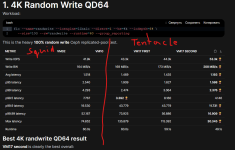
LLeonid Kanareykin replied to the thread Ceph 20.2 Tentacle Release Available as test preview and Ceph 18.2 Reef soon to be fully EOL.One of the test after upgrade my 5 node cluster 40 nvme 1 Tb replicated but network only 10 Gig
-
-
HHighman replied to the thread Running Cisco UC Appliances In Proxmox (i.e., CUCM, CUCS, Expressway, IM&P, CMS, CSR1000v).Since 15 su4 Cisco has implemented their own kvm support called nfvis. To get this detected in Proxmox there is no iso change or other trick from this thread needed but one thing: put Ref Hat in the Vendor String in SMBios settings. That's it...
-
JAm I missing something, or is there no way to set NTP servers for timesync in the web interface? From what I can make out, poking around, PVE is using chrony, which is configured to use the Debian vendor pool. I really don't want my...