Latest activity
-
EEugenMayer replied to the thread After proxmox updates: Random segmentation faults in AlmaLinux 8 VMs on Proxmox VE 9.1.@PVasileff just wanted to assure, all of my vms that are affected are using qcow - so you might be onto something. For me converting the disks is not an option and this would IMHO just confirm that this is related to QEMU kvm (11) and maybe to...
-
Ffever_wits replied to the thread After proxmox updates: Random segmentation faults in AlmaLinux 8 VMs on Proxmox VE 9.1.Hello After converting the disk from qcow2 to raw on a VM that had a problem with segmentation faults $ uptime 07:57:08 up 16:43, 1 users, load average: 0.05, 0.08, 0.02 No segmentation faults reported. I can't say for sure if a conversion is...
-
EEugenMayer replied to the thread After proxmox updates: Random segmentation faults in AlmaLinux 8 VMs on Proxmox VE 9.1.Could it be that we all look for https://lists.nongnu.org/archive/html/qemu-stable/2026-04/msg00145.html ? IMHO this would explain both, how this might be an issue with the IO/disk interface and qemu at the same time. I have downgraded qemu and...
-
Ttrefmanic reacted to dondizzurp's post in the thread [GUIDE] Install Home Assistant OS in a VM with
 Like.
So just like my other guide, this is more for my own records so I can come back and refer to it. I know there are scripts for these things, but I prefer doing them manually so I can learn along the way. Maybe it can help someone else in the...
Like.
So just like my other guide, this is more for my own records so I can come back and refer to it. I know there are scripts for these things, but I prefer doing them manually so I can learn along the way. Maybe it can help someone else in the... -
Kkohai_ut replied to the thread Proxmox 9.x / Strix Halo / GPU Passthrough.Thank you to the OP and to your follow up!!! I ran into this same group id issue and it wasn't obvious it was happening. My machine is the frameworks amd ai max+ 395. I got Qwen3.6 35b running.
-
Kkohai_ut reacted to dlasher's post in the thread Proxmox 9.x / Strix Halo / GPU Passthrough with Like.
Having spent the last few days fighting all the subtle parts of getting this working, I put together a quick guide on how to get Proxmox, running on a Strix Halo, machine, with working GPU passthrough into LXC containers. To be clear, this is a...
-
KJust in case anyone else stumbles across this. The instructions worked for me. My notes are attached below: Phase 1: 1 BIOS Settings - 2. Host Kernel Parameters I read that the amdgpu.gttsize parameter was deprecated on the Strix Halo Wiki...
-
 jebbam posted the thread Cluster not quorate - extending auth key lifetime! in Proxmox VE: Installation and configuration.I have a 5 node Proxmox cluster co-located in a data center with ~100 KVMs that has been running happily the last year+. The ISP needed to move the servers to another building (sigh). Everything came back online, but two of the nodes, node2 and...
 -
Ppongomongo replied to the thread Proxmox won't boot.@Impact thank you thank you thank you for all of your help, especially with walking me through the zfs stuff. Very happy that worked and the pool re-imported with no data loss.
-
Ppongomongo replied to the thread Proxmox won't boot.Alright! Networking issue solved (rebooted router). I am now able to access pve via browser. I set all the VMs to not start at boot, and then went back into the BIOS and re-enabled virtualization. PVE host booted fine. Next I went one by one...
-
GGilberto Ferreira replied to the thread [SOLVED] Windows Server 2022 problems with VirtIO NICs.Strangely enought, it's seem that windows 2022 still have problem with new virtio net drivers yet. I have has tested with virtio-win-0.1.285-1 and get this issue with AD and FileServer. Just changed to e1000 and works fine. Using Proxmox VE 9.1.16.
-
Ppongomongo replied to the thread Proxmox won't boot.It will take me a while to edit out all the IP and MAC addresses, but I will work on it. Thank you for your help.
-
JJohannes S reacted to UdoB's post in the thread Significant IOPS Drop in Proxmox 9.1.9 VMs Compared to Other Hypervisors with Like.
You did not say anything of the underlying filesystems...? For ZFS it may be expected as ZFS does a lot more work than classic filesystems under the hood, resulting in multiple IO-operations used for metadata etc...
-
JJohannes S reacted to t.lamprecht's post in the thread Significant IOPS Drop in Proxmox 9.1.9 VMs Compared to Other Hypervisors with Like.
Yeah, server and storage hardware, software and configuration details, including VM configuration would be nice to have to try reproducing this.
-
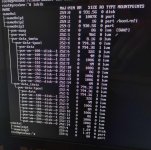
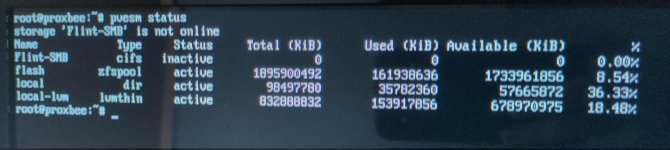
Ppongomongo replied to the thread Proxmox won't boot.#lsblkin normal boot shows the VMs Flint-SMB is the network smb share. Probably shows offline because the PVE box is disconnected from the network. (monitor and router are far apart) # pvesm status ip ashows the primary bridge vmbr0 as UP...
-
-
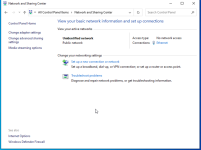
Ppongomongo replied to the thread Proxmox won't boot.zfs list shows the same as in post #23 (immediately after zpool import flash in recovery mode) Frustratingly, I am still unable to ping or reach the pve host via browser. There is no recognition of the pve host by the router, all this even...
-
Ppongomongo replied to the thread Proxmox won't boot.OK! Following this post: https://forum.proxmox.com/threads/is-there-a-way-to-disable-the-automatic-start-of-vms-before-proxmox-boots.83636/ I disabled Virtualization in the BIOS. I am now able to boot into the PVE host.
-
Ppongomongo replied to the thread Proxmox won't boot.Proxmox boots, then immediately crashes. The PC does not turn off, it stays running. Recovery mode is functional, rescue boot is not. Is there a way to disable "start at boot" for the VMs and LXCs from the recovery mode CLI? That way I could...
-
Ppongomongo replied to the thread Proxmox won't boot.Ok. I tried: -boot to recovery mode -remove "intel_iommu=on" from /etc/default/grub -# update-grub -reboot, normal boot Same result. Boots to login screen, then immediately goes black. -insert live boot usb -boot to proxmox rescue boot Same...