Latest activity
-
Uuzumo replied to the thread AMD W7600 Passthrough.Even if it's just a part of it, did it work out? Congratulations. Maybe there's a kernel patched specifically for Ubuntu, not just the driver. https://bugs.launchpad.net/ubuntu/+source/linux/6.17.0-9.9 Several AMD-related fixes are listed. *...
-
DDies Meldung bekomme ich: TASK ERROR: lvremove 'DATASSD/vm-902-disk-0' error: Failed to find logical volume "DATASSD/vm-902-disk-0" Wie kann ich das hinbekommen?
-
UUtilisateurCXS replied to the thread Simple zone SDN.Thanks you
-
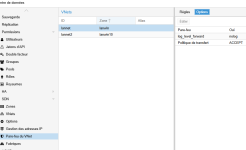
UUtilisateurCXS replied to the thread Simple zone SDN.So what exactly is the purpose of the vnet firewall?
-
Uuzumo replied to the thread Can not create snapshot it says already exists.Is it really unnecessary... that's the question. Since we migrated without consolidating, the VMDK differences might have been created there, but I suspect those differences contain the latest information. However, since we've already changed...
-
 fireon reacted to mbrother's post in the thread Use of uninitialized value $domain in concatenation (.) or string at /usr/share/perl5/PMG/Utils.pm line 678. with
 Like.
Hi @MiamiJack , Ensure you have a line search your_hostname_server at the top of file /etc/resolv.conf Example: root@a:~# cat /etc/resolv.conf search a.node1.example.com nameserver 1.1.1.1 nameserver 8.8.8.8 Hope this help!
Like.
Hi @MiamiJack , Ensure you have a line search your_hostname_server at the top of file /etc/resolv.conf Example: root@a:~# cat /etc/resolv.conf search a.node1.example.com nameserver 1.1.1.1 nameserver 8.8.8.8 Hope this help! -
HHeracleos reacted to Chris's post in the thread [SOLVED] Super slow, timeout, and VM stuck while backing up, after updated to PVE 9.1.1 and PBS 4.0.20 with Like.
Could you check if disabling the tcp window scaling has an effect? sysctl -w net.ipv4.tcp_window_scaling=0 followed by a systemctl restart proxmox-backup-proxy.service proxmox-backup.service. Further, are you able to trigger the stalls/slowdowns...
-
 aasami reacted to Dunuin's post in the thread Noob question, how to cleanly reboot Proxmox host and all of its VMs? with Like.
Then PVE will first try to shutdown all guests in reverse order they got started and wait until all guests have been gracefully shutdown (and if they get stuck they will be forcefuly stopped after 3 or 5 minutes) before it will reboot itself.
aasami reacted to Dunuin's post in the thread Noob question, how to cleanly reboot Proxmox host and all of its VMs? with Like.
Then PVE will first try to shutdown all guests in reverse order they got started and wait until all guests have been gracefully shutdown (and if they get stuck they will be forcefuly stopped after 3 or 5 minutes) before it will reboot itself. -
LLongQT-sea replied to the thread NOVNC only starts on V4 and is not reachable via V6.Ah I see, the panel you're using is hardcoded to connect directly to VNC ports, that's unfortunate. Yeah, not much you can do on your end then except wait for the panel developer to fix it or build your own. Might be worth opening an...
-
Sshiue75 posted the thread Can't access GUI and can ssh to Proxmox VE in Proxmox VE: Networking and Firewall.I am unable to access the GUI of 8006 through VPN, but I can SSH into the Proxmox VE. How should I proceed to resolve this issue? VPN subnet: 172.16.100.0/24 Proxmox VE IP: 172.28.10.5
-
LLongQT-sea reacted to sirnerox's post in the thread NOVNC only starts on V4 and is not reachable via V6 with Like.
Using a VM will not work, since I need to have a V4 address for those ports to be accessible. So then I will just have a V4 address for this purpose until I get either the Panel owner to fix it. Or making my own that will take some time. For my...
-
Ssirnerox replied to the thread NOVNC only starts on V4 and is not reachable via V6.Using a VM will not work, since I need to have a V4 address for those ports to be accessible. So then I will just have a V4 address for this purpose until I get either the Panel owner to fix it. Or making my own that will take some time. For my...
-
LLongQT-sea replied to the thread NOVNC only starts on V4 and is not reachable via V6.Fair enough if you don't want to add Nginx/Caddy to the Proxmox host itself - you could always run it on a separate lightweight VM or container if that's a concern. That said, just so you know: Proxmox already has built-in VNC proxying through...
-
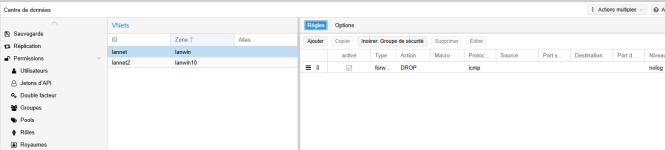
 shanreich replied to the thread Simple zone SDN.The traffic between those two zones gets routed by the host, so you'd need to create the forward rules on the host (where the routing happens), not inside the VNet firewall. Also, in order to use the forward rules you'd need to activate the...
 -
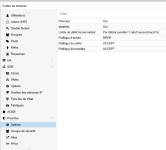
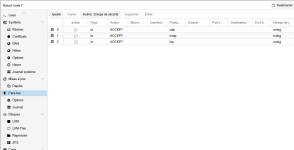
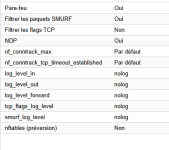
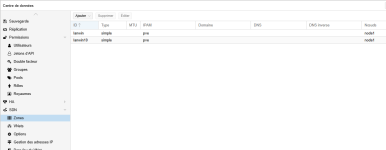
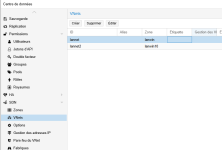
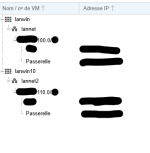
UI need help because I can't isolate two VMs on two different VNets, in two different zones, each with their own subnet, and it still manages to ping. I've also enabled the data center firewall on the node and on the VNets. Here are some...
-
-
Ssirnerox replied to the thread NOVNC only starts on V4 and is not reachable via V6.I don't want to install NGINX or Caddy on the proxmox itself. And that is the only solution to get this working right now without adding a IPv4 to the proxmox. I looked at the services that proxmox starts, and it starts it only on IPv6. I am...
-
LLongQT-sea replied to the thread NOVNC only starts on V4 and is not reachable via V6.Take a look at this: https://github.com/petarduss/proxmox-vnc Also, here's a simple solution for IPv6 without touching anything on the Proxmox side: install Nginx or Caddy, listen on your chosen port (e.g., [::]:443 and 0.0.0.0:443), then proxy...
-
MMagnus-mercer replied to the thread Vanishing / "ghost" backup issue.Can you see Disk Images and ISO images?
-
RRytecbe reacted to Johannes S's post in the thread PBS on desktop pc with SSD or in VM on PVE or not at all? with Like.
Good question, indeed ssh is needed for communication and migration between cluster nodes (according to https://pve.proxmox.com/wiki/Cluster_Manager#_role_of_ssh_in_proxmox_ve_clusters ) but the documentation says nothing about qdevice. The...
-
Cczechsys replied to the thread PDM 1.0.1 unable to add AD realm with anonymous search.PVE (9.1.1): domains.cfg: ad: SUB.EXAMPLE.ORG comment AD authentication domain sub.example.org server1 fqdn1 base_dn DC=sub,DC=example,DC=org case-sensitive 1 default 1 mode ldaps...