ZFS storage is very full, we would like to increase the space but...

Just for fun, we can do the math for your setup and what you should get with 128k.
Let's look at a 132k write.

First block is an incompressible 128k write. Second is also a 128k block but with only 4k data, the rest zeros. LZ4 can compress that down to a 4k block.
Side note: This is one of the reasons why you never should disable compression even if your data is not compressible.

Ok, we take a look at the first 128k block.
This is a single stripe:
P + P + D + D + D + D + D + D.
So a single stripe offers 6 * 4k=24 K
128k / 24k =5.333
Ok so we take 5 "full stripes" to get 5*24k=120 K
Still need another 8k.
So we do another stripe like this
P + P + D + D.

In total we now have 5 * 8 sectors + 4 sectors = 44 sectors. That is not a multiple of 3, so we add one padding to get 45 sectors.

The second block contains 4k real data and mostly zeros. It is still a 128k volblock but LZ4 compresses that to 4k actual write data.
P + P + D. Another 3 sectors.

We now have 48 sectors to store 128k data. Or 48 * 4k=192 K to store 128k.
128 / 192 * 100 =66.66%

Now I don't know what happens at the OS level, if you write another 132k. I think it should make use of the previous second volblock that is mostly empty. But that is way above my paygrade :)

So for simplicity, if you really want to run some test, I would test it with 16k volblock and just fill them with random data.
You will get 66.66% instead of 75% for a 8 wide RAIDZ2.
 
Last edited:
  • Like
Reactions: Johannes S
Being a german, I know that german saying...

As you saw, the actual real-world results with a volblocksize of 128k do not show what the theory says. On a side note, I have a Proxmox Backup Server VM with a 2TByte data disk on the same raidz2 array. It shows inside the VM:

Filesystem Size Used Avail Use% Mounted on
pbs 2.0T 1.3T 676G 66% /mnt/datastore/pbs

The data should be hardly compressible, because PBS only writes compressed data, The data has been collected over months, so the write pattern should also be realistic. Also note, that according to your cited article, I am now officially "that guy that has a 16TB Windows Server VM disk, just to host Plex :)" - in that I did the dumb thing to use a large VM disk volume with lots of padding instead of using a ZFS dataset.

And here - tada - is the result on the PVE host:
NAME USED REFER AVAIL VOLBLOCK
huge/backup/vm-130-disk-0 1.28T 1.28T 37.1T 128K


But you wanted 16k volblocksize. So, there you go, I created the 1G VM disk again on the same array, but this time, in stopped VM state. Then, I did:

zfs destroy huge/backup/vm-105-disk-0
zfs create -V 1G huge/backup/vm-105-disk-0 -b 16k -s -o compression=off
zfs list -oname,used,refer,avail,volblocksize huge/backup/vm-105-disk-0


which gave:

NAME USED REFER AVAIL VOLBLOCK
huge/backup/vm-105-disk-0 154K 154K 37.1T 16K

as it would be if the volblocksize of the array had been 16k in the first place. Also, there will be no compression this time, regardless of what data I write.
Then I started up the VM and again did:

dd if=/dev/urandom of=/dev/vdb bs=4K count=262144 status=progress oflag=direct,sync

I had to interrupt this one at ~100 MByte, because the data was written at only 60kB/s because of an ongoing ZFS scrub on the array. Result was:

NAME USED REFER AVAIL VOLBLOCK
huge/backup/vm-105-disk-0 104M 104M 37.1T 16K

Note the USED to REFER ratio, which is 1.
What I saw in the first test was stressing my theory: When I issued the zfs list command, I saw the sizes of both USED and REFER increase in increments of ~2 MByte, which seems to be what the ZFS transaction sizes are.

dd if=/dev/urandom of=/dev/vdb bs=64K count=16384 status=progress oflag=direct,sync

NAME USED REFER AVAIL VOLBLOCK
huge/backup/vm-105-disk-0 1.07G 1.07G 37.1T 16K

Again, ratio is 1.

dd if=/dev/urandom of=/dev/vdb bs=68K count=15269 status=progress oflag=direct,sync

NAME USED REFER AVAIL VOLBLOCK
huge/backup/vm-105-disk-0 1.07G 1.07G 37.1T 16K

Again, ratio is 1.

dd if=/dev/urandom of=/dev/vdb bs=132K count=7866 status=progress oflag=direct,sync

NAME USED REFER AVAIL VOLBLOCK
huge/backup/vm-105-disk-0 1.06G 1.06G 37.1T 16K

Just to complete this, I also tried:

dd if=/dev/urandom of=/dev/vdb bs=12K count=87381 status=progress oflag=direct,sync

NAME USED REFER AVAIL VOLBLOCK
huge/backup/vm-105-disk-0 1.07G 1.07G 37.1T 16K

I also tried by writing on the PVE host itself, with the same results.

So while I can trigger the theoretical problem with synthetic tests, I almost never see the anticipated worst case in real tests, which is what I said from the start.

P.S.: This whole discussion does not even apply to LXCs, because they use datasets instead of volumes, anyway.

P.P.S.: As you might have guessed from the abysmal speed of my array, this one is build of HDDs, so I am not trashing by SSDs ;-)
 
Last edited:
  • Like
Reactions: Johannes S
As you saw, the actual real-world results with a volblocksize of 128k do not show what the theory says.
No, that is not an actual real-world result, considering how complicated free space reporting is in ZFS.
That is: wer misst, misst Mist
A real world test would be you setting up a 4 wide RAIDZ1 vdev with 1TB HDDs, create a 16k zvol with compression disabled, create a RAW image inside that zvol and fill the disk with data, just to see that you wont be able to write your expected 3TB, because the pool will overspill sooner.
That is a real world test :)

Since I think we are getting into a dead end here, let me try a different approach.
Why do you think there are many, many users reporting more storage used than anticipated?
Why do you think that happens and what is the culprit for these users?

Also discussing about 128 volblocksize is meaningless, since that is such an absurd high volblocksize for most users.

But hey, you don't have to believe me.
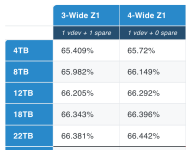
Go to https://www.truenas.com/docs/references/zfscapacitycalculator/
Use recordsize 16k, 4 drives à 1TB, RAIDZ1, 4 drives wide.
What do you get? Even worse numbers than I gave you (because I ignore some stuff).

1765884151286.png


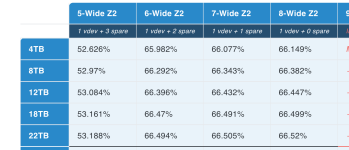
You can to the same thing with your setup, 8 wide 18TB drives, RAIDZ2 with 64k volblocksize and get this:
1765884367100.png

So you see, my numbers are not a worst case scenario. On the contrary, they are a best case scenario.

My wild guess is that you might have so much free space, that you did not realize it yet, that you fell into that ZFS trap and only get roughly 71% instead of 75%.
 
Last edited:
  • Like
Reactions: Johannes S
BTW, that calculator has an interesting note regarding the zfs list command you used:
Note: The zfs list command always assumes a 128KiB recordsize for capacity calculations. The usable capacity values displayed below represent how much data you can store on a pool with a given recordsize, but changing your recordsize will not change the capacity that zfs list displays.
Maybe this is what screwed your tests? I honestly have no idea.

Here is another, IMHO even better calculator.
And if you scroll down all the way to the bottom, there is also explanations behind his math
https://jro.io/capacity
 
Last edited:
  • Like
Reactions: Johannes S and UdoB
Another great explanation of that topic:
https://forums.truenas.com/t/understanding-openzfs-capacity/2444

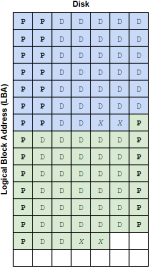
It even has a picture of a 7 wide RAIDZ2 with 128k. Not exactly your 8 wide, but pretty close:

1765886743902.png
See the two X sectors? That is 8k padding for every single 128k stripe.

It is similar with your 8 drives.
P + P + D + D + D + D + D + D offers 24k.
You need that 5 times to get 120k.
Still need another 8k.
So we add another stripe that looks like this
P + P + D + D.

In total we now have 5 * 8 sectors + 4 sectors = 44 sectors. That is not a multiple of 3, so we add one padding to get 45 sectors. So you in the end have for every single 128k volblock exactly this. There is no way around this.

P + P + D + D + D + D + D + D
P + P + D + D + X

One single 128k volblock need 45 times a 4k sector.
128 / (45*4) * 100 =71.111%

But even in a fantasy universe without that padding, you would not get 75%.
128 / (44*4) * 100 =72.727%

Why?
Because your last stripe is not optimal in size and needs 8k parity just to store 8k data.
So your last stripe is only 50% efficient instead of 75%.

Damn I love ZFS :) But it is hard to bring that across. That is why I wrote that Github thing.
I wasted a lot of time but I can't really think of a way to explain it better.
 
Last edited:
  • Like
Reactions: Johannes S