ZFS raidz1 and snapshots, again

Jan 13, 2026
26
2
3
Sorry to ask again but I could use some definitive advice. I have a couple of Proxmox servers that have a zfs mirror for the os and a 4 disk storage array in zfs raidz1. Everything works as expected or so I thought. When I take a snapshot of any VM it seems to increase the storage used on Proxmox by the amount of data in the VM. Problematic as the VM I want to snapshot had 10TB of data. I see references to "zfs set refreservation=none pool_name/dataset_name" but this is normally followed by a lot of other things to set/look at. And seems to be VM disk specific. So I really need to know is...

Will this command result in a small snapshot?
Can this be run at the ZFS pool level so all snapshots for every VM are small when created?
We need to do this on a critical production machine so IS THIS SAFE :eek:


zfs list
NAME USED AVAIL REFER MOUNTPOINT
Primary-ZFS 47.3T 10.7T 291G /Primary-ZFS
Primary-ZFS/base-499-disk-0 60.4G 10.8T 5.08G -
Primary-ZFS/base-499-disk-1 111G 10.8T 3.18M -
Primary-ZFS/base-499-disk-2 221G 10.9T 4.37M -
Primary-ZFS/base-599-disk-0 60.4G 10.8T 5.08G -
Primary-ZFS/base-599-disk-1 111G 10.8T 3.18M -
Primary-ZFS/vm-103-disk-0 22.1G 10.7T 12.8G -
Primary-ZFS/vm-103-disk-1 1.08T 10.8T 992G -
Primary-ZFS/vm-103-disk-2 1.08T 10.8T 997G -
Primary-ZFS/vm-103-disk-3 1.08T 10.8T 1000G -
Primary-ZFS/vm-132-disk-0 166G 10.8T 100G -
Primary-ZFS/vm-141-disk-0 166G 10.9T 35.9G -
Primary-ZFS/vm-305-disk-0 55.3G 10.7T 37.3G -
.............................. etc etc

Thanks all.
 
You can call something like this:
Code:
zfs list -t snapshot -r rpool # rpool is the pool name

And check on github zfs with checkzfs --sourceonly, if you run, so i do, automatic zfs snapshots.
So i can see, if the apt package zfs-auto-snapshot work properly.
 
I setup a test PVE with a test VM and then "zfs set refreservation=none My-Storage/vm-100-disk-1" This seemed to reduce the VM disk usage immediately and when creating a snapshot doesn't use extra storage

On Production... zfs get refreservation for one disk shows...

Primary-ZFS/vm-714-disk-2 refreservation 4.32T local

And that disk in proxmox is a 4TB disk with about 800GB available inside the VM

When I snapshot 714 the storage goes up by 1.38TB

zfs list -t snapshot -r Primary-ZFS....

......
Primary-ZFS/vm-714-disk-0@Test 1.08M - 3.70G -
Primary-ZFS/vm-714-disk-1@Test 0B - 117M -
Primary-ZFS/vm-714-disk-2@Test 0B - 2.18T -
......
 
Last edited:
before we dive too deep into snapshots and their storage consumption, we should IMHO look first at two more important issues.

We need to do this on a critical production machine so IS THIS SAFE :eek:
I would argue that running RAIDZ1 is unsafe. Dell marked RAID5 to be against best practice and unsafe something around back in 2013 when 8TB became to norm. Running RAIDZ1 with such huge drives is IMHO VERY UNSAFE!

Second potential issue is pool geometry.
Do you use the default volblocksize? Did you made any changes to that 16k default?
 
Last edited:
  • Like
Reactions: Johannes S
On Production... zfs get refreservation for one disk shows...
Therefore I did not specify the disk. If you do, you need -r as option

I setup a test PVE with a test VM and then "zfs set refreservation=none My-Storage/vm-100-disk-1" This seemed to reduce the VM disk usage immediately and when creating a snapshot doesn't use extra storage
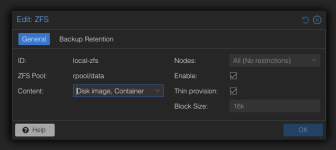
So you missed checking the thin provision box in your storage configuration in the PVE UI:

1782992367363.png
 
  • Like
Reactions: Johannes S
Thanks all for replies.

Got to admit I usually just keep default settings as I figure Proxmox knows better than me. Thin provision is off my default and I think there might be arguments that this is the safer option until you have massive snapshots to do. It looks like setting thin provisioning on VM disks by VM disks basis will work.

yeah zfs get refreservation was run in full with the pool I just took the info for one disk for this thread.

These servers have 4 disk bays so no option to add more or increase the raid level. Which is why we have 3 backups of all VMs :)
 
I would argue that running RAIDZ1 is unsafe. Dell marked RAID5 to be against best practice and unsafe something around back in 2013 when 8TB became to norm. Running RAIDZ1 with such huge drives is IMHO VERY UNSAFE!

I agree. First performance and iops will suffer compared to a mirror or striped setup, second it will lead to waste due to padding see:

Another issue are the large resilver times of raidz compared to mirrors if a disc fails see https://jrs-s.net/2015/02/06/zfs-you-should-use-mirror-vdevs-not-raidz/

Basically RAUDZ is ok for large amount of data where you want higher residency and don't care about iops or performance and can tolerate the risk of days or weeks of resilvering in case of a disc failure. For VM os diskc and any workload which needs huge iops ( aka random access of many small files ) e.g. databases a mirror or striped mirror is more suitable.
 
So you missed checking the thin provision box in your storage configuration in the PVE UI
Lots do. I also always have to suggest this as well. If it were such a bad idea local-zfs wouldn't use it. I made a ticket in argument of changing the default if you care.

It looks like setting thin provisioning on VM disks by VM disks basis will work.
I have a little snippet here which might be useful if you still need to apply it retroactively.
 
Last edited:
  • Like
Reactions: Johannes S