zfs pool missing after reboot

xadox

Well-Known Member
Aug 21, 2019
63
8
48
Since a few months I am having the problem, that one of my zfs pools is gone after reboot.
I have to import the missing one then with:

zpool import POOL_NAME

After importing it again everything seems to be fine again.
Anyone else having this problem?

I am on v8.2.4 .
 
Hi,
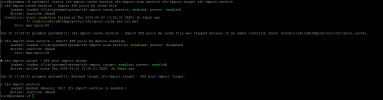
what is the output of systemctl status zfs-import-cache.service zfs-import-scan.service zfs-import.target zfs-import.service?
 
Do I have to set this for every pool? Since I am having tree different ones.
 
Do I have to set this for every pool? Since I am having tree different ones.
Yes, for every pool which should be imported by the cache file.

Do the other pools get imported correctly? Maybe you have a dedicated zfs-import@<pool>.service for these?
 
I have fired the command for all of my pools, now.

But yes you are correct, one of my pools has a dedicated service:
1718955968480.png

But I have no clue why. It's the last pool I have created. The other ones where initialy created as the system was at around v6.
 
I hit the same problem. For me the solution was to use create a new instance of the zfs-import@.service with a symbolic link by running this command (pool was named mainpool, adjust accordingly):
ln -s /lib/systemd/system/zfs-import@.service /etc/systemd/system/zfs-import.target.wants/zfs-import@mainpool.service
 
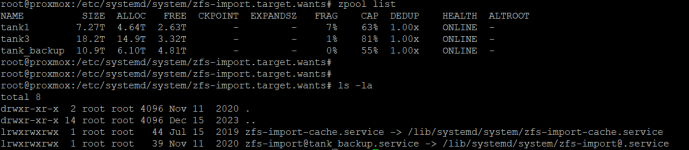
That's the right place, just do 2 further links for tank1 and tank3 which looks same as already existing tank_backup link.
 
  • Like
Reactions: xadox
Do I only have to create symlinks to the same file like:

Code:
ln -s /lib/systemd/system/zfs-import@.service /etc/systemd/system/zfs-import.target.wants/zfs-import@tank1.service
ln -s /lib/systemd/system/zfs-import@.service /etc/systemd/system/zfs-import.target.wants/zfs-import@tank3.service
 
@xadox That's correct. Every link to that same file is another instance of the service. Each instance will use the name of the symlink (the portion after the @ and before the .service ) and import a zfs pool with that name.
 
  • Like
Reactions: xadox
After a restart, all pools were loaded automatically.
Many thanks for your support.
 
  • Like
Reactions: UdoB
Just thought I would add to this, in case anyone finds this information useful.

I created an unattended install for Proxmox, to save me some setup time. In that, I have a script which creates 2 zpools - let's say littlepool and bigpool. After creating littlepool, I use the pvesm command in the script so that it will show up in the Proxmox GUI. I didn't do that for bigpool as I was going to create further datasets under it for Proxmox to use later. (although bigpool still showed up in Disks->ZFS, just not in the main storage list)

I noticed on next reboot, bigpool was not present. I could import it happily and it would be back on the system but if I rebooted again it would disappear.
I initially used the method here to create a link to the zfs-import.service for bigpool, and now it was available after reboot.

I then wiped the lot, and this time in my script I added another pvesm command to add bigpool to the GUI. I hadn't really wanted bigpool showing up in the GUI but since having it there seems to keep it from disappearing on boot, I thought it was the safer option.

So, I may be wrong with this but:

If you don't want a storage pool to show up in the main Storage list of the GUI, set it up on the command line and then create the link to the zfs-import@.service.

Bash:
zpool create bigpool raidz /dev/disk/by-id/ata-ST....<etc>
zfs set xattr=sa bigpool
zfs set compression=lz4 bigpool
zfs set atime=off bigpool
ln -s /lib/systemd/system/zfs-import@.service /etc/systemd/system/zfs-import.target.wants/zfs-import@bigpool.service

Alternatively, if you don't mind it being in the GUI set it up from the GUI itself and you will have nothing further to do. You can of course still create the pool via command line if you prefer but then follow it with the pvesm command so that the Proxmox GUI can see it.

Bash:
zpool create bigpool raidz /dev/disk/by-id/ata-ST....<etc>
zfs set xattr=sa bigpool
zfs set compression=lz4 bigpool
zfs set atime=off bigpool
pvesm add zfspool bigpool --pool bigpool

Not done extensive testing on this, but the zpools stayed available across 3 or 4 reboots using both methods. YMMV.

 
I hit the same problem. For me the solution was to use create a new instance of the zfs-import@.service with a symbolic link by running this command (pool was named mainpool, adjust accordingly):
ln -s /lib/systemd/system/zfs-import@.service /etc/systemd/system/zfs-import.target.wants/zfs-import@mainpool.service
That helped me too