ZFS notifications

jeffgott

New Member
Jan 12, 2026
24
3
3
I'm trying to figure out why I don't get ZFS notifications. I have a pool that is degraded status and never received a notification. I can send a test mail from Datacenter, Notifications and it works fine.

The outgoing emails in the postfix main.cf file are configured to go to '<ourdomain-com>.mail.protection.outlook.com'.

I am running a ZFS test as defined in https://www.thomas-krenn.com/en/wiki/Configuration_and_creation_of_mail_notifications_in_Proxmox_VE

It appears that I am getting an error:
Feb 21 17:00:27 pve1 postfix/smtp[4021369]: connect to mail.global.frontbridge.com[104.47.35.36]:25: Connection timed out
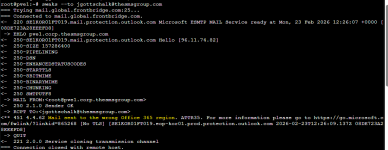
Feb 21 17:00:28 pve1 postfix/smtp[4021369]: 088FC22E32: host mail.global.frontbridge.com[104.47.39.36] said: 451 4.4.62 Mail sent to the wrong Office 365 region. ATTR35. For more information please go to https://go.microsoft.com/fwlink/?linkid=865268 [No TLS] [SE1KOR01FT010.eop-kor01.prod.protection.outlook.com 2026-02-21T22:00:28.573Z 08DE712324557045] (in reply to RCPT TO command)

Why is the email being sent to mail.global.frontbridge.com?
 
By default PVE Notifications have a single target called mail-to-root and a single matcher called default-matcher which sends all notifications to the email address defined for root@pam. Go to Datacenter -> Permissions -> Users and open up the details for root@pam - check the email address.

By default ZFS errors are mailed according to Notifications, so provided you have not made any changes from the defaults then the email address for root@pam is where they will be sent. The article you cite says exactly the same as me (soz - but I did check first by looking at one of my PVEs and I look after something like 30 of them across the country (UK))

The article recommends installing zfs-zed for even more notifications and that's a good idea. Did you set the email address in /etc/zfs/zed.d/zed.rc
as root? If so, you now need to work out how root's email address is worked out by the zfs-zed system. To avoid all that faff, I recommend you set the email address in zed.rc to the actual email address you want to receive the emails.

OK let's look into the email side of things. I recommend SWAKS for this job - its really rather good and been a friend of mine for many years:

Code:
# apt install swaks

Let's test email out. SWAKS will default to how the local system will work but you can change that behaviour with switches. If you can't be arsed to remember switches, it will prompt for a To: address and then crack on. Let's do two experiments, replace me@example.co.uk with the real email address:

Code:
# swaks --to me@example.co.uk
Code:
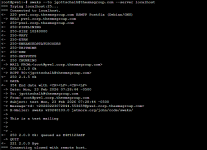
# swaks --to me@example.co.uk --server localhost

The first one ignores the local SMTP daemon (Postfix) and simply does MX lookups and sends a test email. The second example does the same but explicitly tries to use a local SMTP daemon. You will get a replay at the console of an email session with all the difficult things done for you (I used to do this with telnet) and if something fails, it will be spelt out for you.

I note you mention MS as your email wrangler and I happen to own an MS silver partner company. MS's Exchange online will mark test emails from SWAKS as spam and probably dump them into their quarantine because a simple text file is so obviously dangerous! So if you don't receive the test emails, take a look at the quarantine and your Outlook's (*sigh*) junk folder. To be fair the default sender addresses etc used by SWAKS do look a bit dodgy. I probably ought to find out a golden combination of switches. Then again where is the fun in that!

Frontbridge is a company that does something MS Exchange online.

To be honest that error message looks like victim shaming! Anyway, hopefully you have a few more tools to get to grips with the problem. Let us know how you get on.
 
  • Like
Reactions: Onslow and UdoB