ZFS mirror on 2x Crucial T705 (PCIe 5.0) causing txg_sync hangs under write load – no NVMe errors in dmesg

cpaglietti

New Member
Mar 1, 2026
6
1
3
Hi,
I’m running into repeatable ZFS I/O stalls on a Proxmox host and I’d like some technical feedback before I start swapping hardware.
Hardware
  • CPU: Ryzen 9 7900
  • Motherboard: ASUS Pro WS B850M-ACE SE (AM5)
  • RAM: 64GB DDR5 (non-ECC)
  • Storage: 2x Crucial T705 2TB (CT2000T705SSD3)
  • Firmware: PACR5111 (both drives)
  • Both NVMe drives running at PCIe 5.0 x4 (32GT/s confirmed via lspci)
  • Pool: ZFS mirror (rpool).
  • Software
  • Proxmox VE (latest kernel 6.17.x)
  • ZFS mirror on the two T705
  • Guest: Ubuntu VM with LVM inside
The Problem
Under heavy write load (e.g. vzdump backup, snapshot, large writes), the system eventually:
  • Load average spikes (~10+)
  • Multiple ZFS threads enter D state:
    • txg_sync
    • zvol_tq-*
    • flush-zfs

  • Even unrelated processes end up blocked
  • SSH eventually drops
  • No NVMe reset or I/O error in dmesg
  • zpool status still shows ONLINE, no errors
  • Only recovery is full reboot (power cycle sometimes required)
Example of stuck processes:
D [txg_sync]
D [zvol_tq-0]
D [dbuf_evict]
D flush-zfs
D vzdump
No:
  • nvme timeout
  • controller reset
  • blk_update_request error
Observations
  • Both drives are PCIe Gen5 x4
  • No ASPM enabled in BIOS
  • No explicit NVMe power saving tuning
  • Scrub completes fine when idle
  • Issue appears only under sustained write / flush pressure
  • Happens even when backup target is local (so not network-related)
Interrupts still active on both NVMe devices.
  • Has anyone seen txg_sync hangs on Phison E26 (T705) under ZFS?
  • Would forcing PCIe Gen4 instead of Gen5 be a reasonable stability test?
  • Is this a known flush latency issue with consumer Gen5 NVMe?
  • Any ZFS tunables worth testing (before replacing hardware)?
I’m considering:
  • Forcing both slots to PCIe Gen4
  • Temporarily detaching one disk and testing single-device pool
  • Updating firmware (if newer than PACR5111 exists)

Any technical input appreciated.
 
Update – possible root cause identified

After several freezes under ZFS load (snapshots and vzdump), I forced both NVMe slots from PCIe Gen5 (32GT/s) to Gen4 (16GT/s) in the BIOS.
Since downgrading to Gen4:
  • No more tasks stuck in D state
  • No more ZFS txg_sync stalls
  • SMART queries no longer hang
  • Backups complete successfully
  • System remains responsive under sustained write load

At this point, PCIe Gen5 link instability seems to have been the trigger (Ryzen 9 7900 + ASUS board + dual Crucial T705 Gen5 in ZFS mirror).
SMART shows no media errors, temperatures are normal, and ZFS reports no data corruption.
I will monitor the system for 48 hours under load before considering the issue definitively resolved.
 
Update:
I checked the ASPM policy:
cat /sys/module/pcie_aspm/parameters/policy
Result:
[default] performance powersave powersupersave


ASPM was active.
I then disabled it entirely via kernel parameter.

Edit GRUB​

File: /etc/default/grub
Changed:
GRUB_CMDLINE_LINUX_DEFAULT="quiet pcie_aspm=off"

Then:

update-grub
reboot

Verification after reboot:
cat /proc/cmdline
Output included:
pcie_aspm=off


After:
  • Forcing Gen4 in BIOS
  • Disabling ASPM with pcie_aspm=off
The system:
  • Completed heavy Proxmox backups
  • Ran overnight under load
  • No more txg_sync in D state
  • No freeze
  • No NVMe errors
  • No AER / PCIe errors in logs

Current Conclusion (provisional)​

Forcing Gen4 alone did NOT fix the issue.

Disabling PCIe ASPM appears to have resolved it (so far).
 
  • Like
Reactions: Onslow
SOLVED!

ASPM was active.
I then disabled it entirely via kernel parameter.

File: /etc/default/grub
Changed:
GRUB_CMDLINE_LINUX_DEFAULT="quiet pcie_aspm=off"
 
Under heavy write load (e.g. vzdump backup, snapshot, large writes), the system eventually:
vzdump onto the same disk? Snapshot or large sequential writes should not be a heavy load.
Would forcing PCIe Gen4 instead of Gen5 be a reasonable stability test?
I would say yes.
Is this a known flush latency issue with consumer Gen5 NVMe?
No, but it would be far from the first time consumer SSDs have problems. Especially the ones that only buy Phison controllers and slap on a buggy firmware.

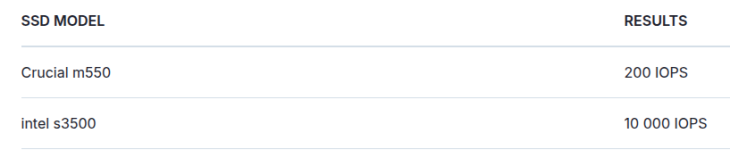
What @spirit was tryint to tell you is that while gamer drive like the 705 have huge sequential numbers, they don't necessarly have good 16k random sync write performance. So something like a Seagate IronWolf 525, while on paper only being able to read at 5GB/s, might for Proxmox be faster.

If you are interested: Or in other words: While on paper the 850 EVO is 5 times faster, in this workload the Intel S3510 is 37 times faster!

So I would get one server or at least Prosumer or NAS drive like the Seagate or Samsung 990 Pro or whatever and switch one of the drives for that.
It is in general a good idea to have different drives. We had many bugs in the past, from broken sync writes on Phison controllers, to Samsung shutdowns. If two SSDs suffer a bug in the same mirror, that is bad. If only one goes south, that is fine.
 
Last edited: