

ZFS device fault
- Thread starter ljhardy
- Start date
You are using an out of date browser. It may not display this or other websites correctly.
You should upgrade or use an alternative browser.
You should upgrade or use an alternative browser.

What kind of fault? What does zpool status actually report (in CODE-tags)? It really depends on read, write or cksum. Are you using QLC or SMR drives then please search the forum about the issues they cause with ZFS. Even brand new SSDs can be terrible for use with ZFS and can also be broken (or incorrectly installed or incompatible).
It's most likely SMR if it's a HDD but it might be CMR, and it might be TLC or QLC if it's a SSD. Either way, it's cheap and probably not suitable for ZFS or any other CoW filesystem. Please show the output ofThe drive is a WD Blue.
zpool status before and/or after a scrub.It's not just you but posts like these make me lose interest in a thread as there is almost no information while the forum alerts me to this thread. I'll post a more helpful reply later, maybe, if I happen to see it. Other volunteers here might also be able to help you.I’ll check the details on the pool status when I get home.
Last edited:
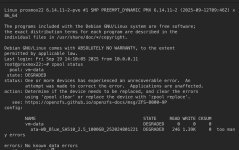

The screenshot is quite readable, thanks! The write errors indicate that the drive is too slow for ZFS. The model number suggest it's a SATA SSD with 1TB of TLC flash memory. Some drives with TLC flash memory work fine with ZFS. Maybe it's the drive, maybe it's the firmware, maybe it's the cable or SATA controller, maybe it's the system RAM (ruin a memtest!). Try replacing each part (and make sure you have restorable and uncorrupted backups).
Last edited:
Are all three installed in the same system? Then I would reseat the cable and maybe try another drive. Maybe moving the drives around (so they all are put in the same system but different ports/cables) to detect a pattern. Otherwise, if it was the only drive I would start with a memtest as that would alert you to much bigger problems.I bought 3, this is the only one having issues. Still could be any of the things you mentioned. I’ll do it piece by piece.
Second though: maybe you could move the drives around and see if the problem follows the drive or the system.All 3 drives are on different systems.
Unless you use ECC memory (and did not get any warnings about detection and recovery), always a good idea.Memtest is next. Thanks again.