xe_guc kernel driver failing on Linux 6.14.8-3-bpo12-pve Proxmox PVE 8.4.16

WYDStepBro

New Member
Feb 13, 2026
4
0
1
Trying to use an Arc B580 I recently purchased and test with Plex's preview build which has support for Battlemage transcoding. Whenever I switch transcoder over to the Arc GPU instead of my igpu on 10850k, my logs begin to fill extremely quickly with. Reached out to plex support and they stated i need to reach out to Proxmox support as it is the xe_guc kernel driver failing. I am an amateur when it comes to Linux administration so any help would be greatly appreciated.

Dec 9 04:44:10 plex kernel: [73797.506693] xe 0000:03:00.0: [drm] GT1: trying reset from guc_exec_queue_timedout_job [xe]
Dec 9 04:44:10 plex kernel: [73797.506780] xe 0000:03:00.0: [drm] GT1: trying reset from guc_exec_queue_timedout_job [xe]
Dec 9 04:44:10 plex kernel: [73797.506859] xe 0000:03:00.0: [drm] GT1: trying reset from guc_exec_queue_timedout_job [xe]
Dec 9 04:44:10 plex kernel: [73797.506914] xe 0000:03:00.0: [drm] GT1: trying reset from guc_exec_queue_timedout_job [xe]
Dec 9 04:44:10 plex kernel: [73797.506967] xe 0000:03:00.0: [drm] GT1: trying reset from guc_exec_queue_timedout_job [xe]
Dec 9 04:44:10 plex kernel: [73797.507021] xe 0000:03:00.0: [drm] GT1: trying reset from guc_exec_queue_timedout_job [xe]
Dec 9 04:44:10 plex kernel: [73797.507087] xe 0000:03:00.0: [drm] GT1: trying reset from guc_exec_queue_timedout_job [xe]
Dec 9 04:44:10 plex kernel: [73797.507170] xe 0000:03:00.0: [drm] GT1: trying reset from guc_exec_queue_timedout_job [xe]
Dec 9 04:44:10 plex kernel: [73797.507239] xe 0000:03:00.0: [drm] GT1: trying reset from guc_exec_queue_timedout_job [xe]
Dec 9 04:44:10 plex kernel: [73797.507294] xe 0000:03:00.0: [drm] GT1: trying reset from guc_exec_queue_timedout_job [xe]
Dec 9 04:44:10 plex kernel: [73797.507348] xe 0000:03:00.0: [drm] GT1: trying reset from guc_exec_queue_timedout_job [xe]```

 
Adding in logs from today after I decided to try it out again once upgrading plex to

Plex Media Server 1.43.1.10495-10cfae054​

Feb 12 23:20:32 Olympus kernel: xe 0000:03:00.0: [drm] GT1: trying reset from guc_exec_queue_timedout_job [xe]
Feb 12 23:20:32 Olympus systemd-journald[421274]: Missed 1 kernel messages
Feb 12 23:20:32 Olympus kernel: xe 0000:03:00.0: [drm] GT1: trying reset from guc_exec_queue_timedout_job [xe]
Feb 12 23:20:32 Olympus systemd-journald[421274]: Missed 1 kernel messages
Feb 12 23:20:32 Olympus kernel: xe 0000:03:00.0: [drm] GT1: trying reset from guc_exec_queue_timedout_job [xe]
Feb 12 23:20:32 Olympus systemd-journald[421274]: Missed 1 kernel messages
Feb 12 23:20:32 Olympus kernel: xe 0000:03:00.0: [drm] GT1: trying reset from guc_exec_queue_timedout_job [xe]
Feb 12 23:20:32 Olympus systemd-journald[421274]: Missed 1 kernel messages
 
I have the same issue but on kernel 6.17.4-2-pve with my B580. Only happens when the GPU is doing more than ~8 1440p decode streams at 20 fps, then it spams the logs and most things just hang forever after a few days of running. It seems to be a driver/kernel issue, I don't think the proxmox touches the xe kernel driver code at all.
 
I have the same issue but on kernel 6.17.4-2-pve with my B580. Only happens when the GPU is doing more than ~8 1440p decode streams at 20 fps, then it spams the logs and most things just hang forever after a few days of running. It seems to be a driver/kernel issue, I don't think the proxmox touches the xe kernel driver code at all.
Very similar here. Though the hang ups I’m sure are due to drive maxing out cause of syslog size. Have to go in and delete that cause it spams this several times per second until host is crippled to a crawl.

I honestly wish I had yours though as mine happens minutes after a single 4K HEVC transcode. I’m just bummed I can’t find much other posts on this issue being reported.
 
I think I was able to "solve" / workaround the issue. I did not find this solution online, instead I dug through the xe module options and tried changing them until it worked. It's been about 4 days without a crash doing 24/7 decode.

First, I updated the firmware. That did not solve the issue, but did get rid of some errors in dmesg and there are several useful fixes in there.
I also updated the GuC/HuC firmware, but there was no change there either.

Finally, adding these parameters to my kernel command line: xe.disable_display=true xe.dmc_firmware_path=/dev/null worked it seems. I have a feeling it's specifically xe.dmc_firmware_path=/dev/null which disables the power management firmware from loading. GPU power usage doesn't seem much higher without it.


I wrote a script to update to the latest available firmware, works inside proxmox root shell, if anyone wants it. Put the igsc binary (available from intel directly) in the same folder.

Code:
#!/bin/bash

echo "Downloading firmware..."
# NOTE: change the first 2 lines to match your GPU!! Browse https://github.com/Solaris17/Arc-Firmware/tree/master/Latest
# and find the files matching your GPU PCI ID (mine is e20b)
wget https://github.com/Solaris17/Arc-Firmware/raw/refs/heads/master/Latest/fwdata/bmg_ibc-frd-b36_e20b_config-data.bin -O fwdata.bin
wget https://github.com/Solaris17/Arc-Firmware/raw/refs/heads/master/Latest/bmg_e20b_1100_config19.bin -O oprom-data.bin
wget https://github.com/Solaris17/Arc-Firmware/raw/refs/heads/master/Latest/bmg_g21_fwupdate.bin -O fwupdate.bin
wget https://github.com/Solaris17/Arc-Firmware/raw/refs/heads/master/Latest/bmg_OpromCode.bin -O oprom-code.bin


echo "Updating firmware..."

./igsc fw update --device /dev/mei0 --image fwupdate.bin
./igsc fw-data update --device /dev/mei0 --image fwdata.bin
./igsc oprom-data update --device /dev/mei0 --image oprom-data.bin
./igsc oprom-code update --device /dev/mei0 --image oprom-code.bin

echo "Downloading latest GuC/HuC firmware..."

# NOTE: this overwrites files from pve-firmware!

cd /usr/lib/firmware/xe
sudo wget -o - -q https://git.kernel.org/pub/scm/linux/kernel/git/firmware/linux-firmware.git/plain/xe/bmg_guc_70.bin -O bmg_guc_70.bin
sudo wget -o - -q https://git.kernel.org/pub/scm/linux/kernel/git/firmware/linux-firmware.git/plain/xe/bmg_huc.bin -O bmg_huc.bin
sudo wget -o - -q https://git.kernel.org/pub/scm/linux/kernel/git/firmware/linux-firmware.git/plain/xe/lnl_gsc_1.bin -O lnl_gsc_1.bin
sudo wget -o - -q https://git.kernel.org/pub/scm/linux/kernel/git/firmware/linux-firmware.git/plain/xe/lnl_guc_70.bin -O lnl_guc_70.bin
sudo wget -o - -q https://git.kernel.org/pub/scm/linux/kernel/git/firmware/linux-firmware.git/plain/xe/lnl_huc.bin -O lnl_huc.bin

cd /usr/lib/firmware/i915
sudo wget -o - -q https://git.kernel.org/pub/scm/linux/kernel/git/firmware/linux-firmware.git/plain/i915/bmg_dmc.bin -O bmg_dmc.bin
echo "Done! Reboot required to use the new firmware."
 
I think I was able to "solve" / workaround the issue. I did not find this solution online, instead I dug through the xe module options and tried changing them until it worked. It's been about 4 days without a crash doing 24/7 decode.

First, I updated the firmware. That did not solve the issue, but did get rid of some errors in dmesg and there are several useful fixes in there.
I also updated the GuC/HuC firmware, but there was no change there either.

Finally, adding these parameters to my kernel command line: xe.disable_display=true xe.dmc_firmware_path=/dev/null worked it seems. I have a feeling it's specifically xe.dmc_firmware_path=/dev/null which disables the power management firmware from loading. GPU power usage doesn't seem much higher without it.


I wrote a script to update to the latest available firmware, works inside proxmox root shell, if anyone wants it. Put the igsc binary (available from intel directly) in the same folder.

Code:
#!/bin/bash

echo "Downloading firmware..."
# NOTE: change the first 2 lines to match your GPU!! Browse https://github.com/Solaris17/Arc-Firmware/tree/master/Latest
# and find the files matching your GPU PCI ID (mine is e20b)
wget https://github.com/Solaris17/Arc-Firmware/raw/refs/heads/master/Latest/fwdata/bmg_ibc-frd-b36_e20b_config-data.bin -O fwdata.bin
wget https://github.com/Solaris17/Arc-Firmware/raw/refs/heads/master/Latest/bmg_e20b_1100_config19.bin -O oprom-data.bin
wget https://github.com/Solaris17/Arc-Firmware/raw/refs/heads/master/Latest/bmg_g21_fwupdate.bin -O fwupdate.bin
wget https://github.com/Solaris17/Arc-Firmware/raw/refs/heads/master/Latest/bmg_OpromCode.bin -O oprom-code.bin


echo "Updating firmware..."

./igsc fw update --device /dev/mei0 --image fwupdate.bin
./igsc fw-data update --device /dev/mei0 --image fwdata.bin
./igsc oprom-data update --device /dev/mei0 --image oprom-data.bin
./igsc oprom-code update --device /dev/mei0 --image oprom-code.bin

echo "Downloading latest GuC/HuC firmware..."

# NOTE: this overwrites files from pve-firmware!

cd /usr/lib/firmware/xe
sudo wget -o - -q https://git.kernel.org/pub/scm/linux/kernel/git/firmware/linux-firmware.git/plain/xe/bmg_guc_70.bin -O bmg_guc_70.bin
sudo wget -o - -q https://git.kernel.org/pub/scm/linux/kernel/git/firmware/linux-firmware.git/plain/xe/bmg_huc.bin -O bmg_huc.bin
sudo wget -o - -q https://git.kernel.org/pub/scm/linux/kernel/git/firmware/linux-firmware.git/plain/xe/lnl_gsc_1.bin -O lnl_gsc_1.bin
sudo wget -o - -q https://git.kernel.org/pub/scm/linux/kernel/git/firmware/linux-firmware.git/plain/xe/lnl_guc_70.bin -O lnl_guc_70.bin
sudo wget -o - -q https://git.kernel.org/pub/scm/linux/kernel/git/firmware/linux-firmware.git/plain/xe/lnl_huc.bin -O lnl_huc.bin

cd /usr/lib/firmware/i915
sudo wget -o - -q https://git.kernel.org/pub/scm/linux/kernel/git/firmware/linux-firmware.git/plain/i915/bmg_dmc.bin -O bmg_dmc.bin
echo "Done! Reboot required to use the new firmware."
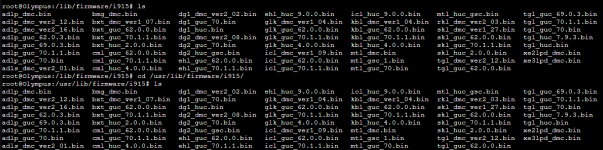
This is extremely helpful. Mine is also e20b, but I'm having some trouble setting up igsc (Please forgive me, trying my best to learn. I ran wget https://github.com/intel/igsc/archive/refs/tags/V1.0.2.tar.gz

Then tar -C ./ -xzf V1.0.2.tar.gz

I now see a directory for igsc but not really sure if i'm doing this right as I'm unable to run the fw updates you wrote since it says "-bash: ./igsc: No such file or directory"

I've downloaded the firmwares and have also downlaoded the latest GuC/HuC. Just needing to install the downloaded firmware for my e20b B580 gpu.
1771826633756.png
 
Another unhappy Intel B580 user here.

I have the same error with the kernel 6.17.9-1-pve.

@cdeck : Could you please show us your firmware versions?

fwdupdmgr get-devices gives the following info:


Bash:
├─Arc B580:
│ │   Device ID:          59fdb4840792b490058110f9228c05a14e30bd96
│ │   Summary:            Discrete Graphics Card
│ │   Current version:    21.1177
│ │   Vendor:             Intel (PCI:0x8086)
│ │   GUIDs:              c3808bdf-c31b-5c03-905f-6f223848cae0 ← PCI\VEN_8086&DEV_E20B&PART_FWCODE
│ │                       cc933c23-dc5e-5ea2-9e06-dfa3d5a00672 ← PCI\VEN_8086&DEV_E20B&SUBSYS_18496020&PART_FWCODE
│ │   Device Flags:       • Internal device
│ │                       • Updatable
│ │                       • System requires external power source
│ │                       • Supported on remote server
│ │                       • Needs shutdown after installation
│ │                       • Signed Payload
│ │                       • Can tag for emulation
│ │
│ ├─Arc B580 (Data):
│ │     Device ID:        c3a3ab13b0ef1b0e87866bb695c865fd029999d5
│ │     Current version:  203.1
│ │     Vendor:           Intel (PCI:0x8086)
│ │     GUIDs:            d7b15d5c-07a3-5055-81a6-fd6643411382 ← PCI\VEN_8086&DEV_E20B&PART_FWDATA
│ │                       4979cf0b-d86e-54d5-b7bc-c69448484c98 ← PCI\VEN_8086&DEV_E20B&SUBSYS_18496020&PART_FWDATA
│ │     Device Flags:     • Internal device
│ │                       • Updatable
│ │                       • System requires external power source
│ │                       • Needs a reboot after installation
│ │                       • Only version upgrades are allowed
│ │                       • Signed Payload
│ │
│ ├─Arc B580 (OptionROM Code):
│ │     Device ID:        1770291d91ef4e8abd3e3372ea23294ea04a40ae
│ │     Current version:  23.1065.0.0
│ │     Vendor:           Intel (PCI:0x8086)
│ │     GUIDs:            3ef75a3f-7174-5426-a43a-91fd6d2c9b9f ← PCI\VEN_8086&DEV_E20B&PART_OPROMCODE
│ │                       c55c4834-3a4c-5d2b-af79-e609aae890c3 ← PCI\VEN_8086&DEV_E20B&SUBSYS_18496020&PART_OPROMCODE
│ │     Device Flags:     • Internal device
│ │                       • Updatable
│ │                       • System requires external power source
│ │                       • Supported on remote server
│ │                       • Needs a reboot after installation
│ │                       • Signed Payload
│ │
│ └─Arc B580 (OptionROM Data):
│       Device ID:        eb3af4f5d552e0abd83997a3be85d108db08afee
│       Current version:  23.1051.0.0
│       Vendor:           Intel (PCI:0x8086)
│       GUIDs:            d791f9fd-2546-50d2-a65a-fe3e15b36817 ← PCI\VEN_8086&DEV_E20B&PART_OPROMDATA
│                         2537db66-49d8-5b4a-96f3-0de95aa57daa ← PCI\VEN_8086&DEV_E20B&SUBSYS_18496020&PART_OPROMDATA
│       Device Flags:     • Internal device
│                         • Updatable
│                         • System requires external power source
│                         • Needs a reboot after installation
│                         • Signed Payload