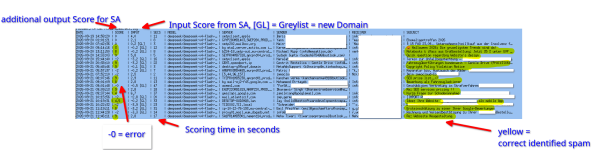
As described in some articles here, I’ve put together a few custom solutions to get rid of as much spam as possible as early as possible — including a Postfix policy service (Policyguard).
The small number of emails (<< 5%) that ultimately end up with a SpamAssassin score between 2 and 7 are the ones I wanted to double-check using AI.
The given score is the sum of all other SA tests, except the custom score, which is added via PMG after the SA scan.
If the score is already high enough, the email will be rejected anyway — even without an AI check. If the score is very low, it’s probably not spam. However, there is one exception: if the domain has never been seen before, it could be a compromised domain — in that case, I still want to check it. For this, the service pulls greylisting statistics from the current version of Policyguard. But Policyguard itself is not required for the AI check to function, you just have no greylisting statistics.
A good fit here is the currently very strong yet inexpensive DeepSeek Flash v4 via OpenRouter. With thinking/reasoning "low", it operates fast enough ( < 45 seconds) and is extremely cost-efficient for evaluating emails.
How does the service work?
The Perl module (.pm) is hooked into SpamAssassin as the “last check” via the .cf configuration.
This Perl service then launches a Python script and passes the email in EML format along with the current score.
The Python script, in turn, has its configuration (including the prompt) stored in a .toml file. This defines:
What data is transmitted?
Can a local model be used?
Yes, but it only works with a GPU.
The interfaces are already in place: install Ollama, download a model, and add the exact model name with “:local” appended to the model list. It works immediately.
However, this does not work on CPU. I tested qwen2.5:4B and qwen3:4B-instruct — they are fast but produce completely useless results. Anything larger is only available as a reasoning model, and it’s almost absurd/funny to watch the “thinking.” You can’t expect a score within 2 minutes. A GPU is absolutely required — then it might work.
What does it cost?
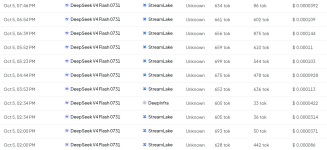
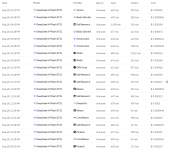
Here’s my cost overview. For both data protection and cost reasons, you should definitely only scan what is absolutely necessary — but for that, it’s absolutely worth it. I’ll provide some example filtering cases separately.
Edit: The current version supports fetching the price list every x seconds (default: 7200) and selecting the cheapest model. The OpenRouter “:floor” routing is broken. This query uses roughly 600–1000 input tokens and about the same number of output tokens, so the effective price is the sum of input and output tokens. However, OpenRouter heavily overweights input tokens in its “:floor” pricing. Some providers, such as OpenInference, exploit this by offering very cheap input tokens while charging excessive prices for output tokens. This price check works around the issue.
With around 700 input tokens and ~100–1000 output tokens, checking 40 emails (my daily 5% of 1000 mails volume) costs roughly 0.3 cent.
Paste your API Key into ai-spamcheck.toml
Remove the txt file ending from attached files and copy them to
Restart Spamassassin
Will i help to setup?
Yes, i am a freelancer.
The small number of emails (<< 5%) that ultimately end up with a SpamAssassin score between 2 and 7 are the ones I wanted to double-check using AI.
The given score is the sum of all other SA tests, except the custom score, which is added via PMG after the SA scan.
If the score is already high enough, the email will be rejected anyway — even without an AI check. If the score is very low, it’s probably not spam. However, there is one exception: if the domain has never been seen before, it could be a compromised domain — in that case, I still want to check it. For this, the service pulls greylisting statistics from the current version of Policyguard. But Policyguard itself is not required for the AI check to function, you just have no greylisting statistics.
A good fit here is the currently very strong yet inexpensive DeepSeek Flash v4 via OpenRouter. With thinking/reasoning "low", it operates fast enough ( < 45 seconds) and is extremely cost-efficient for evaluating emails.
How does the service work?
The Perl module (.pm) is hooked into SpamAssassin as the “last check” via the .cf configuration.
This Perl service then launches a Python script and passes the email in EML format along with the current score.
The Python script, in turn, has its configuration (including the prompt) stored in a .toml file. This defines:
- The spam score range in which an AI scan is actually performed. There are 2x2 Parameters: min and max paramters for either the normal scan and the greylist scan. Scanning greylist mails below -5 does not make sense: The maximum output score of 9 won't change anything, if the input score is too low.
- The output score range: minimum and maximum score the AI is allowed to assign
- History file: if sender and subject is identical (the last 10 are stored by default), don’t re-check — the score should remain the same
- Maximum output tokens and reasoning/thinking effort
- API key and model used
- Whether and how many lines of the email body should be included. The body significantly improves detection, but is sensitive from a data protection perspective
- The prompt template. This can be optimized depending on whether (fake) applications, newsletters, etc. should be filtered — or not
What data is transmitted?
- Sending server
- Sender
- Recipient
- Subject
- Optional: X lines of the extracted e-mail body text (sanitized from html code)
Can a local model be used?
Yes, but it only works with a GPU.
The interfaces are already in place: install Ollama, download a model, and add the exact model name with “:local” appended to the model list. It works immediately.
However, this does not work on CPU. I tested qwen2.5:4B and qwen3:4B-instruct — they are fast but produce completely useless results. Anything larger is only available as a reasoning model, and it’s almost absurd/funny to watch the “thinking.” You can’t expect a score within 2 minutes. A GPU is absolutely required — then it might work.
What does it cost?
Here’s my cost overview. For both data protection and cost reasons, you should definitely only scan what is absolutely necessary — but for that, it’s absolutely worth it. I’ll provide some example filtering cases separately.
Edit: The current version supports fetching the price list every x seconds (default: 7200) and selecting the cheapest model. The OpenRouter “:floor” routing is broken. This query uses roughly 600–1000 input tokens and about the same number of output tokens, so the effective price is the sum of input and output tokens. However, OpenRouter heavily overweights input tokens in its “:floor” pricing. Some providers, such as OpenInference, exploit this by offering very cheap input tokens while charging excessive prices for output tokens. This price check works around the issue.
With around 700 input tokens and ~100–1000 output tokens, checking 40 emails (my daily 5% of 1000 mails volume) costs roughly 0.3 cent.
Code:
# Install requirements
apt install python3-openai

# Create Folder for Statistics
mkdir -p /t/
chmod -R 777 /t/
Paste your API Key into ai-spamcheck.toml
Remove the txt file ending from attached files and copy them to
Code:
/etc/mail/spamassassin/aicheck.cf
/usr/local/lib/AICheck.pm
/usr/local/bin/ai-spamcheck.py
/etc/ai-spamcheck.toml
Restart Spamassassin
Code:
systemctl restart pmg-smtp-filter.service
Code:
# Test with E-Mail with score between 2 and 9
spamassassin -t < test.eml
Will i help to setup?
Yes, i am a freelancer.
Attachments
Last edited: