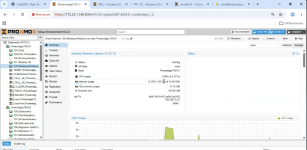
We are observing a memory utilization discrepancy for a Windows VM running on Proxmox VE.
The memory usage reported at the Proxmox host/VM level is significantly higher than the actual memory utilization observed inside the Windows VM, even when the VM is idle with minimal workload.
We have properly installed the required VirtIO drivers and configured the QEMU Guest Agent. The VM IP address is correctly reflected in the Proxmox VM Summary confirming that guest-agent communication is working.
However, the memory utilization discrepancy still persists.
Impact
This is affecting host memory capacity planning. The memory reported as consumed by the Windows VM is being considered as part of the host's memory utilization, which reduces the available memory shown on the Proxmox host.
As a result, the available memory for creating additional VMs appears lower than the actual memory available, which may impact or restrict new VM creation and resource allocation.
Support Required
Please help us determine why the Proxmox host is reporting higher memory consumption for this Windows VM and whether this is expected behavior.
Please confirm whether the behavior is related to:
The memory usage reported at the Proxmox host/VM level is significantly higher than the actual memory utilization observed inside the Windows VM, even when the VM is idle with minimal workload.
We have properly installed the required VirtIO drivers and configured the QEMU Guest Agent. The VM IP address is correctly reflected in the Proxmox VM Summary confirming that guest-agent communication is working.
However, the memory utilization discrepancy still persists.
Impact
This is affecting host memory capacity planning. The memory reported as consumed by the Windows VM is being considered as part of the host's memory utilization, which reduces the available memory shown on the Proxmox host.
As a result, the available memory for creating additional VMs appears lower than the actual memory available, which may impact or restrict new VM creation and resource allocation.
Support Required
Please help us determine why the Proxmox host is reporting higher memory consumption for this Windows VM and whether this is expected behavior.
Please confirm whether the behavior is related to:
- Windows memory caching/standby memory
- Proxmox memory accounting
- VirtIO Ballooning
- QEMU memory allocation
- Windows VirtIO Balloon driver
- QEMU Guest Agent
- Any specific Proxmox configuration required for accurate memory reporting and efficient host memory utilization