Hi,
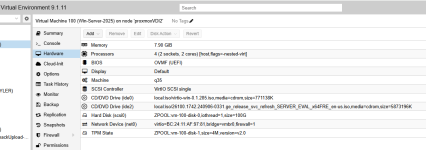
I'm trying to install a Windows Server 2025 VM, unfortunately I'm stuck in a loop after the first reboot following the installation.
UEFI sees the EFI boot entry and starts Windows Boot Manager but instantly after that it goes back to Proxmox logo and starts booting again...in a loop.
I never get to see the Windows logo.
I can't reproduce the issue with a fresh Windows Server 2022 VM or a WS 2022 VM migrated from VMware (both work fine and boot).
It only affects Windows Server 2025.
Also tested the install on an Intel CPU host, there's no problem at all. The WS 2025 VM is booting.
Context :
- Proxmox 9.1.6 and 9.2.2 tested
- Virtio scsi driver v0.1.271 as recommended (v0.1.285 is not working better)
- CPU is an AMD EPYC 9255.
- Tried to change the VM's CPU type to EPYC, host, x86-64-v2/v3/v4 : nothing is working.
- Also tried to add args as seen on the forum but it doesn't help.
Any known workaround or recommended CPU/machine configuration?
Thanks for your help!
I'm trying to install a Windows Server 2025 VM, unfortunately I'm stuck in a loop after the first reboot following the installation.
UEFI sees the EFI boot entry and starts Windows Boot Manager but instantly after that it goes back to Proxmox logo and starts booting again...in a loop.
I never get to see the Windows logo.
I can't reproduce the issue with a fresh Windows Server 2022 VM or a WS 2022 VM migrated from VMware (both work fine and boot).
It only affects Windows Server 2025.
Also tested the install on an Intel CPU host, there's no problem at all. The WS 2025 VM is booting.
Context :
- Proxmox 9.1.6 and 9.2.2 tested
- Virtio scsi driver v0.1.271 as recommended (v0.1.285 is not working better)
- CPU is an AMD EPYC 9255.
- Tried to change the VM's CPU type to EPYC, host, x86-64-v2/v3/v4 : nothing is working.
- Also tried to add args as seen on the forum but it doesn't help.
Any known workaround or recommended CPU/machine configuration?
Thanks for your help!