

[SOLVED] Windows Server 2025 not working with Virtio Disk

Out of curiosity, what made you try the drivers in X:\amd64\2k25? I'm just wondering because most guides (also non-Proxmox ones) seem to use the path recommended by the page you linked to. I quickly looked at both paths and they seem to both include the very same driver, so unless I'm overlooking something, this should not make any difference.
 
Using the path "x:\vioscso\2k25\amd64" results in my case in an empty field of drivers. Using "x:\amd64\2k25\" results in an entry of driver(s) to choose. There should be no difference, but in my case there was this difference. I don't know why, and it was the first time for me. Last install of WS2022 works flawlessly without the folder-confusion...

best regards
 
Are you sure you chose "SCSI" as Bus/Device and not "VirtIO Block" for the hard disk?
The difference between those two directories is, in "x:\amd64\2k25\" you can find the VirtIO Block driver too.
 
Hello Forummembers,

i have tried to install a Windows Server 2025 using https://pve.proxmox.com/wiki/Windows_2025_guest_best_practices

I ran in an issue - the virtio drivers on Windows don't show a compatible device.
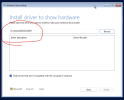
View attachment 81893

After 3 hours of searching, I found the solution: do not use the suggested path from the instruction, rather "x:\amd64\2k25\" and everything works fine!

best regards Mario
Interesting. I have no issues with this.

VM created with VirtIO SCSI Single, and the drivers was loaded normally on both paths .
I have another issue, regarding unattended installation of WIndows Server 2025 vs. VirtIO SCSI controller (even with drivers loaded). I will search for any other topic related to that, and I will create a new one if did not find anything similar.
 
I have another issue, regarding unattended installation of WIndows Server 2025 vs. VirtIO SCSI controller (even with drivers loaded). I will search for any other topic related to that, and I will create a new one if did not find anything similar.
Maybe you are already aware, but there is a guide on building ISOs including VirtIO drivers. Anyway, if this is a different issue than the one described above, I recommend opening another thread.
 
  • Like
Reactions: rocha.best
Very simple

1. Upload the VirtIO driver ISO to your VPS and mount it when Windows setup asks for drivers.
2. After installing the required drivers, unmount the VirtIO ISO and remount your Windows Server 2025 ISO to continue with the installation process.
 
Im my case the problem was uploading the windows 2025 ISO with web-upload using chrome. The SHA256 was different on proxmox and the file size of the ISO was different as well. Using WinSCP to transfer the ISO to proxmox was solving the problem.

I also did this:
  • Proxmox → VM → HardwareEFI Disk: Remove.
  • Then Add → EFI Disk new, but „Pre‑Enrolled Keys“ OFF