

Windows 11 High RAM usage
- Thread starter jhmc93
- Start date
You are using an out of date browser. It may not display this or other websites correctly.
You should upgrade or use an alternative browser.
You should upgrade or use an alternative browser.
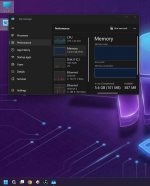

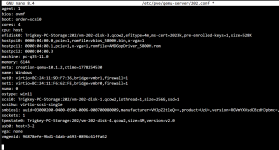
The picture is too cropped to tell much. Can you share the
Hardware tab too? As for memory details I'd check Task Manager, Resource Monitor and especially RAMMap: https://learn.microsoft.com/en-us/sysinternals/downloads/rammap
Last edited:
task manager is already posted..., here's the hardware tab:The picture is too cropped to tell much. Can you share theHardwaretab too? As for memory details I'd check Task Manager, Resource Monitor and RAMMap: https://learn.microsoft.com/en-us/sysinternals/downloads/rammap
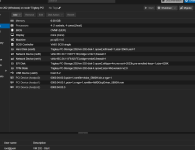 and here's other screenshots
Attachments

In Task Manger’s Ptocesses tab you can sort by memory usage.
Using Host can trigger the high CPU usage because virtualization…there are plenty of threads like https://forum.proxmox.com/threads/h...n-idle-with-windows-server-2025.163564/page-7 or try lowering to the v3 CPU type.
Using Host can trigger the high CPU usage because virtualization…there are plenty of threads like https://forum.proxmox.com/threads/h...n-idle-with-windows-server-2025.163564/page-7 or try lowering to the v3 CPU type.
This is normal when using PCI(e) passthrough.
EDIT: Remove
EDIT: Remove
balloon: 0 if you want Proxmox to show the "memory usage" from within the VM.
I Don't have balloon: 0 in my configThis is normal when using PCI(e) passthrough.
EDIT: Removeballoon: 0if you want Proxmox to show the "memory usage" from within the VM.

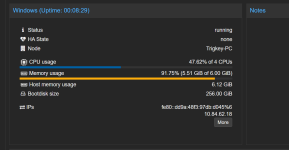
The VM will always use a little over 6GiB on the Proxmox host because of the PCI(e) passthrough, but this appears not to be the issue here. Proxmox is oblivious about the software inside the VM and simply shows you about the same memory usage as Windows shows you, as you showed in the first post of this thread.
Why the software inside the VM is using about 5.6GiB is unclear to me (as I don't use Windows), but I don't see how this relates to Proxmox. Maybe some Windows administrator will know? Other guides and forums on the internet about Windows memory management and about the other software you run inside the VM might help in this case.
Why the software inside the VM is using about 5.6GiB is unclear to me (as I don't use Windows), but I don't see how this relates to Proxmox. Maybe some Windows administrator will know? Other guides and forums on the internet about Windows memory management and about the other software you run inside the VM might help in this case.
Last edited:
In Task Manger’s Ptocesses tab you can sort by memory usage.
Using Host can trigger the high CPU usage because virtualization…there are plenty of threads like https://forum.proxmox.com/threads/h...n-idle-with-windows-server-2025.163564/page-7 or try lowering to the v3 CPU type.
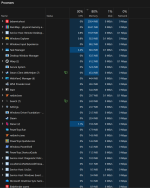
because I thought it would have something to do with proxmox, but like said above it pci passthrough, problem I've got is even when idle it sits at 94-100% and on pve summary tab it says over 100%, I don't know whether I was told to turn ballooning off or on, I did try it with it off and pve summary still says over 100 and on windows 11 task manager under processes memory says 87-90%The VM will always use a little over 6GiB on the Proxmox host because of the PCI(e) passthrough, but this appears not to be the issue here. Proxmox is oblivious about the software inside the VM and simply shows you about the same memory usage as Windows shows you, as you showed in the first post of this thread.
Why the software inside the VM is using about 5.6GiB is unclear to me (as I don't use Windows), but I don't see how this relates to Proxmox. Maybe some Windows administrator will know? Other guides and forums on the internet about Windows memory management and about the other software you run inside the VM might help in this case.
That's because of the PCI(e) passthrough and completely explainable but not the issue here, as I understand it, as Proxmox also shows the same number as Windows. Recent Proxmox shows two numbers: the memory usage as reported by the OS inside the VM using the balloon driver (if installed as appears to be the case) and the host uages which is a little over 100% as expected.pve summary still says over 100
That's inside the VM. Whatever happens inside the VM is, in my opinion, unrelated to Proxmox. Then again, I understand that you ask here if people recognize the issue and maybe someone here can help. Unfortunately, there has been a lot of memory usage confusion in the past and most Proxmox-related answers from the past don't seem to apply here.and on windows 11 task manager under processes memory says 87-90%
Something inside the VM is using more memory than expected. That's unrelated to the Proxmox host itself. Windows itself is reporting high memory usage but not showing enough applications that can explain the memory usage. This is a Windows OS or Windows application issue and not a Proxmox issue. Maybe someone here can help but other Windows forum might also be able to help, as they have more experience with Windows memory issues.
Yes but, as said, too cropped/limited Can you maximize RAMMap and share all the tabs? That's what I'd do. You can also try if memory in Task Manager goes down if you use its empty (see too menu) functionality.task manager is already posted
Last edited:
Yes but, as said, too cropped/limited Can you maximize RAMMap and share all the tabs? You can also try if memory in Task Manager goes down if you use its empty (see too menu) functionality.
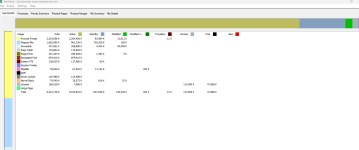
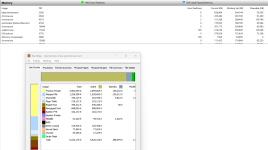
here's rammap @Impact
which empty there's 5 optionsYes but that's just one tab. Have you tried the empty suggestion too?
For the inside guest memory usage, what about full screenshot of Task Manager's Memory section , showing Paged pool and Hardware reserved.
Sorry to sound dumb, but the only empty I see are empty working sets, system working set, modified page list, standby list and priority list and hereFor the inside guest memory usage, what about full screenshot of Task Manager's Memory section , showing Paged pool and Hardware reserved.
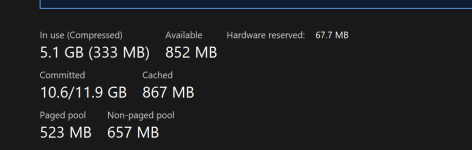
Try each and see what happens to the memory in Task Manager. I was intentionally unspecific here. RAMMap's main view already shows you where the memory goes. If you need more details you need to check the other tabs.there's 5 options
Last edited: