Windows 10 VM freezing ramdomly

Casulo

New Member
Nov 19, 2024
12
0
1
Hello everyone,

So this is a windows 10 VM with random freezes. Only stopping and startingt fixes it. This started to happen in the last 2 or 3 weeks. I have changed cpu type, raised memory and cores. Even changed the display options. Same result. Once in a while it also shows a split lock.

Code:
2026-03-22T15:22:02.495953+00:00 prox kernel: x86/split lock detection: #AC: CPU 0/KVM/263079 took a split_lock trap at address: 0xfffff8012fe1e643
2026-03-22T22:27:31.680714+00:00 prox kernel: perf: interrupt took too long (3142 > 3136), lowering kernel.perf_event_max_sample_rate to 63000
2026-03-23T07:13:24.132959+00:00 prox kernel: x86/split lock detection: #AC: CPU 1/KVM/263080 took a split_lock trap at address: 0x20c03394aff

It had the lastest version of virtio drivers, but downgraded to 0.1.271 as recommended here in proxmox's support pages. Nothing changed.
Also, no "fancy" software running there.

pveversion:


Code:
pveversion  --verbose
proxmox-ve: 9.1.0 (running kernel: 6.17.13-2-pve)
pve-manager: 9.1.6 (running version: 9.1.6/71482d1833ded40a)
proxmox-kernel-helper: 9.0.4
proxmox-kernel-6.17: 6.17.13-2
proxmox-kernel-6.17.13-2-pve-signed: 6.17.13-2
proxmox-kernel-6.17.13-1-pve-signed: 6.17.13-1
ceph-fuse: 19.2.3-pve1
corosync: 3.1.10-pve1
criu: 4.1.1-1
frr-pythontools: 10.4.1-1+pve1
ifupdown2: 3.3.0-1+pmx12
intel-microcode: 3.20260227.1
ksm-control-daemon: 1.5-1
libjs-extjs: 7.0.0-5
libproxmox-acme-perl: 1.7.0
libproxmox-backup-qemu0: 2.0.2
libproxmox-rs-perl: 0.4.1
libpve-access-control: 9.0.5
libpve-apiclient-perl: 3.4.2
libpve-cluster-api-perl: 9.1.1
libpve-cluster-perl: 9.1.1
libpve-common-perl: 9.1.8
libpve-guest-common-perl: 6.0.2
libpve-http-server-perl: 6.0.5
libpve-network-perl: 1.2.5
libpve-rs-perl: 0.11.4
libpve-storage-perl: 9.1.0
libspice-server1: 0.15.2-1+b1
lvm2: 2.03.31-2+pmx1
lxc-pve: 6.0.5-4
lxcfs: 6.0.4-pve1
novnc-pve: 1.6.0-3
proxmox-backup-client: 4.1.4-1
proxmox-backup-file-restore: 4.1.4-1
proxmox-backup-restore-image: 1.0.0
proxmox-firewall: 1.2.1
proxmox-kernel-helper: 9.0.4
proxmox-mail-forward: 1.0.2
proxmox-mini-journalreader: 1.6
proxmox-widget-toolkit: 5.1.8
pve-cluster: 9.1.1
pve-container: 6.1.2
pve-docs: 9.1.2
pve-edk2-firmware: 4.2025.05-2
pve-esxi-import-tools: 1.0.1
pve-firewall: 6.0.4
pve-firmware: 3.18-1
pve-ha-manager: 5.1.1
pve-i18n: 3.6.6
pve-qemu-kvm: 10.1.2-7
pve-xtermjs: 5.5.0-3
qemu-server: 9.1.4
smartmontools: 7.4-pve1
spiceterm: 3.4.1
swtpm: 0.8.0+pve3
vncterm: 1.9.1
zfsutils-linux: 2.4.0-pve1


Any ideas on how to fix OR troubleshoot this?
 
So this is a windows 10 VM with random freezes. Only stopping and startingt fixes it. This started to happen in the last 2 or 3 weeks.
  • Does that mean the VM was working normally a while ago? If so, have there been any changes?
  • If the VM freezes, will you see any other interesting messages in the Proxmox log besides “SplitLock”?


I have changed cpu type, raised memory and cores. Even changed the display options. Same result. Once in a while it also shows a split lock.
Take a look at the article on Splitlock [0]. That might help you. Please also post your current VM configuration:

Code:
qm config <vmid>

It would also be interesting to see lscpu.

It had the lastest version of virtio drivers, but downgraded to 0.1.271 as recommended here in proxmox's support pages. Nothing changed.
Also, no "fancy" software running there.
Downgrading the driver was definitely a good idea.


[0] https://pve.proxmox.com/wiki/Split_lock_detection
 
Last edited:
  • Like
Reactions: Casulo
Does that mean the VM was working normally a while ago? If so, have there been any changes?
Yes, normal as it can be.

  • If the VM freezes, will you see any other interesting messages in the Proxmox log besides “SplitLock”?
Nothing suspicious, i have searched.


qm config <vmid>


It would also be interesting to see lscpu.

Code:
agent: 0
boot: order=virtio0
cores: 4
cpu: x86-64-v2-AES,flags=+hv-tlbflush
description: 192.168.0.110
machine: pc-i440fx-8.0
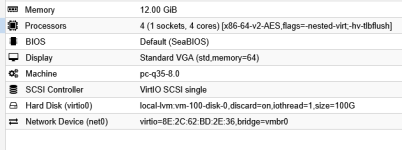
memory: 12288
meta: creation-qemu=8.0.2,ctime=1689610365
name: winprox
net0: virtio=8E:2C:62:BD:2E:36,bridge=vmbr0
numa: 0
onboot: 1
ostype: win10
scsihw: virtio-scsi-single
smbios1: uuid=f2dfabd8-443c-4451-a5e6-76a3ccd47a24
sockets: 1
vga: memory=64
virtio0: local-lvm:vm-100-disk-0,discard=on,iothread=1,size=100G
vmgenid: e2612de6-ca8f-4560-ae3f-4244ad12f0ca


Code:
Architecture:                x86_64
  CPU op-mode(s):            32-bit, 64-bit
  Address sizes:             39 bits physical, 48 bits virtual
  Byte Order:                Little Endian
CPU(s):                      16
  On-line CPU(s) list:       0-15
Vendor ID:                   GenuineIntel
  Model name:                13th Gen Intel(R) CoreT i5-1340P
    CPU family:              6
    Model:                   186
    Thread(s) per core:      2
    Core(s) per socket:      12
    Socket(s):               1
    Stepping:                2
    CPU(s) scaling MHz:      29%
    CPU max MHz:             4600.0000
    CPU min MHz:             400.0000
    BogoMIPS:                4377.60
    Flags:                   fpu vme de pse tsc msr pae mce cx8 apic sep mtrr pge mca cmov pat pse36 clflush dts acpi mmx fxsr sse sse2 ss ht t
                             m pbe syscall nx pdpe1gb rdtscp lm constant_tsc art arch_perfmon pebs bts rep_good nopl xtopology nonstop_tsc cpui
                             d aperfmperf tsc_known_freq pni pclmulqdq dtes64 monitor ds_cpl vmx smx est tm2 ssse3 sdbg fma cx16 xtpr pdcm pcid
                              sse4_1 sse4_2 x2apic movbe popcnt tsc_deadline_timer aes xsave avx f16c rdrand lahf_lm abm 3dnowprefetch cpuid_fa
                             ult epb ssbd ibrs ibpb stibp ibrs_enhanced tpr_shadow flexpriority ept vpid ept_ad fsgsbase tsc_adjust bmi1 avx2 s
                             mep bmi2 erms invpcid rdseed adx smap clflushopt clwb intel_pt sha_ni xsaveopt xsavec xgetbv1 xsaves split_lock_de
                             tect user_shstk avx_vnni dtherm ida arat pln pts hwp hwp_notify hwp_act_window hwp_epp hwp_pkg_req hfi vnmi umip p
                             ku ospke waitpkg gfni vaes vpclmulqdq rdpid movdiri movdir64b fsrm md_clear serialize arch_lbr ibt flush_l1d arch_
                             capabilities
Virtualization features:
  Virtualization:            VT-x
Caches (sum of all):
  L1d:                       448 KiB (12 instances)
  L1i:                       640 KiB (12 instances)
  L2:                        9 MiB (6 instances)
  L3:                        12 MiB (1 instance)
NUMA:
  NUMA node(s):              1
  NUMA node0 CPU(s):         0-15
Vulnerabilities:
  Gather data sampling:      Not affected
  Ghostwrite:                Not affected
  Indirect target selection: Not affected
  Itlb multihit:             Not affected
  L1tf:                      Not affected
  Mds:                       Not affected
  Meltdown:                  Not affected
  Mmio stale data:           Not affected
  Old microcode:             Not affected
  Reg file data sampling:    Mitigation; Clear Register File
  Retbleed:                  Not affected
  Spec rstack overflow:      Not affected
  Spec store bypass:         Mitigation; Speculative Store Bypass disabled via prctl
  Spectre v1:                Mitigation; usercopy/swapgs barriers and __user pointer sanitization
  Spectre v2:                Mitigation; Enhanced / Automatic IBRS; IBPB conditional; PBRSB-eIBRS SW sequence; BHI BHI_DIS_S
  Srbds:                     Not affected
  Tsa:                       Not affected
  Tsx async abort:           Not affected
  Vmscape:                   Mitigation; IBPB before exit to userspace


I'll check for future freezes, if happens again, i'll disable the split lock.
 
Last edited:
Hi @Casulo,
This started to happen in the last 2 or 3 weeks.
can you relate this with a kernel/QEMU/pve-edk2-firmware update? See /var/log/apt/history.log and its rotations and journalctl --list-boots | tail -n 20.

What does qm status ID --verbose say when the VM is frozen? Anything in the Windows event viewer logs?
 
Hi @Casulo,

can you relate this with a kernel/QEMU/pve-edk2-firmware update? See /var/log/apt/history.log and its rotations and journalctl --list-boots | tail -n 20.

What does qm status ID --verbose say when the VM is frozen? Anything in the Windows event viewer logs?

I see the last update for pve-edk2-firmware was at the end of November. Is it related? Maybe.


Code:
journalctl --list-boots | tail -n 20
-19 c313a2913bbc451697f30b1715d93083 Fri 2026-01-23 15:04:19 WET  Fri 2026-01-23 17:17:01 WET
-18 4549c8c5474b4deab0453b5153391792 Fri 2026-01-23 17:25:24 WET  Sat 2026-01-24 16:35:01 WET
-17 e46c6ef66f0046a09628f653599910a3 Sat 2026-01-24 16:40:24 WET  Sun 2026-02-01 08:17:01 WET
-16 0705fe6c6db347b69736a148f31291a2 Sun 2026-02-01 08:20:23 WET  Sun 2026-02-08 07:45:01 WET
-15 b2df20fbc8b4413b876caeedba67e5dd Sun 2026-02-08 07:47:24 WET  Sun 2026-02-08 07:51:42 WET
-14 01563dbdd9e8474389da6fbebd0ac287 Sun 2026-02-08 07:56:24 WET  Sun 2026-02-08 07:58:32 WET
-13 bbc0c1d073e044918c80d21220632b4f Wed 2025-09-03 19:38:20 WEST Tue 2026-02-10 02:05:01 WET
-12 5ecc87af429a43978f6df93e4d3c02a2 Tue 2026-02-10 06:38:14 WET  Thu 2026-02-26 09:20:18 WET
-11 83ea220f51b4493ba1a568bc19f2c30a Thu 2026-02-26 09:27:25 WET  Thu 2026-02-26 10:35:01 WET
-10 c37e73524db54eadbd74524c597d0c44 Thu 2026-02-26 10:46:25 WET  Fri 2026-02-27 17:34:14 WET
 -9 24edb2072ea24399b2e39ff14a2e13b1 Fri 2026-02-27 17:44:22 WET  Fri 2026-02-27 17:47:41 WET
 -8 20dd935a71e7462b93eea89990e4ba6a Fri 2026-02-27 17:49:10 WET  Fri 2026-02-27 17:49:43 WET
 -7 96e258782352459995a684c6b6885400 Fri 2026-02-27 17:51:57 WET  Fri 2026-02-27 17:55:02 WET
 -6 4fa0a457f1c647baa110119b1fd72fa2 Fri 2026-02-27 18:12:49 WET  Sun 2026-03-01 13:42:10 WET
 -5 2243b87513f841a9a1ae524e6b27904d Sun 2026-03-01 13:42:33 WET  Fri 2026-03-13 12:34:52 WET
 -4 24b8bf34e4c74dc9ad82616ebf4c3847 Fri 2026-03-13 12:35:23 WET  Fri 2026-03-13 12:37:34 WET
 -3 ff3c4cf7d0a34f3e926bdc21c781a8b9 Fri 2026-03-13 12:44:22 WET  Fri 2026-03-20 18:48:45 WET
 -2 9ae4dee75dfe463c90e601a9b4c4afbd Fri 2026-03-20 18:49:08 WET  Fri 2026-03-20 19:02:22 WET
 -1 6afe7441bf2846f29e9840f7786ce265 Fri 2026-03-20 19:02:44 WET  Fri 2026-03-20 19:04:39 WET
  0 6f37e47ea9e24e23b7c327555afd889c Fri 2026-03-20 19:05:01 WET  Wed 2026-03-25 12:10:40 WET

What does qm status ID --verbose say when the VM is frozen?
I'll tell you next time.

On event viewer, nothing special. But i'll check it further if it happens again.
 
@Casulo thank you for your answer. The VM-Config should work. If the freezes occur again, try disabling SplitLock to see if that helps. If that doesn't change the behavior, here are some other options:

  • Remove "hv-tlbflush" for the CPU
  • change the machine qemu version to the newest (current 8.0)
  • change from pc-i440 to q35
  • change the drivebus from "VirtIO Block" to SCSI [0]
Before making such changes, we always recommend backing up the affected VM.

[0] https://pve.proxmox.com/wiki/Paravirtualized_Block_Drivers_for_Windows
 
  • Like
Reactions: Casulo