Why does my VM backup to PBS hang and show "dirty-bitmap status: created new"?

Oct 14, 2025
44
11
8
Hi everyone, I've been encountering severe performance issues recently when backing up a few specific VMs to my PBS.

Most of my VMs back up without any issues. However, VMID 107 and two other VMs consistently hang during the process. The progress bar usually gets stuck at a very low percentage. This ultimately causes the guest OS to become completely unresponsive.

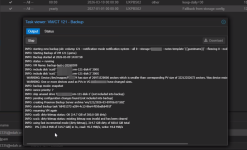
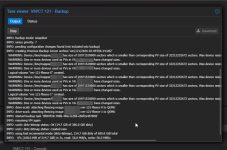
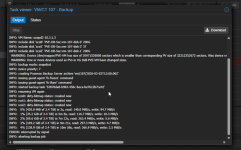
Looking at the backup logs, I noticed the message “dirty-bitmap status: created new”. These VMs are running Informix databases and handle a significant amount of IO load. Even though the QEMU Guest Agent is installed and running correctly, the freeze during the backup makes the systems almost unusable. I've tried manually stopping the task and using “qm unlock 107” to regain control, but I'm worried the same thing will happen during the next backup attempt.

Does anyone know why the “dirty-bitmap status: created new” status appears? Is there a way to prevent the backup process from causing the VM IO to hang? Does this mean my specific VM workload is not suitable for PBS backups?
 

Attachments

  • 20260304-1740.png
    20260304-1740.png
    363.9 KB · Views: 14
Hi, @pulipulichen
You posted only a screenshot and to make matters worse, it doesn't show all the logs' content (the wrapped parts).

If we could see the log in the CODE blocks (this < / > icon above), maybe we could help more.

Anyway, what I can hardly see in the screenshot, there's some warning about changing of the size.
If a filesystem size has changed, the dirty bitmap is reset.
 
  • Like
Reactions: _gabriel
Does anyone know why the “dirty-bitmap status: created new” status appears? Is there a way to prevent the backup process from causing the VM IO to hang? Does this mean my specific VM workload is not suitable for PBS backups?
Hi,
PBS backups are performed by a copy before write principle for data consistency. That means that writes to a block on the block device during backup are first written to the backup, only then to the block device. For VMs with high write load and slow PBS uploads, this can cause the I/O issues you are seeing.

It is for this reason the backup fleecing was introduced to decouple guest IO, see https://pve.proxmox.com/pve-docs/pve-admin-guide.html#_vm_backup_fleecing
 
  • Like
Reactions: pulipulichen
Hi,
PBS backups are performed by a copy before write principle for data consistency. That means that writes to a block on the block device during backup are first written to the backup, only then to the block device. For VMs with high write load and slow PBS uploads, this can cause the I/O issues you are seeing.

So, just to make sure I understand correctly: this issue occurs because the VM's write speed exceeds the PBS upload speed, and the "copy-before-write" mechanism forces the guest IO to wait until the data is sent to PBS, right?


It is for this reason the backup fleecing was introduced to decouple guest IO, see https://pve.proxmox.com/pve-docs/pve-admin-guide.html#_vm_backup_fleecing

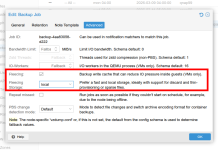
I found the Backup Fleecing option in the "Advanced" tab of the backup job, and I am planning to give it a try.

However, I noticed the warning in the documentation regarding traditional LVM (without thin provisioning). It mentions that the system needs to allocate a fleecing image with the same size as the guest disk.

In my current setup, I have 3 VMs experiencing this backup issue. Each VM has 2 disks totaling 4TB, which means 12TB in total for all three.

My question is: do I need to ensure there is enough free space for the largest single VM (4TB), assuming the backup jobs run sequentially? Or do I need to have 12TB of free space available to cover all VMs included in that backup job?
 

Attachments

  • 2026-03-06_15-32.png
    2026-03-06_15-32.png
    83 KB · Views: 3
So, just to make sure I understand correctly: this issue occurs because the VM's write speed exceeds the PBS upload speed, and the "copy-before-write" mechanism forces the guest IO to wait until the data is sent to PBS, right?

Yes, that is basically what is the limitation.

I found the Backup Fleecing option in the "Advanced" tab of the backup job, and I am planning to give it a try.

However, I noticed the warning in the documentation regarding traditional LVM (without thin provisioning). It mentions that the system needs to allocate a fleecing image with the same size as the guest disk.

In my current setup, I have 3 VMs experiencing this backup issue. Each VM has 2 disks totaling 4TB, which means 12TB in total for all three.

My question is: do I need to ensure there is enough free space for the largest single VM (4TB), assuming the backup jobs run sequentially? Or do I need to have 12TB of free space available to cover all VMs included in that backup job?
You will need enough space to store the largest VM disks, not the sum for all VMs. The fleecing image allocated on demand.
 
“dirty‑bitmap status: created new” just means the change‑tracking bitmap was recreated, so that backup behaves like a full read instead of an incremental one.

The hang you are seeing is more likely from heavy write IO on the VM while PBS is uploading the backup. With copy‑before‑write, guest writes have to wait if the backup upload is slower.

Enabling backup fleecing usually fixes this because it buffers the writes locally and prevents the VM IO from stalling during backup.
 
  • Like
Reactions: pulipulichen
I did a quick test to reproduce this backup "hang" issue, and the results are pretty clear. It seems Backup Fleecing is exactly what we need for these kinds of bottlenecks.

My test setup:I tried to simulate a "worst-case scenario" with a high-write VM and a very slow backup connection:
  1. VM Load: Constant disk writes at 25MB/s using fio.
    螢幕擷取畫面 2026-03-09 060707.png
  2. PBS Network: Throttled down to 3MB/s (running PBS in a VM).
    2.PBS螢幕擷取畫面 2026-03-09 075849.png

Test 1: Without Backup FleecingAs soon as I started the backup, the progress just sat at 0% forever.

3-1. 螢幕擷取畫面 2026-03-09 060806.png

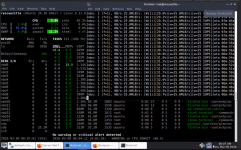
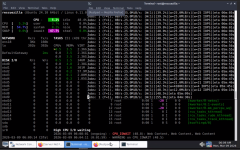
But the real problem was that the VM completely froze. It couldn't handle any more writes because it was waiting for the slow backup task to move data. My iowait went through the roof, and the guest OS became totally unresponsive.

1.螢幕擷取畫面 2026-03-09 060915.png

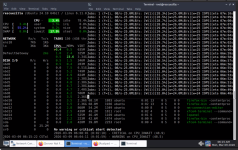
Test 2: With Backup Fleecing EnabledThe progress still stayed at 0% for a long time (which makes sense since the 3MB/s limit was still there), but the VM didn't lag at all.
4.螢幕擷取畫面 2026-03-09 061510.png
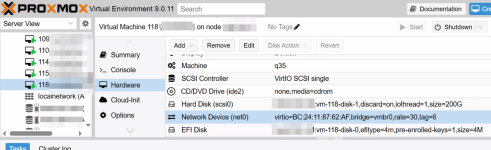
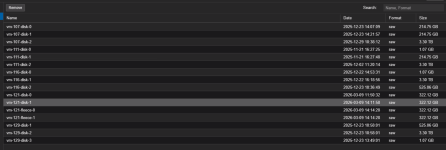
The fio write task just kept humming along at 25MB/s without skipping a beat. I could also see the temporary vm-121-fleece-x disks popping up in the storage during the process.

5.螢幕擷取畫面 2026-03-09 060915.png

6.螢幕擷取畫面 2026-03-09 061742.png
The Verdict:If your VM writes faster than your backup storage can ingest data, fleecing is a lifesaver. It basically decouples the VM's performance from the backup speed, so a slow network won't crash your services.

Thanks to everyone who helped out!
 

Attachments

  • 螢幕擷取畫面 2026-03-09 060707.png
    螢幕擷取畫面 2026-03-09 060707.png
    1.4 MB · Views: 0
  • Like
Reactions: UdoB and _gabriel