[SOLVED] Where to change the level of notification

rynomite

New Member
Sep 2, 2021
5
0
1
54
I get daily emails the backup grooming is successful, but I would like to change the setting so that it only sends an email upon error. I'm on the new PBS (v2.0-9) and as with the VE has the latest stable build (PVE 5.11.22-8 as of this post). I would like some help finding where to change a setting...

The documentation clearly states this in the "maintenance.html" page:
You can also change the level of notification received per task type, the following options are available:

  • Always: send a notification for any scheduled task, independent of the outcome
  • Errors: send a notification for any scheduled task resulting in an error
  • Never: do not send any notification at all
...but I can't find the task type notification settings, either on the terminal or the web interface. I also searched the forums and Internet for examples. The closest I could find were how to change the email address of the administrator. Surely I'm missing something! My goal is to change from the default Always to Errors, so that I don't skip over them.
 
Last edited:
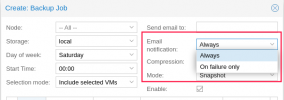
You can set the Email notification in the backup job from PVE side by going to Datacenter -> Node -> Backup then click Edit on the backup job you will see the email notification.

DeepinScreenshot_select-area_20210906081229.png
 
I'm referring to the garbage collection on the datastore which is independent of the backup job. Sorry that I said 'grooming' because I didn't have the email in front of me. The email I get looks like this ...I would rather only see an email if there are errors:
Datastore: xxx-ssd
Task ID: UPID:xx-proxmox-prod:0000049E:000005B0:00000014:6135A050:garbage_collection:internal\x2dssd:xxx@pam:
Index file count: 29

Removed garbage: 11.38 MiB
Removed chunks: 36
Removed bad chunks: 0

Leftover bad chunks: 0
Pending removals: 0 B (in 0 chunks)

Original Data usage: 466.02 GiB
On-Disk usage: 105.54 GiB (22.65%)
On-Disk chunks: 57204

Deduplication Factor: 4.42

Garbage collection successful.


Please visit the web interface for further details
 
Awesome! Thanks for your quick response, and sorry for the basic question. I thought I already looked there. Cheers.
 
Last edited: