[SOLVED] What is the procedure to replicate a VM Disk

yunmkfed

Member
Sep 2, 2023
96
14
13
www.alanbonnici.com
I have a Windows VM that is problematic. It has to virtual hard disks. I will be installing a new VM but would like to copy the data drive, attach it to the new VM setup everything and then eventually delete the problem VM.

What is the process one should follow to copy the highlighted drive please and attach it to the newly created one?

1747289164159.png
 
Last edited:
Create a new VM and install Windows. Then move the old drive to the new VM with the Disk Action > Reassign Owner. Then do Windows specific stuff to access the added drive in the new VM. (Make sure you have a backup in case anything goes wrong.)
 
With the source vm shutdown I copied the vm to the directory of the new vm.

Code:
qm rescan
rescan volumes...
VM 102 add unreferenced volume 'hdd-dir:102/vm-102-disk-1.qcow2' as 'unused0' to config

Under Hardware I have unused Disk, Can I just use it?

1. Can I change its name to Hard Diskc (scsi1)
2. How can attach it to the Windows VM

Thanks
1747596030447.png
 
Last edited:
In the GUI you can "attach" it to be used by the VM by selecting it & then press the Edit button on the top & add it to the Bus being used.
 
@gfngfn256 I can find the option you are referring to. How do I get to it.

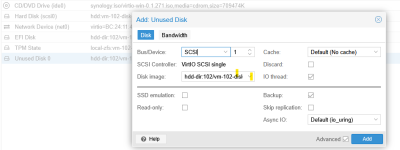
As shown in the image I pasted, the disk is already associated with the machine as "Unused Disk 0". If I double click on it from within the GUI I get the following

1747635081769.png

Should I remove it and then attempt the attach option?

Thanks
 
I might have missed a set but it did not work for me. I ended up editing the .conf file and added the disk.

When I loaded the vm, I went into computer management and it showed the disk as being offline. I made it online and it available to the OS.
 
I might have missed a set but it did not work for me. I ended up editing the .conf file and added the disk.
I enjoy the way you ask for advice - but always do it differently. Maybe a language barrier?

But the important thing is - you got it solved.

Happy Proxmoxing!