What is proper way to make PVE host a dhcp client in 9.2 ?

shodan

Well-Known Member
Sep 1, 2022
314
77
48
Hi,
I'm upgrading to 9.2
I need to update my procedure to make the PVE host a dhcp client for its web userinterface.

There are the following concerns to address

editing /etc/network/interfaces to change to dhcp client mode
maybe install a dhcpclient (isc-dhcp-client)
deal with apparmor complaints if any
make /etc/hosts update automatically on IP address changes
make pvebanner reload automatically on IP address changes

and automate this entire process so it's as easy as flipping dhcp client on or off

And how it should act is that

If the dhcp server is unavailable, it should fallback to a sane address
and this sane address should be the last given dhcp address or a specified fallback for the very first time (the one determined at proxmox install time)
after that, when the dhcp server is unavailable at boot, or become unavailable during operation,
it should not prevent booting and it should not cease to function when the dhcp server becomes unavailable
and when the dhcp server becomes available again, the system should seamlessly switch to the new (or old) provided address
it should not fail then give up forever
disconnecting and reconnecting the network cable from the host should be as minimally disruptive as possible.
it should not produce spurious error or warning messages in logs
I did research previous questions about this issues in the following URLs

Code:
https://forum.level1techs.com/t/dhcp-for-proxmox-host-server/196733/5
https://forum.proxmox.com/threads/configured-proxmox-as-dhcp.180572/
https://forum.proxmox.com/threads/dhcp-in-proxmox.185112/
https://forum.proxmox.com/threads/dhcp-option.160785/
https://forum.proxmox.com/threads/my-dream-dhcp-server-built-into-proxmox-how-do-you-users-workarround-it.98900/
https://forum.proxmox.com/threads/proxmox-9-0-4-doesnt-get-ip-by-dhcp.169721/
https://forum.proxmox.com/threads/proxmox-9-0-4-doesnt-get-ip-by-dhcp.169721/page-2
https://forum.proxmox.com/threads/proxmox-automated-installation-dhcp-issue.151844/
https://forum.proxmox.com/threads/pve-nodes-with-dhcp-assigned-ips-and-hostnames.135952/
https://forum.proxmox.com/threads/set-a-dynamic-address-to-pve.119847/
https://forum.proxmox.com/threads/set-dhcp-on-proxmox.168358/
https://forum.proxmox.com/threads/static-ip-to-dhcp.154422/
https://forum.proxmox.com/threads/ve_host-web-interface-setup-for-dhcp.27481/
https://www.reddit.com/r/Proxmox/comments/1lplwkx/is_there_a_definitive_way_to_get_proxmox_to/

The general attitude is "no, create manual IP lease exceptions instead"

I took all these threads and consults with an LLM.

Here are the general concerns it identified

Code:
1. Basic network configuration
2. DHCP client implementation
3. DHCP unavailable during normal operation
4. DHCP unavailable during boot
5. Address-collision handling
6. DHCP becomes available again
7. Cable disconnect and reconnect
8. /etc/hosts
9. Node hostname
10. DNS and /etc/resolv.conf
11. Default gateway and DHCP routes
12. pvebanner and /etc/issue
13. pveproxy
14. AppArmor
15. DHCP event architecture
16. Persistent state
17. First DHCP conversion
18. IPv6
19. Firewall, storage, monitoring, APIs and external dependencies
20. Standalone versus clustered hosts
21. Logging
22. Upgrade safety and idempotence
23. Disabling DHCP again

It provided a look at the "dhcp state machine" once completed
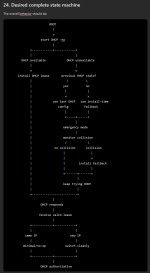
1790484307768.png

And there is even a checklist of what "done" would look like
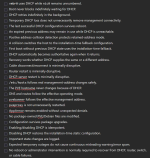
1790484324556.png

So, before I do all of that, I mostly wanted to ask, if anyone had already done it ?

And I did find these

https://free-pmx.org/guides/dhcp-single/
https://free-pmx.org/guides/dhcp-cluster/

But I'm not really sure it addresses all of the above.
 
I believe your scheme to fall back to using an IP from an old lease would technically violate the DHCP standard. If I remember correctly, the spec says that after a change (like a reboot, or disconnect and reconnect) you can continue with the old address only if the lease hasn't expired. If it has you have to get a new lease from DHCP, and can't have an IP until the DHCP server gives you one (unless you use one from the link-local range). That doesn't mean you can't do it if you want, just that I don't think you will find an already existing easy option that works the way you outlined.

I get that you want it to work even if the DHCP server is misbehaving (or just missing), but I would like to know what problem you are trying to solve this way that wouldn't be better addressed with a static IP? My best guess is that you want one simple image you can deploy somewhere just by cloning it to new hardware and booting without needing to take a few seconds to set a static IP, but that doesn't really make sense. So, if you don't mind, why do you want this?
 
  • Like
Reactions: Johannes S
For the why, yes, I don't want to hardcode anything, each hardcoded setting is another maintenance item I have to keep track of, I want everything automated.

As for violating the dhcp standard for keeping the install time network stats, yes, however that is not more violating that using stating IP addresses.
And that would only occur when the DHCP server is failing to respond plus I'm putting it collision checking on top so I'm fine with this, I have an IDS running on the internal network so any collision would also be very easy to detect and fix, but since this would only happen when the dhcp server has failed, I would already have bigger problems to deal with.

I think the only problem I left out is cluster issues related with proxmox hosts changing addesses and also, if the server's IP address gets hardcoded into anything else, for instance iscsi targets and the like, but I only every use the .lan hostname so I think it's all good. In those places where I can't use the hostname I'll put some background process that updates the IP based on whatever the hostname is.

I'm also considering letting the DHCP server itself name the proxmox host, I'm not sure if hostnamectl really will let the dhcp server set the hostname but I think that's be great to also remove another hardcoded value. Then proxmox server is, whatever host the dhcp decide is "proxmox.lan" which is going to be important for the other aspect I proposed in a separate thread, this is to suspend and shutdown the proxmox server is idle and also including automatic wake on lan on demand
 
each hardcoded setting is another maintenance item I have to keep track of
I see it exactly the other way: each non hardcoded setting is a moving target.

Usually servers should have a stable configuration, nothing dynamic. DHCP is only for clients like laptops/mobile/desktops...

Just my two 2 €¢...
 
Yes I understand the orthodox network position, I too was there 10 thousands years ago before dhcp even existed.
It feels scary to relinquish manual control to an unreliable untested machine.
It feels empowering to give numbers to things and know they won't change.

In aerospace there is a similar concept with fuel control units, old system designers used to route most of the levels of the FCU into the cockpit so the pilots could tune and tweak all the parameters of the fuel mixture but eventually they found out that while it feels like giving the user control and empowering them, it does not.

It is just extra meaningless busywork that makes the whole system inflexible and brittle.
It only feels solid because it cannot change anymore without manual intervention.
They are now numbers "set in stone" but there's not really any upsides to this, it's just extra work when you need to change it.

And I understand the reply to that is "I'll never change it anyway".

But my stuff needs to change and I don't want to have this minutiae standing in my way.

My working system should never ask me to type in IP addresses, if I am having to type IP addresses anywhere other than the DHCP lease definition, then I consider the system to be in a failed state.

Host should only have one identity, their name, the actual IP numbers should be irrelevant and not hardcoded anywhere.

And yes I'm having the same argument with the firewall people, they sure do love their IP numbers too !

I remembers in the dark past, we even had to enter memory address numbers, IRQ numbers, DMA numbers, manually configure PPP protocols, we needed straight and crossover cables even baud rates and parity bits.

All of that is work for machines, the only time we should be concerned with those is when the system has failed. Working systems should not be designed in a way that makes these concerns necessary.

I don't even want my default gateway to have an hard coded address.

I think these are bad habits we need to lose.
And I'm pretty sure these habits are why dns is always breaking everything, as the memes go on social media.

My dns always works, because if it doesn't then nothing works, so it always works.
 
I'll be honest - I can see the idea for using DHCP to configure everything - but I can also see it being a gateway for pain.

I'm not sure if you're looking at running more than one PVE host in a cluster - or this is a single server operation - but there are many more services that need a static layout.

You'll also need to manually update / reconfigure your corosync configuration to make sure that continues to work - risking entire cluster stability if you end up losing quorum. I'd also be weary of what would break in migrations if any IP information changed.

If you use correct ACME style certs, you'll need to make sure DNS also updates to the correct set of hosts. Without this, if you use passkeys, this functionality will also break.

Once you also use IPv6, you'll also have to start hooking into RA / DHCPv6 renewals and acting on those as well to update the running system - especially if you use temporary addressing within IPv6.

Personally, I use static IPv6 only on my PVE nodes at home, and static dual stack for standalone physical machines in data centres. While I can understand the ideology of not using static addressing for anything - I can also see it causing many more issues than it solves rather than manually assigning a single address to your most critical infrastructure.

As for VMs, LXC installs, absolutely, go ham and have all of those configured via your DHCP infrastructure.
 

CRCinAU, you get it​

Yep, corosync is far too brittle, similar to ip based firewalling, would only continue working with an hostname process that keeps the hardcoded addresses aligned with hostnames.

I also don't really have a use for the cluster system since it doesn't allow to run one VM that uses the CPU, ram & hardware resources of multiple proxmox host, I haven't investigated it further, but the way it breaks even logging in when it fails is just too much

Code:
https://forum.proxmox.com/threads/no-quorum-error.113459/
https://forum.proxmox.com/threads/how-to-disable-quorum-mechanism-in-a-cluster.159498/

I have no working system for handling certificate distribution on the LAN, that will be its own set of headaches when it gets there. But the certificates will be issues to .lan domains, not their internal IP addresses, so I hope that will sidestep the problem entirely.

For IPv6 I don't know yet what it's going to look like, but I also would prefer to have everything be ipv6 with ipv4 disabled on the LAN entirely.
And never, ever look at or type a single IPv6 address in the same way that I've never had to type a memory address to use a program.
But that is still far off, I have a bunch of hardware that doesn't even support ipv6 to replace before I get there.

Making proxmox work off a dhcp client for the web interface isn't hard, I've done it for years. Latest version introduced issues with apparmor but I think that is resolved now. As long as you use hostname for everyhing, it doesn't seem to be an issue.

I just wanted to do it in a very clean way that continues to work in case of dhcp server outages.