[SOLVED] WebSocket VNC console not working via Cloudflare Tunnel (works locally)

cristobal.t_2009

New Member
Jan 19, 2026
6
0
1

Description​

Hello,

I’m having issues accessing the Proxmox web console (VNC/LXC console) only when accessing Proxmox through my public domain behind a Cloudflare Tunnel.

Accessing Proxmox directly via LAN IP works fine, but the console fails when using the domain.

Environment​

Problem​

When I try to open the LXC console via the web UI, the console never connects.

Browser error:

WebSocket connection to
'wss://proxmox.domain.com/api2/json/nodes/proxmox/lxc/103/vncwebsocket?...'
failed

Proxmox server error

failed waiting for client: timed out
TASK ERROR: command '/usr/bin/termproxy 5900 --path /vms/103 --perm VM.Console -- /usr/bin/dtach -A /var/run/dtach/vzctlconsole103 -r winch -z lxc-console -n 103 -e -1' failed: exit code 1

This suggests that Proxmox starts the console but never receives the WebSocket connection from the client.

WebSocket request details​

The browser sends a WebSocket request to:

wss://proxmox.domain.com/api2/json/nodes/proxmox/lxc/103/vncwebsocket

With:
  • Upgrade: websocket
  • Connection: Upgrade
  • Sec-WebSocket-Protocol: binary
  • Cookies include PVEAuthCookie
  • Request goes through Cloudflare Access / Tunnel
(Full request headers available if needed.)

Observations​

  • ✅ Console works perfectly when accessing Proxmox via LAN IP.
  • ❌ Console fails only when accessed through the domain.
  • Normal web UI works, only the VNC/LXC console WebSocket fails.
  • Looks like Cloudflare Tunnel or proxy is not correctly forwarding WebSocket traffic or timing it out.
  • Proxmox waits for the client but never receives the WebSocket connection.

Question​

Is this a known limitation or configuration issue when using Cloudflare Tunnel / reverse proxy with Proxmox WebSockets?

Is there any recommended configuration for:
  • WebSocket proxying
  • termproxy / VNC console
  • Cloudflare Tunnel compatibility with Proxmox VE?
Any advice or confirmation would be appreciated.

Thanks!
 
Last edited:
Hi, can you elaborate a bit on what the fix was here?

I have similar issues with websockets on ntfy with cloudflare tunnels

Detailed fix for Cloudflare Tunnel / Access WebSocket issues

Hi,

I’m happy to elaborate because this issue was quite a headache. The problem lies in how Cloudflare Access handles authentication challenges for WebSocket connections. When the browser tries to initiate the WebSocket for the console, it can’t always pass through the Access login page or handle the authentication token correctly, causing the "failed waiting for client" error in Proxmox.

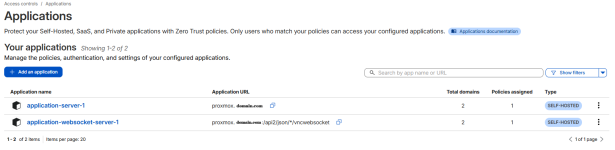
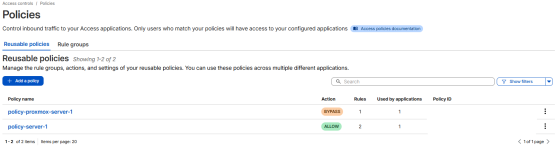
To solve this, I had to split my Cloudflare Access configuration into two separate Applications/Policies:

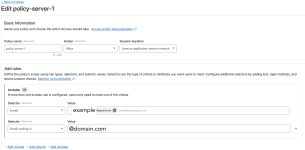
1. The Main Dashboard Application

  • Application URL:proxmox.domain.com
  • Policy:Allow
  • Include: Your specific email or domain (e.g., example@gmail.com or @domain.com).
  • Purpose: This protects the main web interface, requiring you to log in via Cloudflare first.
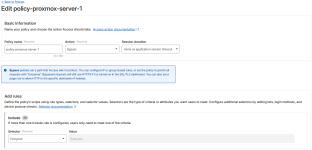
2. The WebSocket Bypass Application

  • Application URL:proxmox.domain.com/api2/json/*/vncwebsocket
  • Policy:Bypass
  • Include:Everyone
  • Purpose: By using the Bypass action for the specific WebSocket path, you allow the terminal traffic to flow without the Cloudflare Access challenge blocking it. Since Proxmox itself still requires a login (PVEAuthCookie), this is still secure.
Tunnel Configuration:
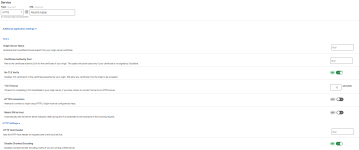
Additionally, within the Cloudflare Tunnel settings for that specific public hostname, I ensured these two options were enabled under the "Origin Settings" tab:

  • No TLS Verify: Enabled (since Proxmox uses self-signed certificates by default).
  • Disable Chunked Encoding: Enabled.

I have attached screenshots of my Cloudflare dashboard showing both applications, the policies, and the tunnel configuration.

In your case with ntfy, I suspect you need to find the specific API or WebSocket path that the app uses and create a similar Bypass policy for it.

I hope this helps you get your consoles back online!
 

Attachments

  • applications.png
    applications.png
    98.8 KB · Views: 41
  • policies.png
    policies.png
    87.3 KB · Views: 42
  • policy-proxmox-server-1.png
    policy-proxmox-server-1.png
    99.7 KB · Views: 39
  • policy-server-1.png
    policy-server-1.png
    129.2 KB · Views: 36
  • tunnel-subdomain-config.png
    tunnel-subdomain-config.png
    70.9 KB · Views: 39
My Cloudflare application matched your post https://forum.proxmox.com/threads/w...flare-tunnel-works-locally.179382/post-833983

My first application was as follows:
  • Application URL:*.domain.com
  • Policy's:
    • My home IP: Bypass
    • My custom email domain: Allow
Added second application based on your post:
  • Application URL: proxmox.domain.com/api2/json/*/vncwebsocket
  • Policy: Bypass
  • Include: Everyone
I am going to try to change the second application subdomain to a wildcard next [no luck]
  • *.domain.com/api2/json/*/vncwebsocket
FYI: still running Proxmox 8.4.19
 
Last edited:
My Cloudflare application matched your post https://forum.proxmox.com/threads/w...flare-tunnel-works-locally.179382/post-833983

My first application was as follows:
  • Application URL:*.domain.com
  • Policy's:
    • My home IP: Bypass
    • My custom email domain: Allow
Added second application based on your post:
  • Application URL: proxmox.domain.com/api2/json/*/vncwebsocket
  • Policy: Bypass
  • Include: Everyone
I am going to try to change the second application subdomain to a wildcard next [no luck]
  • *.domain.com/api2/json/*/vncwebsocket
FYI: still running Proxmox 8.4.19
Hi,

I think the wildcard application (*.domain.com) is probably the reason.

In Cloudflare Access, application matching and priority matter. If your wildcard application is matching the request before the specific WebSocket application, the Access authentication challenge may still be applied to /api2/json/*/vncwebsocket, preventing the WebSocket from connecting.

A few things I'd check:

  • Make sure the proxmox.domain.com/api2/json/*/vncwebsocket application has higher priority than the wildcard application.
  • Verify that the request is actually hitting the Bypass policy (you can check this in the Cloudflare Access logs).
  • Confirm that your tunnel's Origin Settings still have No TLS Verify and Disable Chunked Encoding enabled.
  • Open your browser's Developer Tools (Network → WS) and see what status code the WebSocket request returns (101, 302, 403, etc.). That can help identify whether Cloudflare Access is still intercepting it.
Also, are you getting the exact same Proxmox error (failed waiting for client) or something different? If possible, could you share:

  • the WebSocket request status code from the browser,
  • any console errors,
  • and your Cloudflare Access application order?
That should help narrow down whether it's an Access policy issue or something else.
 
The websocket is returning a 403, and code 1006 inside proxmox.

I assumed it was priority and the wildcard issue. I just have like 18 subdomains being utilized.

I'll look into getting the proxmox subdomain as a higher priority than the wildcard app.
 
  • Like
Reactions: cristobal.t_2009
The websocket is returning a 403, and code 1006 inside proxmox.

I assumed it was priority and the wildcard issue. I just have like 18 subdomains being utilized.

I'll look into getting the proxmox subdomain as a higher priority than the wildcard app.
A 403 is actually a good clue—it usually means the request is still being blocked by Cloudflare Access before it ever reaches Proxmox.

I would definitely try moving the dedicated Proxmox WebSocket application above the wildcard application in the Access application order. With *.domain.com, it's possible that the wildcard app is still matching first and applying the Access policy, even though you have a more specific Bypass rule.

The 1006 code in Proxmox is expected in this situation because the WebSocket connection is being closed before it can be established.

After changing the priority, test it again and let me know if the WebSocket starts returning 101 Switching Protocols instead of 403. If it still returns 403, we can dig a little deeper into the Access logs to see exactly which application and policy are matching the request.