

WEB-interface does not have information about nodes and VM/LXC status
- Thread starter SilentStorm
- Start date
You are using an out of date browser. It may not display this or other websites correctly.
You should upgrade or use an alternative browser.
You should upgrade or use an alternative browser.
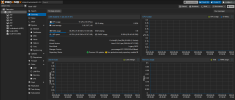

The question marks in the tree panel on the left signify a miscommunication with "pvestatd" daemon which is responsible for statistics.
Drop down to PVE shell and examine:
- available space
- log information
- status of pvestad service
- have you done anything unusual?
- have you rebooted?
good luck
Blockbridge : Ultra low latency all-NVME shared storage for Proxmox - https://www.blockbridge.com/proxmox
Drop down to PVE shell and examine:
- available space
- log information
- status of pvestad service
- have you done anything unusual?
- have you rebooted?
good luck
Blockbridge : Ultra low latency all-NVME shared storage for Proxmox - https://www.blockbridge.com/proxmox
>available spaceThe question marks in the tree panel on the left signify a miscommunication with "pvestatd" daemon which is responsible for statistics.
Drop down to PVE shell and examine:
- available space
- log information
- status of pvestad service
- have you done anything unusual?
- have you rebooted?
good luck
Blockbridge : Ultra low latency all-NVME shared storage for Proxmox - https://www.blockbridge.com/proxmox
I think node has enough free space.
>log information
I dont see any logs.
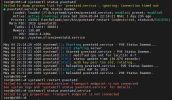
>status of pvestad service
See screenshot
>have you done anything unusual?
I dont think so
>have you rebooted?
Yes, already rebooted, now it works fine
Attachments
Last edited:

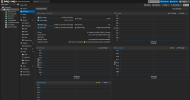
It repeated today, but now question marks only on storage, and I see very high load average on node.The question marks in the tree panel on the left signify a miscommunication with "pvestatd" daemon which is responsible for statistics.
Drop down to PVE shell and examine:
- available space
- log information
- status of pvestad service
- have you done anything unusual?
- have you rebooted?
good luck
Blockbridge : Ultra low latency all-NVME shared storage for Proxmox - https://www.blockbridge.com/proxmox
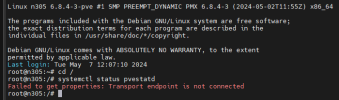
Command "systemctl status pvestatd" send error.
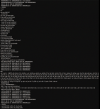
Also I see many messages on local screen (via ip kvm), but cant read (because very low quality - see screenshot).
After reboot, which file contains these messages?
Attachments
IDW your exact problem or your exact HW/config- but my guess is your running some mini pc (or miniscule) with that midget 9w i3-N305 Processor.
Note that CPU is rated by Intel for a max of 16gb as per their docs, you have 32gb. I see this time & time again of vendors (mostly far-east) speccing out their matchbox PCs against MF own specs. You can surely expect trouble.
I see your running (at once) 4 VM's (including a CCTV one which I guess is pretty intensive) + one database LXC
IDW your passthrough situation - but I imagine it exists.
I think its time to actually purchase a PC.
I will point out one other disturbing note: In your original image your running in Legacy BIOS boot mode - however in the second image (with a kernel update) you've gone over to EFI. If this was unintentional - its probably disturbing.
Note that CPU is rated by Intel for a max of 16gb as per their docs, you have 32gb. I see this time & time again of vendors (mostly far-east) speccing out their matchbox PCs against MF own specs. You can surely expect trouble.
I see your running (at once) 4 VM's (including a CCTV one which I guess is pretty intensive) + one database LXC
IDW your passthrough situation - but I imagine it exists.
I think its time to actually purchase a PC.
I will point out one other disturbing note: In your original image your running in Legacy BIOS boot mode - however in the second image (with a kernel update) you've gone over to EFI. If this was unintentional - its probably disturbing.
Thank you.IDW your exact problem or your exact HW/config- but my guess is your running some mini pc (or miniscule) with that midget 9w i3-N305 Processor.
Note that CPU is rated by Intel for a max of 16gb as per their docs, you have 32gb. I see this time & time again of vendors (mostly far-east) speccing out their matchbox PCs against MF own specs. You can surely expect trouble.
I see your running (at once) 4 VM's (including a CCTV one which I guess is pretty intensive) + one database LXC
IDW your passthrough situation - but I imagine it exists.
I think its time to actually purchase a PC.
I will point out one other disturbing note: In your original image your running in Legacy BIOS boot mode - however in the second image (with a kernel update) you've gone over to EFI. If this was unintentional - its probably disturbing.
I checked RAM (original Kingston, what i bought separate from PC-box) with Memtest and checked SSD (also (original Kingston, what i bought separate from PC-box) with Victoria and CrystalDiskInfo and I dont saw any problems.
CCTV VM runs only for watching, no for recording and in this mode CPU load less than 20%.
PC-box has active cooling, and I changer thermal interface, temperatures are good.
I disassembled PC and erase contact for RAM and SSD.
If problem will repeat, next step I will replace step by step SSD for other model and RAM for 16Gb and will check. I think its good way.
And maybe I need external rsyslog server for collecting logs from PVE?
Last edited:
>What was the Legacy BIOS/EFI issue?If its still under warranty - I'd send it back!
What was the Legacy BIOS/EFI issue?
SSD is Kingston HyperX Predator 480G (old model with cool MLC NAND, its have m.2 pci-e 2.0 x4 interface and AHCI mode, non NVMe). And I checked how it works with "only UEFI" mode and "CSM enable mode" in BIOS, its not issue, its my experiment. I have new SSD with NVMe, but its too hot for this small PC-box.
I dont know how I can check HW fast. Now I can only run VMs and wait for a problem.
Last edited: