

Web GUI error (500) on any config change

yrzorg

Member
Jun 9, 2024
9
1
8
Hello,
I'm running PMG 9.1, but this issue actually started back in version 9.0.7.
Whenever I try to change any setting in the Web GUI (like toggling a checkbox or changing a dropdown selection), I get the following error:
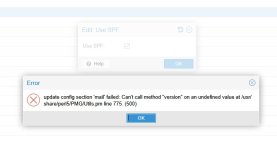
Code:
update config section 'mail' failed: Can't call method "version" on an
undefined value at /usr/share/perl5/PMG/Utils.pm line 775. (500)

2026-06-17 100826.jpg

Despite the error popping up, the changes are actually applied successfully, and PMG keeps running without any other issues.
How can I fix or debug this? Thanks in advance!
 
Hi @yrzorg

thanks for posting in the forum!

Code:
 770 sub find_local_network_for_ip {
 771     my ($ip, $noerr) = @_;
 772
 773     my $testip = Net::IP->new($ip);
 774
 775     my $isv6 = $testip->version == 6;
 776     my $routes =
 777         $isv6
 778         ? PVE::ProcFSTools::read_proc_net_ipv6_route()
 779         : PVE::ProcFSTools::read_proc_net_route();
 780
Source [1]

Line 775 is actually a check of the configured IP address of PMG for IPv6.

Have you changed anything in your network configuration recently?

Is your PMG running in a Cluster?

Yours sincerely
Jonas

[1] https://git.proxmox.com/?p=pmg-api....8904dc34bf250681024f5d7f8426bbac;hb=HEAD#l770
 
  • Like
Reactions: Stoiko Ivanov
Have you changed anything in your network configuration recently?

Is your PMG running in a Cluster?
No, I haven’t changed anything in the network configuration recently, and this PMG is a standalone instance
Code:
[root@srv : ~]#>cat /etc/network/interfaces
# network interface settings; autogenerated
# Please do NOT modify this file directly, unless you know what
# you're doing.
#
# If you want to manage parts of the network configuration manually,
# please utilize the 'source' or 'source-directory' directives to do
# so.
# PVE will preserve these directives, but will NOT read its network
# configuration from sourced files, so do not attempt to move any of
# the PVE managed interfaces into external files!

auto lo
iface lo inet loopback

auto eth0
iface eth0 inet static
        address 192.168.220.9/24
        gateway 192.168.220.1


Update: The issue has been successfully resolved

Thanks to the prompt hint about line 775, I investigated the networking side. Together with my AI assistant, we analyzed the outputs of ip addr, ip route, and the contents of /proc/net/ipv6_route. We suspected that the automatically assigned IPv6 default route was causing the parser to fail.

To test this theory, I temporarily disabled IPv6 on the interface using:
Code:
sysctl -w net.ipv6.conf.eth0.disable_ipv6=1

Immediately after the IPv6 routes were cleared, the Web GUI started working perfectly. I can now change any settings, toggle checkboxes, and save configurations without encountering any 500 errors.
 
Last edited:
  • Like
Reactions: j.theisen