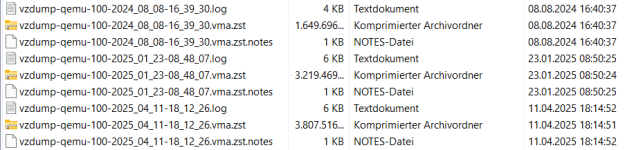
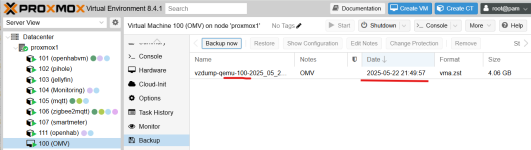
I have a Proxmox server with 8 LXC an one VM (Openmediavault). I run a manual Backup of the 8 LXCs (successfull) and after that a manual backup of the VM. At the beginning the server backed up with 280MiB/s, after 14% the server backup speed went down to 50MiB/s and than 25MiB/s (which I didn't understand). Then the server stopped with the following error message: Error: job errors
Warning: unable to close filehandle GEN5 properly: No space left on device at /usr/share/perl5/PVE/APIServer/AnyEvent.pm line 1980
I ask myself what the problem could be:
- I run Proxmox on a Dell Optiplex 3000 ThinClient with 4 x Intel(R) Pentium(R) Silver N6005 @ 2.00GHz, 16GB RAM and 256GB PVMe Memory-Card, two external USB-SSD-Drives attached. Work perfekt without any problems. Only the backup of VM create a problem.
- does the processor get too hot (normal temperature 53° Celsius, went up to 70° Celsius)?
- does the buildin PVMe Memory Card get too hot?
- PVE error?
- ...
In another post I saw that the following information was requested to analyze the error:
root@proxmox1:~# pveversion -v
proxmox-ve: 8.4.0 (running kernel: 6.8.12-10-pve)
pve-manager: 8.4.1 (running version: 8.4.1/2a5fa54a8503f96d)
proxmox-kernel-helper: 8.1.1
proxmox-kernel-6.8.12-10-pve-signed: 6.8.12-10
proxmox-kernel-6.8: 6.8.12-10
proxmox-kernel-6.8.12-9-pve-signed: 6.8.12-9
ceph-fuse: 17.2.8-pve2
corosync: 3.1.9-pve1
criu: 3.17.1-2+deb12u1
frr-pythontools: 10.2.2-1+pve1
glusterfs-client: 10.3-5
ifupdown2: 3.2.0-1+pmx11
ksm-control-daemon: 1.5-1
libjs-extjs: 7.0.0-5
libknet1: 1.30-pve2
libproxmox-acme-perl: 1.6.0
libproxmox-backup-qemu0: 1.5.1
libproxmox-rs-perl: 0.3.5
libpve-access-control: 8.2.2
libpve-apiclient-perl: 3.3.2
libpve-cluster-api-perl: 8.1.0
libpve-cluster-perl: 8.1.0
libpve-common-perl: 8.3.1
libpve-guest-common-perl: 5.2.2
libpve-http-server-perl: 5.2.2
libpve-network-perl: 0.11.2
libpve-rs-perl: 0.9.4
libpve-storage-perl: 8.3.6
libspice-server1: 0.15.1-1
lvm2: 2.03.16-2
lxc-pve: 6.0.0-1
lxcfs: 6.0.0-pve2
novnc-pve: 1.6.0-2
proxmox-backup-client: 3.4.1-1
proxmox-backup-file-restore: 3.4.1-1
proxmox-firewall: 0.7.1
proxmox-kernel-helper: 8.1.1
proxmox-mail-forward: 0.3.2
proxmox-mini-journalreader: 1.4.0
proxmox-offline-mirror-helper: 0.6.7
proxmox-widget-toolkit: 4.3.10
pve-cluster: 8.1.0
pve-container: 5.2.6
pve-docs: 8.4.0
pve-edk2-firmware: 4.2025.02-3
pve-esxi-import-tools: 0.7.4
pve-firewall: 5.1.1
pve-firmware: 3.15-3
pve-ha-manager: 4.0.7
pve-i18n: 3.4.2
pve-qemu-kvm: 9.2.0-5
pve-xtermjs: 5.5.0-2
qemu-server: 8.3.12
smartmontools: 7.3-pve1
spiceterm: 3.3.0
swtpm: 0.8.0+pve1
vncterm: 1.8.0
zfsutils-linux: 2.2.7-pve2
root@proxmox1:~#
root@proxmox1:~# df -h
Filesystem Size Used Avail Use% Mounted on
udev 7.7G 0 7.7G 0% /dev
tmpfs 1.6G 3.1M 1.6G 1% /run
/dev/mapper/pve-root 68G 11G 54G 17% /
tmpfs 7.7G 34M 7.7G 1% /dev/shm
tmpfs 5.0M 0 5.0M 0% /run/lock
efivarfs 438K 181K 253K 42% /sys/firmware/efi/efivars
/dev/nvme0n1p2 1022M 12M 1011M 2% /boot/efi
/dev/fuse 128M 28K 128M 1% /etc/pve
//Openmediavault/omv1/OMV1 110G 980M 109G 1% /mnt/lxc_shares/nas_rwx
//Openmediavault/omv2/Media 110G 13G 98G 12% /mnt/jelly_shares/omv2_rwx
tmpfs 1.6G 0 1.6G 0% /run/user/0
root@proxmox1:~# df -ih
Filesystem Inodes IUsed IFree IUse% Mounted on
udev 2.0M 674 2.0M 1% /dev
tmpfs 2.0M 1.2K 2.0M 1% /run
/dev/mapper/pve-root 4.4M 62K 4.3M 2% /
tmpfs 2.0M 78 2.0M 1% /dev/shm
tmpfs 2.0M 32 2.0M 1% /run/lock
efivarfs 0 0 0 - /sys/firmware/efi/efivars
/dev/nvme0n1p2 0 0 0 - /boot/efi
/dev/fuse 256K 46 256K 1% /etc/pve
//Openmediavault/omv1/OMV1 0 0 0 - /mnt/lxc_shares/nas_rwx
//Openmediavault/omv2/Media 0 0 0 - /mnt/jelly_shares/omv2_rwx
tmpfs 395K 18 395K 1% /run/user/0
root@proxmox1:~# ls -lh
total 0
root@proxmox1:~# ls -lh /var/log/pveproxy
total 2.6M
-rw-r----- 1 www-data www-data 2.0M May 22 17:38 access.log
-rw-r----- 1 www-data www-data 703 May 21 14:59 access.log.1
-rw-r----- 1 www-data www-data 34K May 20 19:51 access.log.2.gz
-rw-r----- 1 www-data www-data 71K May 19 14:59 access.log.3.gz
-rw-r----- 1 www-data www-data 64K May 18 19:49 access.log.4.gz
-rw-r----- 1 www-data www-data 146K May 17 19:24 access.log.5.gz
-rw-r----- 1 www-data www-data 120K May 16 21:29 access.log.6.gz
-rw-r----- 1 www-data www-data 177K May 15 20:34 access.log.7.gz
root@proxmox1:~#
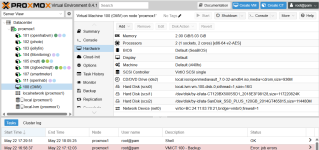
Warning: unable to close filehandle GEN5 properly: No space left on device at /usr/share/perl5/PVE/APIServer/AnyEvent.pm line 1980
I ask myself what the problem could be:
- I run Proxmox on a Dell Optiplex 3000 ThinClient with 4 x Intel(R) Pentium(R) Silver N6005 @ 2.00GHz, 16GB RAM and 256GB PVMe Memory-Card, two external USB-SSD-Drives attached. Work perfekt without any problems. Only the backup of VM create a problem.
- does the processor get too hot (normal temperature 53° Celsius, went up to 70° Celsius)?
- does the buildin PVMe Memory Card get too hot?
- PVE error?
- ...
In another post I saw that the following information was requested to analyze the error:
root@proxmox1:~# pveversion -v
proxmox-ve: 8.4.0 (running kernel: 6.8.12-10-pve)
pve-manager: 8.4.1 (running version: 8.4.1/2a5fa54a8503f96d)
proxmox-kernel-helper: 8.1.1
proxmox-kernel-6.8.12-10-pve-signed: 6.8.12-10
proxmox-kernel-6.8: 6.8.12-10
proxmox-kernel-6.8.12-9-pve-signed: 6.8.12-9
ceph-fuse: 17.2.8-pve2
corosync: 3.1.9-pve1
criu: 3.17.1-2+deb12u1
frr-pythontools: 10.2.2-1+pve1
glusterfs-client: 10.3-5
ifupdown2: 3.2.0-1+pmx11
ksm-control-daemon: 1.5-1
libjs-extjs: 7.0.0-5
libknet1: 1.30-pve2
libproxmox-acme-perl: 1.6.0
libproxmox-backup-qemu0: 1.5.1
libproxmox-rs-perl: 0.3.5
libpve-access-control: 8.2.2
libpve-apiclient-perl: 3.3.2
libpve-cluster-api-perl: 8.1.0
libpve-cluster-perl: 8.1.0
libpve-common-perl: 8.3.1
libpve-guest-common-perl: 5.2.2
libpve-http-server-perl: 5.2.2
libpve-network-perl: 0.11.2
libpve-rs-perl: 0.9.4
libpve-storage-perl: 8.3.6
libspice-server1: 0.15.1-1
lvm2: 2.03.16-2
lxc-pve: 6.0.0-1
lxcfs: 6.0.0-pve2
novnc-pve: 1.6.0-2
proxmox-backup-client: 3.4.1-1
proxmox-backup-file-restore: 3.4.1-1
proxmox-firewall: 0.7.1
proxmox-kernel-helper: 8.1.1
proxmox-mail-forward: 0.3.2
proxmox-mini-journalreader: 1.4.0
proxmox-offline-mirror-helper: 0.6.7
proxmox-widget-toolkit: 4.3.10
pve-cluster: 8.1.0
pve-container: 5.2.6
pve-docs: 8.4.0
pve-edk2-firmware: 4.2025.02-3
pve-esxi-import-tools: 0.7.4
pve-firewall: 5.1.1
pve-firmware: 3.15-3
pve-ha-manager: 4.0.7
pve-i18n: 3.4.2
pve-qemu-kvm: 9.2.0-5
pve-xtermjs: 5.5.0-2
qemu-server: 8.3.12
smartmontools: 7.3-pve1
spiceterm: 3.3.0
swtpm: 0.8.0+pve1
vncterm: 1.8.0
zfsutils-linux: 2.2.7-pve2
root@proxmox1:~#
root@proxmox1:~# df -h
Filesystem Size Used Avail Use% Mounted on
udev 7.7G 0 7.7G 0% /dev
tmpfs 1.6G 3.1M 1.6G 1% /run
/dev/mapper/pve-root 68G 11G 54G 17% /
tmpfs 7.7G 34M 7.7G 1% /dev/shm
tmpfs 5.0M 0 5.0M 0% /run/lock
efivarfs 438K 181K 253K 42% /sys/firmware/efi/efivars
/dev/nvme0n1p2 1022M 12M 1011M 2% /boot/efi
/dev/fuse 128M 28K 128M 1% /etc/pve
//Openmediavault/omv1/OMV1 110G 980M 109G 1% /mnt/lxc_shares/nas_rwx
//Openmediavault/omv2/Media 110G 13G 98G 12% /mnt/jelly_shares/omv2_rwx
tmpfs 1.6G 0 1.6G 0% /run/user/0
root@proxmox1:~# df -ih
Filesystem Inodes IUsed IFree IUse% Mounted on
udev 2.0M 674 2.0M 1% /dev
tmpfs 2.0M 1.2K 2.0M 1% /run
/dev/mapper/pve-root 4.4M 62K 4.3M 2% /
tmpfs 2.0M 78 2.0M 1% /dev/shm
tmpfs 2.0M 32 2.0M 1% /run/lock
efivarfs 0 0 0 - /sys/firmware/efi/efivars
/dev/nvme0n1p2 0 0 0 - /boot/efi
/dev/fuse 256K 46 256K 1% /etc/pve
//Openmediavault/omv1/OMV1 0 0 0 - /mnt/lxc_shares/nas_rwx
//Openmediavault/omv2/Media 0 0 0 - /mnt/jelly_shares/omv2_rwx
tmpfs 395K 18 395K 1% /run/user/0
root@proxmox1:~# ls -lh
total 0
root@proxmox1:~# ls -lh /var/log/pveproxy
total 2.6M
-rw-r----- 1 www-data www-data 2.0M May 22 17:38 access.log
-rw-r----- 1 www-data www-data 703 May 21 14:59 access.log.1
-rw-r----- 1 www-data www-data 34K May 20 19:51 access.log.2.gz
-rw-r----- 1 www-data www-data 71K May 19 14:59 access.log.3.gz
-rw-r----- 1 www-data www-data 64K May 18 19:49 access.log.4.gz
-rw-r----- 1 www-data www-data 146K May 17 19:24 access.log.5.gz
-rw-r----- 1 www-data www-data 120K May 16 21:29 access.log.6.gz
-rw-r----- 1 www-data www-data 177K May 15 20:34 access.log.7.gz
root@proxmox1:~#