

Warning during PBS backup
- Thread starter lanepark5033
- Start date
You are using an out of date browser. It may not display this or other websites correctly.
You should upgrade or use an alternative browser.
You should upgrade or use an alternative browser.
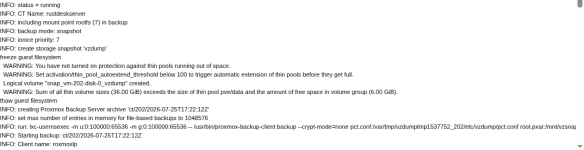

That's normal when you over allocate (snapshots count too IIRC) with LVM-Thin. What's
lvs -a look like? I don't recommend letting it auto extend. You cannot shrink it again and if something misbehaves you will just hit the 100% full issue a bit later. Either don't over allocate or keep an eye on the usage and do periodic trims. This isn't really PBS related, by the way.
Last edited:

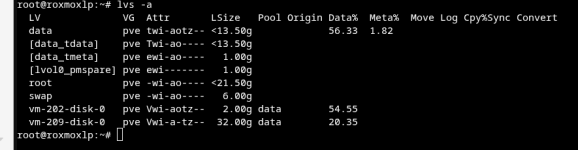
Your
But right now only 54% of that pool is used so if you keep trimming and don't let the guest fill the pool it's fine.
Why is the pool so small? Can you share this too?
data thin pool only has a real size of 13G~ but your virtual disks are proviisoned 34G~. You should generally not allocate more size that you have in total to a single disk. That doesn't really make sense as a single guest can fill it completely.But right now only 54% of that pool is used so if you keep trimming and don't let the guest fill the pool it's fine.
Why is the pool so small? Can you share this too?
Bash:
lsblk -o+FSTYPE,LABEL,MODEL
pvs
vgs
Last edited:
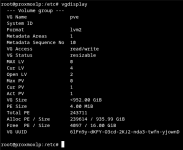
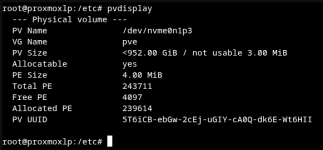
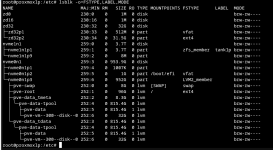
The data thin pool was created as a first attempt of installing proxmox, and was a default, at least as far as I recall.
Oh rats, I need to start over, in addition to the warning issues, I'm installing a second proxmox server and have been taking pictures from that GUI interface and need to redo all the photos on the failing server. My bad....
Oh rats, I need to start over, in addition to the warning issues, I'm installing a second proxmox server and have been taking pictures from that GUI interface and need to redo all the photos on the failing server. My bad....
Last edited:
Probably when I created 209 and 202 I did not create them in the ZFS and created them in local disk. They need to be reinstalled in the correct disk space. They were created recently.
You are absolutly correct, I fubared, and reinstalled both 202 and 209 into a ZFS disk that has far more space. Ran backups and the warning went away.
How do I close this as it needs to go away..... LOL
How do I close this as it needs to go away..... LOL