Volume Group disappeared

jaytee129

Member
Jun 16, 2022
144
10
23
Yesterday after rebooting my proxmox host it stopped in "emergency mode" because it could not mount a volume it was using as a second non boot disk in a linux VM running Plexserver.

I got past the stalled boot up process by adding "nofail" to /etc/fstab mount line at the console:
LABEL=PlexStorage /mnt/pve/PlexMediaHDD ext4 defaults,nofail 0 2

While that allowed the host boot up to finish and my other VMs to run, the Plex VM won't start at all, and when I looked up the volume group that's been working fine for several weeks, it was gone. The disk it was using is still there and in good condition. The VG just dropped off the face of the earth.

Here's info on the (spinning) disk after running both short and long SMART tests:

SMART Attributes Data Structure revision number: 16
Vendor Specific SMART Attributes with Thresholds:
ID# ATTRIBUTE_NAME FLAG VALUE WORST THRESH TYPE UPDATED WHEN_FAILED RAW_VALUE
1 Raw_Read_Error_Rate 0x002f 200 200 051 Pre-fail Always - 0
3 Spin_Up_Time 0x0027 149 148 021 Pre-fail Always - 3525
4 Start_Stop_Count 0x0032 100 100 000 Old_age Always - 64
5 Reallocated_Sector_Ct 0x0033 200 200 140 Pre-fail Always - 0
7 Seek_Error_Rate 0x002e 200 200 000 Old_age Always - 0
9 Power_On_Hours 0x0032 091 091 000 Old_age Always - 7049
10 Spin_Retry_Count 0x0032 100 253 000 Old_age Always - 0
11 Calibration_Retry_Count 0x0032 100 253 000 Old_age Always - 0
12 Power_Cycle_Count 0x0032 100 100 000 Old_age Always - 25
192 Power-Off_Retract_Count 0x0032 200 200 000 Old_age Always - 6
193 Load_Cycle_Count 0x0032 200 200 000 Old_age Always - 125
194 Temperature_Celsius 0x0022 111 107 000 Old_age Always - 32
196 Reallocated_Event_Count 0x0032 200 200 000 Old_age Always - 0
197 Current_Pending_Sector 0x0032 200 200 000 Old_age Always - 0
198 Offline_Uncorrectable 0x0030 100 253 000 Old_age Offline - 0
199 UDMA_CRC_Error_Count 0x0032 200 200 000 Old_age Always - 0
200 Multi_Zone_Error_Rate 0x0008 200 200 000 Old_age Offline - 0

SMART Error Log Version: 1
No Errors Logged

SMART Self-test log structure revision number 1
Num Test_Description Status Remaining LifeTime(hours) LBA_of_first_error
# 1 Extended offline Completed without error 00% 7039 -
# 2 Short offline Completed without error 00% 7038 -
lsblk
NAME MAJ:MIN RM SIZE RO TYPE MOUNTPOINT
sda 8:0 1 1.8T 0 disk

blkid
/dev/sda: PTUUID="cad175ee-13a4-411f-a8dc-5bd60dff40f0" PTTYPE="gpt"

What's missing is /dev/sda1, a 1.5TB volume group that uses the 2TB disk

The various commands to display VG, i.e. vgdisplay. vgscan, do not return anything.

vgcfgrestore --list PlexVG returns the following. Note that this VG was created for a "test" VM (250) then moved to the real one (220), in case that's an important detail. I will confirm, though, that the disk/VG has been running fine on VM 220 long after VM 250 was deleted.

File: /etc/lvm/archive/PlexVG_00000-1224222384.vg
VG name: PlexVG
Description: Created *before* executing '/sbin/vgcreate PlexVG /dev/sda1'
Backup Time: Sun Feb 12 14:24:03 2023


File: /etc/lvm/archive/PlexVG_00001-315613058.vg
VG name: PlexVG
Description: Created *before* executing '/sbin/lvcreate -aly -Wy --yes --size 1879048192k --name vm-250-disk-0 --addtag pve-vm-250 PlexVG'
Backup Time: Sun Feb 12 14:26:44 2023


File: /etc/lvm/archive/PlexVG_00002-187948522.vg
VG name: PlexVG
Description: Created *before* executing '/sbin/lvremove -f PlexVG/vm-250-disk-0'
Backup Time: Sun Feb 12 14:28:08 2023


File: /etc/lvm/archive/PlexVG_00003-716806561.vg
VG name: PlexVG
Description: Created *before* executing '/sbin/lvcreate -aly -Wy --yes --size 1610612736k --name vm-250-disk-0 --addtag pve-vm-250 PlexVG'
Backup Time: Sun Feb 12 14:29:23 2023


File: /etc/lvm/archive/PlexVG_00004-168062075.vg
VG name: PlexVG
Description: Created *before* executing '/sbin/lvrename PlexVG vm-250-disk-0 vm-220-disk-0'
Backup Time: Mon Feb 13 17:37:50 2023


File: /etc/lvm/backup/PlexVG
VG name: PlexVG
Description: Created *after* executing '/sbin/lvrename PlexVG vm-250-disk-0 vm-220-disk-0'
Backup Time: Mon Feb 13 17:37:50 2023

vgcfgrestore --test PlexVG returns:

TEST MODE: Metadata will NOT be updated and volumes will not be (de)activated.
WARNING: Couldn't find device with uuid s5jAky-3Nfc-i1kc-rYXw-rMbA-05qi-epEZTx.
Cannot restore Volume Group PlexVG with 1 PVs marked as missing.

The UUID here does not match the UUID above. Is that because /dev/sda1 gets a different UUID than /dev/sda, or is that because this command only remembers the UUID assigned when VM250 had this disk/VG?

Attached are screenshots from the GUI:
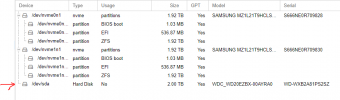
sda.PNG

plexVG.PNG


1. What happened to my VG?

2, Is the data recoverable somehow? It's just a week's worth of DVR stuff and rebuildable metadata. It would be nice to get it back but not critical.

3. Most importantly, how can I avoid/prevent or reduce chance of this happening again?

Any info would be appreciated.
 
Ok, I have to get my VM going so I decided just to just give up on old data and create new volume group over top.

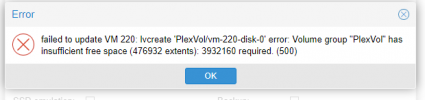
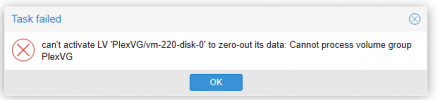
While I can create a new VG on the disk (/dev/sda), I can't assign space to it in the VM. And, while I can detach the lost volume/disk from my VM, I can't remove it. A ghost of the old one remains.

How do I get rid of the remnants of the lost VG?

cantremovedisk.png
VGnotenoughspace.png
 
Hello? Is this thing on?

1. What happened to my VG?

2, Is the data recoverable somehow?

3. Most importantly, how can I avoid/prevent or reduce chance of this happening again?

4. How do I configure the VM so it is NOT dependent on this VG to run?
 
Having a very similar issue right now.. did you ever determine what happened to your missing volume group?

Thanks!
 
Hi, the same happend to my Home PVE. The Disk is fine and working as long the VM/LXC's that depend on it are not stopped or an Snapshot/Backup happened. Failed Volume is on /dev/sda:

root@pve01:~# lsblk
NAME MAJ:MIN RM SIZE RO TYPE MOUNTPOINTS
sda 8:0 0 1.7T 0 disk
├─micron5100-micron5100_tmeta 252:0 0 15.9G 0 lvm
│ └─micron5100-micron5100-tpool 252:8 0 1.7T 0 lvm
│ ├─micron5100-micron5100 252:9 0 1.7T 1 lvm
│ ├─micron5100-vm--200--disk--0 252:10 0 8G 0 lvm
│ ├─micron5100-vm--101--disk--0 252:11 0 60G 0 lvm
│ ├─micron5100-vm--102--disk--0 252:12 0 4M 0 lvm
│ ├─micron5100-vm--102--disk--1 252:13 0 40G 0 lvm
│ ├─micron5100-vm--201--disk--0 252:14 0 2G 0 lvm
│ ├─micron5100-vm--103--disk--0 252:15 0 4M 0 lvm
│ ├─micron5100-vm--103--disk--1 252:16 0 80G 0 lvm
│ ├─micron5100-vm--103--disk--2 252:17 0 4M 0 lvm
│ ├─micron5100-vm--202--disk--0 252:18 0 4G 0 lvm
│ ├─micron5100-vm--203--disk--0 252:19 0 4G 0 lvm
│ ├─micron5100-vm--204--disk--0 252:20 0 512M 0 lvm
│ ├─micron5100-vm--205--disk--0 252:21 0 4G 0 lvm
│ ├─micron5100-vm--208--disk--0 252:22 0 8G 0 lvm
│ ├─micron5100-vm--209--disk--0 252:23 0 6G 0 lvm
│ ├─micron5100-vm--206--disk--0 252:24 0 4G 0 lvm
│ ├─micron5100-vm--110--disk--0 252:25 0 4M 0 lvm
│ ├─micron5100-vm--110--disk--1 252:26 0 10G 0 lvm
│ ├─micron5100-vm--110--disk--2 252:27 0 4M 0 lvm
│ ├─micron5100-vm--111--disk--0 252:28 0 4M 0 lvm
│ ├─micron5100-vm--111--disk--1 252:29 0 20G 0 lvm
│ ├─micron5100-vm--111--disk--2 252:30 0 4M 0 lvm
│ ├─micron5100-vm--112--disk--0 252:31 0 4M 0 lvm
│ ├─micron5100-vm--112--disk--1 252:32 0 20G 0 lvm
│ ├─micron5100-vm--112--disk--2 252:33 0 4M 0 lvm
│ ├─micron5100-vm--113--disk--0 252:34 0 4M 0 lvm
│ ├─micron5100-vm--113--disk--1 252:35 0 20G 0 lvm
│ ├─micron5100-vm--113--disk--2 252:36 0 4M 0 lvm
│ ├─micron5100-vm--100--disk--0 252:37 0 4M 0 lvm
│ ├─micron5100-vm--100--disk--1 252:38 0 60G 0 lvm
│ ├─micron5100-vm--100--disk--2 252:39 0 4M 0 lvm
│ └─micron5100-vm--207--disk--0 252:40 0 50G 0 lvm
└─micron5100-micron5100_tdata 252:1 0 1.7T 0 lvm
└─micron5100-micron5100-tpool 252:8 0 1.7T 0 lvm
├─micron5100-micron5100 252:9 0 1.7T 1 lvm
├─micron5100-vm--200--disk--0 252:10 0 8G 0 lvm
├─micron5100-vm--101--disk--0 252:11 0 60G 0 lvm
├─micron5100-vm--102--disk--0 252:12 0 4M 0 lvm
├─micron5100-vm--102--disk--1 252:13 0 40G 0 lvm
├─micron5100-vm--201--disk--0 252:14 0 2G 0 lvm
├─micron5100-vm--103--disk--0 252:15 0 4M 0 lvm
├─micron5100-vm--103--disk--1 252:16 0 80G 0 lvm
├─micron5100-vm--103--disk--2 252:17 0 4M 0 lvm
├─micron5100-vm--202--disk--0 252:18 0 4G 0 lvm
├─micron5100-vm--203--disk--0 252:19 0 4G 0 lvm
├─micron5100-vm--204--disk--0 252:20 0 512M 0 lvm
├─micron5100-vm--205--disk--0 252:21 0 4G 0 lvm
├─micron5100-vm--208--disk--0 252:22 0 8G 0 lvm
├─micron5100-vm--209--disk--0 252:23 0 6G 0 lvm
├─micron5100-vm--206--disk--0 252:24 0 4G 0 lvm
├─micron5100-vm--110--disk--0 252:25 0 4M 0 lvm
├─micron5100-vm--110--disk--1 252:26 0 10G 0 lvm
├─micron5100-vm--110--disk--2 252:27 0 4M 0 lvm
├─micron5100-vm--111--disk--0 252:28 0 4M 0 lvm
├─micron5100-vm--111--disk--1 252:29 0 20G 0 lvm
├─micron5100-vm--111--disk--2 252:30 0 4M 0 lvm
├─micron5100-vm--112--disk--0 252:31 0 4M 0 lvm
├─micron5100-vm--112--disk--1 252:32 0 20G 0 lvm
├─micron5100-vm--112--disk--2 252:33 0 4M 0 lvm
├─micron5100-vm--113--disk--0 252:34 0 4M 0 lvm
├─micron5100-vm--113--disk--1 252:35 0 20G 0 lvm
├─micron5100-vm--113--disk--2 252:36 0 4M 0 lvm
├─micron5100-vm--100--disk--0 252:37 0 4M 0 lvm
├─micron5100-vm--100--disk--1 252:38 0 60G 0 lvm
├─micron5100-vm--100--disk--2 252:39 0 4M 0 lvm
└─micron5100-vm--207--disk--0 252:40 0 50G 0 lvm
nvme0n1 259:0 0 238.5G 0 disk
├─nvme0n1p1 259:1 0 1007K 0 part
├─nvme0n1p2 259:2 0 1G 0 part /boot/efi
└─nvme0n1p3 259:3 0 237.5G 0 part
├─pve-swap 252:2 0 8G 0 lvm [SWAP]
├─pve-root 252:3 0 69.4G 0 lvm /
├─pve-data_tmeta 252:4 0 1.4G 0 lvm
│ └─pve-data-tpool 252:6 0 141.2G 0 lvm
│ └─pve-data 252:7 0 141.2G 1 lvm
└─pve-data_tdata 252:5 0 141.2G 0 lvm
└─pve-data-tpool 252:6 0 141.2G 0 lvm
└─pve-data 252:7 0 141.2G 1 lvm


Just as with jaytee129, /dev/sha is missing here:

root@pve01:~# blkid
/dev/mapper/micron5100-vm--204--disk--0: UUID="57f8153a-2dcf-4f33-95be-dbda49b17f4d" BLOCK_SIZE="4096" TYPE="ext4"
/dev/mapper/micron5100-vm--200--disk--0: UUID="ffed9560-d6a5-4030-8f9e-4367578dfc88" BLOCK_SIZE="4096" TYPE="ext4"
/dev/nvme0n1p3: UUID="GFV6tA-cT6w-IeXQ-z01M-oYvM-Y24E-zs8Y7s" TYPE="LVM2_member" PARTUUID="b4ab3edd-da95-4669-baa7-bd9762d77ad9"
/dev/nvme0n1p2: UUID="DBA2-1209" BLOCK_SIZE="512" TYPE="vfat" PARTUUID="e24cc87c-2bc8-4216-b406-7548cfedcfca"
/dev/mapper/micron5100-vm--203--disk--0: UUID="a74c57b2-77dd-456d-bae5-7d679064fc95" BLOCK_SIZE="4096" TYPE="ext4"
/dev/mapper/micron5100-vm--209--disk--0: UUID="182e0f08-7625-43dc-bcec-54395ef2c9b0" BLOCK_SIZE="4096" TYPE="ext4"
/dev/mapper/micron5100-vm--205--disk--0: UUID="980053c1-1912-4acc-8ccf-cab2e2af9139" BLOCK_SIZE="4096" TYPE="ext4"
/dev/mapper/pve-swap: UUID="be0f8c4c-9a50-4d92-acd7-04f81067dbd7" TYPE="swap"
/dev/mapper/micron5100-vm--202--disk--0: UUID="0d8630f9-8355-47e9-baf0-f0a32329f53e" BLOCK_SIZE="4096" TYPE="ext4"
/dev/mapper/micron5100-vm--206--disk--0: UUID="a3059f09-edf3-48f5-b406-4ca873dc5052" BLOCK_SIZE="4096" TYPE="ext4"
/dev/mapper/micron5100-vm--201--disk--0: UUID="1d3b28ba-144c-400a-8625-3f920481cb5c" BLOCK_SIZE="4096" TYPE="ext4"
/dev/mapper/micron5100-vm--208--disk--0: UUID="a4399216-c1c7-45f0-9905-9da6fef2689b" BLOCK_SIZE="4096" TYPE="ext4"
/dev/mapper/pve-root: UUID="9f91d842-00a1-414c-a2ea-ce04ed036bc5" BLOCK_SIZE="4096" TYPE="ext4"
/dev/nvme0n1p1: PARTUUID="6291d67c-817d-4e97-aae7-82b314745c6e"
/dev/mapper/micron5100-vm--111--disk--1: PTUUID="68bc3214-0e58-46cd-b34d-241ccad712eb" PTTYPE="gpt"
/dev/mapper/micron5100-vm--113--disk--1: PTUUID="b1bcc529-afc0-4ac5-aa79-9d68df66a0dd" PTTYPE="gpt"
/dev/mapper/micron5100-vm--102--disk--1: PTUUID="5af20857-0d75-4d1d-9cea-9ac62b8b25e1" PTTYPE="gpt"
/dev/mapper/micron5100-vm--101--disk--0: PTUUID="3bbe98e7-3fe9-4590-9592-ad8d851f4f4a" PTTYPE="gpt"
/dev/mapper/micron5100-vm--100--disk--1: PTUUID="31a320b0-476c-427d-b978-0b62dc0afa98" PTTYPE="gpt"
/dev/mapper/micron5100-vm--110--disk--1: PTUUID="34ec2c73-1bc8-4c2c-a15c-b2ce0efafcde" PTTYPE="gpt"
/dev/mapper/micron5100-vm--103--disk--1: PTUUID="44ef13a5-c6c5-4e61-8abe-a97d54a9cf81" PTTYPE="gpt"
/dev/mapper/micron5100-vm--112--disk--1: PTUUID="ea652b47-e3ed-4014-986c-cf82affcd6d1" PTTYPE="gpt"
/dev/mapper/micron5100-vm--207--disk--0: UUID="600fcb1f-74f1-4267-99bf-7565682072ee" BLOCK_SIZE="4096" TYPE="ext4"

If i try to readd the group there is no unsused disk available.
Does anyone have an idea how I can fix this problem?

thanks in advance
Felix

Addendum: The LVM configuration seems completely missing for this drive.
None of the LVM layers(PV/VG/LV) shows a configuration for this.

However, it is still present in the last backup under `/etc/lvm/backup/micron5100`. What is the recommended way to restore it?
 
Last edited:
Welcome, @FelixZ
If it's possible, could you edit your post and place those commands and their outputs in CODE blocks?
I mean this icon in the menu: "< / >".

Or even better: place long outputs in "SPOILER" blocks (icon of a crossed eye).

Currently those are a little hard to read (the formatting was not preserved).

Also, post the results of the following command:
pvs
pvdisplay
vgs
vgdisplay
lvs
lvdisplay

The long outputs absolutely in "SPOILER" blocks, because the outputs will be long, making the post mind-boggling.

Maybe later more LVM-related commands will be needed, but let's start with basic ones :).
 
Welcome, @FelixZ
If it's possible, could you edit your post and place those commands and their outputs in CODE blocks?
I mean this icon in the menu: "< / >".

Or even better: place long outputs in "SPOILER" blocks (icon of a crossed eye).

Currently those are a little hard to read (the formatting was not preserved).

Also, post the results of the following command:
pvs
pvdisplay
vgs
vgdisplay
lvs
lvdisplay

The long outputs absolutely in "SPOILER" blocks, because the outputs will be long, making the post mind-boggling.

Maybe later more LVM-related commands will be needed, but let's start with basic ones :).
Hi Onslow, here are the output:
PV VG Fmt Attr PSize PFree
/dev/nvme0n1p3 pve lvm2 a-- 237.47g 16.00g

PV Name /dev/nvme0n1p3
VG Name pve
PV Size 237.47 GiB / not usable <1.32 MiB
Allocatable yes
PE Size 4.00 MiB
Total PE 60793
Free PE 4097
Allocated PE 56696
PV UUID GFV6tA-cT6w-IeXQ-z01M-oYvM-Y24E-zs8Y7s

VG #PV #LV #SN Attr VSize VFree
pve 1 3 0 wz--n- 237.47g 16.00g

--- Volume group ---
VG Name pve
System ID
Format lvm2
Metadata Areas 1
Metadata Sequence No 11
VG Access read/write
VG Status resizable
MAX LV 0
Cur LV 3
Open LV 2
Max PV 0
Cur PV 1
Act PV 1
VG Size 237.47 GiB
PE Size 4.00 MiB
Total PE 60793
Alloc PE / Size 56696 / <221.47 GiB
Free PE / Size 4097 / 16.00 GiB
VG UUID xoXyBS-zIF1-hhDr-RmRc-63mJ-Ecu2-nzbXRo

LV VG Attr LSize Pool Origin Data% Meta% Move Log Cpy%Sync Convert
data pve twi-aotz-- <141.23g 0.00 1.13
root pve -wi-ao---- <69.37g
swap pve -wi-ao---- 8.00g

--- Logical volume ---
LV Name data
VG Name pve
LV UUID 6fRn1Y-THCi-w5c3-T3KH-CVmZ-H34w-ETY2OE
LV Write Access read/write (activated read only)
LV Creation host, time proxmox, 2025-02-11 16:33:11 +0100
LV Pool metadata data_tmeta
LV Pool data data_tdata
LV Status available
# open 0
LV Size <141.23 GiB
Allocated pool data 0.00%
Allocated metadata 1.13%
Current LE 36154
Segments 1
Allocation inherit
Read ahead sectors auto
- currently set to 256
Block device 252:7

--- Logical volume ---
LV Path /dev/pve/swap
LV Name swap
VG Name pve
LV UUID sYqU25-SqeB-szKl-ma6F-kplr-Td2q-7GFkBe
LV Write Access read/write
LV Creation host, time proxmox, 2025-02-11 16:33:08 +0100
LV Status available
# open 2
LV Size 8.00 GiB
Current LE 2048
Segments 1
Allocation inherit
Read ahead sectors auto
- currently set to 256
Block device 252:2

--- Logical volume ---
LV Path /dev/pve/root
LV Name root
VG Name pve
LV UUID vTwgWw-Q2vW-thHT-u4pb-AlK9-aDKd-5JfztY
LV Write Access read/write
LV Creation host, time proxmox, 2025-02-11 16:33:08 +0100
LV Status available
# open 1
LV Size <69.37 GiB
Current LE 17758
Segments 1
Allocation inherit
Read ahead sectors auto
- currently set to 256
Block device 252:3

As was likely mentioned around the same time as your post, all configuration for this device has "disappeared." However, it is still present at `/etc/lvm/backup/micron5100`.

Greetings
Felix
 
Off-topic: sorry, seems that "spoiler" doesn't preserve the formatting, so CODE is better.
I'm not asking you to edit your posts, just informing for future :cool:.

As for the LVM issue: I'm afraid of giving some harmful advice, so don't proceed blindly.
Maybe one or more LVM-related commands (like pvck, pvscan, pvchange, vgck, vgscan, vgcfgrestore, vgchange) could be used. But again: don't try blindly. And have backups.

It doesn't look like specific Proxmox-related issue. So I would search the Internet for a solution. And check suggested ones in more than one place. And read the manual before issuing suggested methods.

First of all: have backups.