

VMWare to Proxmox Conversion Help - Dell PowerVault ME5224 Integration / Shared Storage Questions

hoot.

New Member
Jan 6, 2026
1
1
3
Green Bay, WI
Hi all,

We just got a gnarly quote to renew our VMWare licensing and are hoping to move to Proxmox VE. I'm struggling a bit to understand which process I should follow for migrating over, considering our current storage setup.

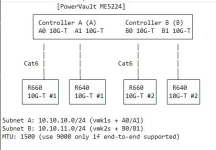
At our main site, we have 2 hosts both running VMWare ESXI, both connected to the ME5 for shared storage directly instead of being routed through our switches. Below is a diagram of how it's hooked up.

We use Veeam B&R for backups (to a dedicated Veeam Hardened Repo) and replication to a DR host.

I'm confused on what I need to do to accommodate our current hardware so that we can continue using our ME5 for shared storage between hosts, while still allowing for quick and easy backup and recovery when needed via Veeam. As far as I know, snapshotting is required for Veeam, so traditional iSCSI does not work for us here, since snapshotting is not supported over iSCSI. Hopefully someone can provide some insight on what my options are for converting over without losing complete functionality of Veeam or our ME5 we purchased last year.

Thanks!!
1768922582318.png
 
  • Like
Reactions: FrankList80
Just my 2 cent likely NOT answering your question (not an SAN expert - others might have better answers!): an interesting project! Good that you have VBR and the backups already on a 3rd device (aka Hardened Repo). If you not looking at AppAware Backups, i would see some overlap between PBS/PVE "Backup" and VEEAM but i would leave that for the moment. What would i do here? I would check if the PowerVault would support plain and simple NFS, and you would "degrade" the PowerVault to a "simple NAS" (i know ...) - then you could (NIC compatibility) imo also connect them to the PVE R6xx per se (question open whether any PVE clustering would support this). As a result in worst case you would have 2x PVEs with 2x vStorage on the same Powervault "NAS" (NOT shared Storage, but vStorage). Then i would try to connect the VBR to these fresh PVEs and see how it goes. Then i would adapt my Backup & Restore Strategy - Introduce PBS (Extra Invest) - foe the bread & butter Snapshotting PBS with a 2nd PBS is likely enough - but you could run them for a time in parallel - PBS Backups and VEEAM Backups. JUst my 2 cent.

[Virtualization Support for SME and NGOs | DLI Solutions ]
 
I'm just doing pretty much the same project so here's what I've learnt:

1) You can have LVM over iSCSI and use snapshots
2) You'll need a third node/host or QDevice for HA in Proxmox
3) Veeam doesn't replicate VM's from Proxmox - currently the best you'll get is Backup Copy but hopefully replication will come soon. However, you'll have to start the backup chains from scratch as the hypervisor is different.
4) When you convert your first ESXi host to PVE node, create the cluster and then add it to Veeam else you'll have to restart again when you add the cluster later
5) You should be able to use Jumbo Frames (MTU 9000) if network cards, switches and controllers support them.

I started by creating a new LUN in my SAN with enough capacity to accommodate the VM's which I migrated. Moved all VM's to ESXi host and installed PVE on the other host. Convert each VM (requires downtime so took a couple of weekends) and make sure you follow the steps for using VirtIO drivers for Windows.
Once all VM's are on Proxmox node, remove vCenter and delete datastores in ESXi. Move them over to PVE and then put disks back where you want them.
It's essentially a like-for-like replacement, just takes a while to understand the setup and do the converting but the Wiki articles on VirtIO, iSCSI, multipath etc are all very good.
 
  • Like
Reactions: FrankList80
As far as I know, snapshotting is required for Veeam,
Veeam doesnt work the same way on PVE as it does on vmware, so you DONT actually need snapshot support for functionality- nor does veeam even use hardware snapshots if available.

I was really excited when veeam started quietly testing pve support, but was underwhelmed by the actual implementation-its missing a lot of functionality present in the vmware impelentation. I'd advocate a shift to PBS if/when you no longer need recoverability of old veeam backups. This may change in the future.
1) You can have LVM over iSCSI and use snapshots
A word about this- the current (preview) implementation of snapshots over lvm thick have performance consequences. search the forums for people's reported experience. There are also all kinds of odd behaviors if you also deploy your storage thin provisioned- avoid doing that for best results.
 
Regarding veeam: If you need it for application-aware domain-controller- or database-backups, a veaam agent might be used while the actual vm vmbackups are done with Proxmox native feature to a ProxmoxBackupServer. If done right this combination could even be cheaper than the complete Veeam suite
 
Last edited:
  • Like
Reactions: FrankList80
I'm just doing pretty much the same project so here's what I've learnt:

1) You can have LVM over iSCSI and use snapshots
2) You'll need a third node/host or QDevice for HA in Proxmox
3) Veeam doesn't replicate VM's from Proxmox - currently the best you'll get is Backup Copy but hopefully replication will come soon. However, you'll have to start the backup chains from scratch as the hypervisor is different.
4) When you convert your first ESXi host to PVE node, create the cluster and then add it to Veeam else you'll have to restart again when you add the cluster later
5) You should be able to use Jumbo Frames (MTU 9000) if network cards, switches and controllers support them.

I started by creating a new LUN in my SAN with enough capacity to accommodate the VM's which I migrated. Moved all VM's to ESXi host and installed PVE on the other host. Convert each VM (requires downtime so took a couple of weekends) and make sure you follow the steps for using VirtIO drivers for Windows.
Once all VM's are on Proxmox node, remove vCenter and delete datastores in ESXi. Move them over to PVE and then put disks back where you want them.
It's essentially a like-for-like replacement, just takes a while to understand the setup and do the converting but the Wiki articles on VirtIO, iSCSI, multipath etc are all very good.

One more point, our ESXi was running on dual SD modules in the hosts but I was advised PVE needed a proper disk so I put a 500GB SSD in each host to install PVE onto.
 
Regarding veeam: If you need it for application-aware domain-controller- or database-backups, a veaam agent might be used while the actual vm vmbackups are done with Proxmox native feature to a ProxmoxBackupServer. If done right this combination could even be cheaper than the complete Veeam suite
How does PBS handle off site backup?

Veeam has Backup Copy and hopefully will have Replication for Proxmox soon too.