

VMWare to Proxmox Conversion Help - Dell PowerVault ME5224 Integration / Shared Storage Questions

hoot.

New Member
Jan 6, 2026
2
1
3
Green Bay, WI
Hi all,

We just got a gnarly quote to renew our VMWare licensing and are hoping to move to Proxmox VE. I'm struggling a bit to understand which process I should follow for migrating over, considering our current storage setup.

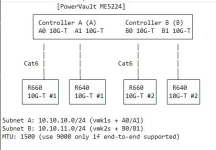
At our main site, we have 2 hosts both running VMWare ESXI, both connected to the ME5 for shared storage directly instead of being routed through our switches. Below is a diagram of how it's hooked up.

We use Veeam B&R for backups (to a dedicated Veeam Hardened Repo) and replication to a DR host.

I'm confused on what I need to do to accommodate our current hardware so that we can continue using our ME5 for shared storage between hosts, while still allowing for quick and easy backup and recovery when needed via Veeam. As far as I know, snapshotting is required for Veeam, so traditional iSCSI does not work for us here, since snapshotting is not supported over iSCSI. Hopefully someone can provide some insight on what my options are for converting over without losing complete functionality of Veeam or our ME5 we purchased last year.

Thanks!!
1768922582318.png
 
  • Like
Reactions: FrankList80
Just my 2 cent likely NOT answering your question (not an SAN expert - others might have better answers!): an interesting project! Good that you have VBR and the backups already on a 3rd device (aka Hardened Repo). If you not looking at AppAware Backups, i would see some overlap between PBS/PVE "Backup" and VEEAM but i would leave that for the moment. What would i do here? I would check if the PowerVault would support plain and simple NFS, and you would "degrade" the PowerVault to a "simple NAS" (i know ...) - then you could (NIC compatibility) imo also connect them to the PVE R6xx per se (question open whether any PVE clustering would support this). As a result in worst case you would have 2x PVEs with 2x vStorage on the same Powervault "NAS" (NOT shared Storage, but vStorage). Then i would try to connect the VBR to these fresh PVEs and see how it goes. Then i would adapt my Backup & Restore Strategy - Introduce PBS (Extra Invest) - foe the bread & butter Snapshotting PBS with a 2nd PBS is likely enough - but you could run them for a time in parallel - PBS Backups and VEEAM Backups. JUst my 2 cent.

[Virtualization Support for SME and NGOs | DLI Solutions ]
 
I'm just doing pretty much the same project so here's what I've learnt:

1) You can have LVM over iSCSI and use snapshots
2) You'll need a third node/host or QDevice for HA in Proxmox
3) Veeam doesn't replicate VM's from Proxmox - currently the best you'll get is Backup Copy but hopefully replication will come soon. However, you'll have to start the backup chains from scratch as the hypervisor is different.
4) When you convert your first ESXi host to PVE node, create the cluster and then add it to Veeam else you'll have to restart again when you add the cluster later
5) You should be able to use Jumbo Frames (MTU 9000) if network cards, switches and controllers support them.

I started by creating a new LUN in my SAN with enough capacity to accommodate the VM's which I migrated. Moved all VM's to ESXi host and installed PVE on the other host. Convert each VM (requires downtime so took a couple of weekends) and make sure you follow the steps for using VirtIO drivers for Windows.
Once all VM's are on Proxmox node, remove vCenter and delete datastores in ESXi. Move them over to PVE and then put disks back where you want them.
It's essentially a like-for-like replacement, just takes a while to understand the setup and do the converting but the Wiki articles on VirtIO, iSCSI, multipath etc are all very good.
 
  • Like
Reactions: FrankList80
As far as I know, snapshotting is required for Veeam,
Veeam doesnt work the same way on PVE as it does on vmware, so you DONT actually need snapshot support for functionality- nor does veeam even use hardware snapshots if available.

I was really excited when veeam started quietly testing pve support, but was underwhelmed by the actual implementation-its missing a lot of functionality present in the vmware impelentation. I'd advocate a shift to PBS if/when you no longer need recoverability of old veeam backups. This may change in the future.
1) You can have LVM over iSCSI and use snapshots
A word about this- the current (preview) implementation of snapshots over lvm thick have performance consequences. search the forums for people's reported experience. There are also all kinds of odd behaviors if you also deploy your storage thin provisioned- avoid doing that for best results.
 
Regarding veeam: If you need it for application-aware domain-controller- or database-backups, a veaam agent might be used while the actual vm vmbackups are done with Proxmox native feature to a ProxmoxBackupServer. If done right this combination could even be cheaper than the complete Veeam suite
 
Last edited:
  • Like
Reactions: FrankList80
I'm just doing pretty much the same project so here's what I've learnt:

1) You can have LVM over iSCSI and use snapshots
2) You'll need a third node/host or QDevice for HA in Proxmox
3) Veeam doesn't replicate VM's from Proxmox - currently the best you'll get is Backup Copy but hopefully replication will come soon. However, you'll have to start the backup chains from scratch as the hypervisor is different.
4) When you convert your first ESXi host to PVE node, create the cluster and then add it to Veeam else you'll have to restart again when you add the cluster later
5) You should be able to use Jumbo Frames (MTU 9000) if network cards, switches and controllers support them.

I started by creating a new LUN in my SAN with enough capacity to accommodate the VM's which I migrated. Moved all VM's to ESXi host and installed PVE on the other host. Convert each VM (requires downtime so took a couple of weekends) and make sure you follow the steps for using VirtIO drivers for Windows.
Once all VM's are on Proxmox node, remove vCenter and delete datastores in ESXi. Move them over to PVE and then put disks back where you want them.
It's essentially a like-for-like replacement, just takes a while to understand the setup and do the converting but the Wiki articles on VirtIO, iSCSI, multipath etc are all very good.

One more point, our ESXi was running on dual SD modules in the hosts but I was advised PVE needed a proper disk so I put a 500GB SSD in each host to install PVE onto.
 
Regarding veeam: If you need it for application-aware domain-controller- or database-backups, a veaam agent might be used while the actual vm vmbackups are done with Proxmox native feature to a ProxmoxBackupServer. If done right this combination could even be cheaper than the complete Veeam suite
How does PBS handle off site backup?

Veeam has Backup Copy and hopefully will have Replication for Proxmox soon too.
 
How does PBS handle off site backup?

You have multiple options:

  • First you can have another ProxmoxBackupServer (e.g. on a cloud server or another location if your company is multispread or (as home user) on a friends or family members place). PBS has a native sync mechanism. I prefer to configure the offsite PBS firwall that is has no incoming connections allowed from my local PBS and that the local PBS or PVE have no permission to write to it. The offsite PBS can still pull it's backup from the local PBS as long as it has read-permissions and the local PBS has an open port 8007. See the relevant manual chapters for the documentationFor a more hands-on description I described my homelab setup in following thread (the information is spread on multiple posts though, so be prepared to read the whole discussion): https://forum.proxmox.com/threads/b...r-with-incremental-chunks.157965/#post-723568
  • Second you can to a backup to tape or a "removable datastore" (aka external storage like USB) for air-gapped backup. This needs manual intervention though while the sync mechanisms can be fully automated.
  • Beginning with PBS 4 PBS has support for using S3-storage as offsite backup. It's still in "technology-preview" though so I wouldn't use it as sole offsite backup. But for evaluating the feature and as an additional copy you can already use it.
  • Obviouvsly you could combine these options in any way you want, e.G. having one local and remote PBS plus tape as additional air-gapped backup or having a local PBS and remote PBS together with S3. Or even everything together ;)
If you don't want the hassle to maintain your own offsite backup server: There are Proxmox Partners (e.G. Inett in Germany or tuxis.nl in the Netherlands) who provide a managed ProxmoxBackupServer for a typical cost of around 0,02 € per GB or 20 € per TB. Maybe ask office@proxmox.com whether they know any PBS hosting provider who would offer services in your region (tuxis.nl will serve private customers only in the Netherlands and Business customers only in the EU, they are happy to do business with resellers outside though). On the other hand you can get a dedicated server from companys like Hetzner for a surprising good price (sometimes their deals start at around 50-70 Euro for a server with decent storage and they have their own line of dedicated "storage" servers which offers quite a lot of storage for your bucks). So depending on your budget it might be even worth it to have two offsite rented servers, each from another company so you are not locked in.
 
Last edited:
  • Like
Reactions: FrankList80
How does PBS handle off site backup?

Veeam has Backup Copy and hopefully will have Replication for Proxmox soon too.
to be fair i think its a little bit "apples and oranges". There is a reason why VEEAM is so successful, and the millions of man days R&D under Gostev VEEAM had put into the product - its Day 2 operations as its best. The 106 scenarios they market have a reason to exist, incl. replica seeding, impressive GUI Failback-Wizards etc. How could our beloved Vienna based company could compete with that. Not possible if not Zillions of VC put into it, and then the whole idea of PVE breaks apart. For now, PVE is not a "first class citizen" in VEEAM, but ESX is. Imo PBS is Pareto-Optimal - 80/20 and very very solid. You can also go the "Data Domain" way to acheive immutability, and just deactive the PBS NIC / change routing etc so thats not longer reachable - its "Virtual airgap" or you could even solve it with KVM PowerOn. A lot of the 3-2-1-0-0 capabilities you can achieve with PBS. P.S. for "Bread and butter" and "general workloads". If you have indeed "Crazy" e.g. WIndows SQL Servers with very hard RPO/RTO demands "Application Aware Backup" of Backup COTS has a reason to exist ...

[Virtualization Support for SME and NGOs | DLI Solutions ]
 
  • Like
Reactions: Johannes S
I'm confused on what I need to do to accommodate our current hardware so that we can continue using our ME5 for shared storage between hosts, while still allowing for quick and easy backup and recovery when needed via Veeam. As far as I know, snapshotting is required for Veeam, so traditional iSCSI does not work for us here, since snapshotting is not supported over iSCSI. Hopefully someone can provide some insight on what my options are for converting over without losing complete functionality of Veeam or our ME5 we purchased last year.
Hi @hoot,
You’ve already received a lot of good feedback. The important points mentioned are:
- You can use ME4 with PVE. If you have spare ports, servers, and capacity, you can run PVE in parallel with ESXi during the migration window.
- PVE does not have a clustered filesystem comparable to ESXi’s VMFS.
- You will likely use LVM (thick) for shared storage organization at the hypervisor level (PVE).
- PVE provides a tech-preview feature for using LVM with snapshots. Whether this is suitable for your business needs is something only you can decide.
- You can continue using Veeam with PVE.
- Veeam does not use storage-level snapshots in its PVE integration.
- A possible starting point is a single or multiple PVE servers running as VMs on ESXi. This would allow you to test recovery workflows as well as VM functionality when running on ESXi.

Good luck


Blockbridge : Ultra low latency all-NVME shared storage for Proxmox - https://www.blockbridge.com/proxmox
 
  • Like
Reactions: Johannes S
Thanks for all the support everyone. I think I've got what I need to make things work. Will definitely be back if I have any follow up questions, but you've all been super helpful!
 
If you have indeed "Crazy" e.g. WIndows SQL Servers with very hard RPO/RTO demands "Application Aware Backup" of Backup COTS has a reason to exist ...
I would never solve those RPO/RTO demands with a recovery solution, I would always go with internal replication/standby solutions within the database. There is also a reason those techniques exist in those products for decades. So those should be used first. No backup solution on the planet can restore a 8 TB database fast, a simple switchover or failover to a standby can be done automatically and transparent to the clients without any backup & restore software.


to be fair i think its a little bit "apples and oranges".
I would call it a lot like that ;) Both are for backup and recovery, but their scopes are different.

I assume Proxmox is not going to integrate application aware stuff by themselves into PBS. IMHO this is part of a proper VM admin to do with VM hooks in the qemu guest agent so that it is also working with normal VM snapshots, as PBS is mainly a hypervisor backup tool that does already use the snapshot functionality of QEMU (not the storage) so hooks are already supported for VMs. So yes, Veeam has done the work with respect to their backup agent so that they control everything for a lot of products, mainly for Windows-based stuff. I would assume that the veeam agent does also do the integration into windows' VSC stuff so that you have one set of scripts/software that does the application aware snapshotting. For QEMU, there is currently no public repo for those scripts. We do those qemu agent integrations for customers and it's the same for EVERY backup program that does not support $yourtool or $youros. I've done it also for one customer with Rubrik.

However, PBS offers a lot what most people in SMEs need from their hypervisor backup, so it is the first and obvious choice for most if you're not already heavily invested in another solution. Is this also your experience @FrankList80, as your signature states that you're supporting mainly SMEs?
 
I would never solve those RPO/RTO demands with a recovery solution, I would always go with internal replication/standby solutions within the database. There is also a reason those techniques exist in those products for decades. So those should be used first. No backup solution on the planet can restore a 8 TB database fast, a simple switchover or failover to a standby can be done automatically and transparent to the clients without any backup & restore software.
This is true in theory but not always possible. There is, for example, a well-known enterprise-grade backup software, who allows backing up MS SQL clusters, but doesn't support the backup of MySQL/MariaDB/Oracle or PostgreSQL clusters.

For this reason at my place of work we can't cluster our postgres database although we really would love to do it to keep downtimes and rto/rpo short since the backup is done by a different team and they don't want to migrate to another backup software. Of course alternatively we could to a daily pg_sql dump and backup that with our regular backup software, but with a multi-tb-database this isn't without problems either.

Now one might want to ask what kind of niche software we use which lacks such a critical feature like support for backing up clusters? Well, it't the small garage company known as Veeam.

So imho if one needs to do a migration anyhow I would always also consider whether one should really stick to the current backup software even if one it totally happy with it. It might turnout that although the existing setup was perfect for the old environment and hypervisor, it's not worth it in the new environment.
 
  • Like
Reactions: carles89