Hello,
We are currently testing VMware to Proxmox migrations using a VMware storage connected to a vCenter server.
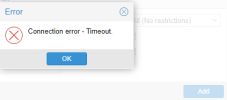
The VMware storage is configured correctly and authentication works. However, when browsing the VMware storage from the Proxmox GUI, the inventory frequently fails to load and the GUI displays:
communication failure (0)
The issue is intermittent, but occurs most of the time.
Environment
The inventory can be retrieved successfully from the command line:
First test:
real 0m25.121s
user 0m8.525s
sys 0m0.383s
Second test:
real 0m35.472s
user 0m8.529s
sys 0m0.425s
So the inventory is retrieved successfully, but it takes between 25 and 35 seconds.
Connectivity tests
Direct access to the vCenter SDK endpoint is immediate:
Results:
real 0m0.024s
and
real 0m0.031s
Basic network connectivity and HTTPS access appear to be working correctly.
Question
Has anyone experienced the GUI returning:
communication failure (0)
while browsing a VMware storage backed by a large vCenter inventory?
The inventory can always be retrieved from the CLI, but the GUI frequently fails while loading it.
Is there any known timeout in the Proxmox GUI or VMware storage plugin that could explain this behavior?
Could the inventory size itself be contributing to the issue?
Any recommendations for troubleshooting or tuning would be greatly appreciated.
Thanks.
proxmox-ve: 9.2.0 (running kernel: 7.0.14-6-pve)
pve-manager: 9.2.5 (running version: 9.2.5/20242970da7fbcef)
proxmox-kernel-helper: 9.2.0
proxmox-kernel-7.0.14-6-pve-signed: 7.0.14-6
proxmox-kernel-7.0: 7.0.14-6
proxmox-kernel-7.0.14-5-pve-signed: 7.0.14-5
proxmox-kernel-7.0.2-6-pve-signed: 7.0.2-6
ceph-fuse: 19.2.3-pve4
corosync: 3.1.10-pve3
criu: 4.1.1-1
frr-pythontools: 10.6.1-1+pve2
ifupdown2: 3.3.0-1+pmx12
intel-microcode: 3.20251111.1~deb13u1
ksm-control-daemon: 1.5-1
libjs-extjs: 7.0.0-5
libproxmox-acme-perl: 1.7.1
libproxmox-backup-qemu0: 2.0.2
libproxmox-rs-perl: 0.4.1
libpve-access-control: 9.1.1
libpve-apiclient-perl: 3.4.2
libpve-cluster-api-perl: 9.1.6
libpve-cluster-perl: 9.1.6
libpve-common-perl: 9.1.19
libpve-guest-common-perl: 6.0.5
libpve-http-server-perl: 6.0.5
libpve-network-perl: 1.6.7
libpve-notify-perl: 9.1.6
libpve-rs-perl: 0.15.3
libpve-storage-perl: 9.1.6
libspice-server1: 0.15.2-1+b1
lvm2: 2.03.31-2+pmx1
lxc-pve: 7.0.0-2
lxcfs: 7.0.0-pve1
novnc-pve: 1.7.0-2
proxmox-backup-client: 4.2.3-1
proxmox-backup-file-restore: 4.2.3-1
proxmox-backup-restore-image: 1.0.0
proxmox-firewall: 1.2.3
proxmox-kernel-helper: 9.2.0
proxmox-mail-forward: 1.0.3
proxmox-mini-journalreader: 1.7
proxmox-offline-mirror-helper: 0.7.4
proxmox-widget-toolkit: 5.2.6
pve-cluster: 9.1.6
pve-container: 6.1.12
pve-docs: 9.2.3
pve-edk2-firmware: 4.2025.05-2
pve-esxi-import-tools: 1.0.1
pve-firewall: 6.0.5
pve-firmware: 3.18-5
pve-ha-manager: 5.2.4
pve-i18n: 3.9.0
pve-qemu-kvm: 11.0.2-2
pve-xtermjs: 6.0.0-2
qemu-server: 9.2.1
smartmontools: 7.5-pve2
spiceterm: 3.4.2
swtpm: 0.8.0+pve3
vncterm: 1.9.2
zfsutils-linux: 2.4.3-pve1
We are currently testing VMware to Proxmox migrations using a VMware storage connected to a vCenter server.
The VMware storage is configured correctly and authentication works. However, when browsing the VMware storage from the Proxmox GUI, the inventory frequently fails to load and the GUI displays:
communication failure (0)
The issue is intermittent, but occurs most of the time.
Environment
- Proxmox VE 9
- VMware storage configured against a vCenter Server
- Inventory contains a large number of virtual machines and resources
- GUI error: "communication failure (0)"
The inventory can be retrieved successfully from the command line:
Bash:
pvesh get /nodes/<node>/storage/<vmware-storage>/contentFirst test:
real 0m25.121s
user 0m8.525s
sys 0m0.383s
Second test:
real 0m35.472s
user 0m8.529s
sys 0m0.425s
So the inventory is retrieved successfully, but it takes between 25 and 35 seconds.
Connectivity tests
Direct access to the vCenter SDK endpoint is immediate:
Bash:
time curl -k https://<vcenter>/sdk >/dev/nullResults:
real 0m0.024s
and
real 0m0.031s
Basic network connectivity and HTTPS access appear to be working correctly.
Question
Has anyone experienced the GUI returning:
communication failure (0)
while browsing a VMware storage backed by a large vCenter inventory?
The inventory can always be retrieved from the CLI, but the GUI frequently fails while loading it.
Is there any known timeout in the Proxmox GUI or VMware storage plugin that could explain this behavior?
Could the inventory size itself be contributing to the issue?
Any recommendations for troubleshooting or tuning would be greatly appreciated.
Thanks.
Bash:
root@srv-pve-05:~# pveversion -vproxmox-ve: 9.2.0 (running kernel: 7.0.14-6-pve)
pve-manager: 9.2.5 (running version: 9.2.5/20242970da7fbcef)
proxmox-kernel-helper: 9.2.0
proxmox-kernel-7.0.14-6-pve-signed: 7.0.14-6
proxmox-kernel-7.0: 7.0.14-6
proxmox-kernel-7.0.14-5-pve-signed: 7.0.14-5
proxmox-kernel-7.0.2-6-pve-signed: 7.0.2-6
ceph-fuse: 19.2.3-pve4
corosync: 3.1.10-pve3
criu: 4.1.1-1
frr-pythontools: 10.6.1-1+pve2
ifupdown2: 3.3.0-1+pmx12
intel-microcode: 3.20251111.1~deb13u1
ksm-control-daemon: 1.5-1
libjs-extjs: 7.0.0-5
libproxmox-acme-perl: 1.7.1
libproxmox-backup-qemu0: 2.0.2
libproxmox-rs-perl: 0.4.1
libpve-access-control: 9.1.1
libpve-apiclient-perl: 3.4.2
libpve-cluster-api-perl: 9.1.6
libpve-cluster-perl: 9.1.6
libpve-common-perl: 9.1.19
libpve-guest-common-perl: 6.0.5
libpve-http-server-perl: 6.0.5
libpve-network-perl: 1.6.7
libpve-notify-perl: 9.1.6
libpve-rs-perl: 0.15.3
libpve-storage-perl: 9.1.6
libspice-server1: 0.15.2-1+b1
lvm2: 2.03.31-2+pmx1
lxc-pve: 7.0.0-2
lxcfs: 7.0.0-pve1
novnc-pve: 1.7.0-2
proxmox-backup-client: 4.2.3-1
proxmox-backup-file-restore: 4.2.3-1
proxmox-backup-restore-image: 1.0.0
proxmox-firewall: 1.2.3
proxmox-kernel-helper: 9.2.0
proxmox-mail-forward: 1.0.3
proxmox-mini-journalreader: 1.7
proxmox-offline-mirror-helper: 0.7.4
proxmox-widget-toolkit: 5.2.6
pve-cluster: 9.1.6
pve-container: 6.1.12
pve-docs: 9.2.3
pve-edk2-firmware: 4.2025.05-2
pve-esxi-import-tools: 1.0.1
pve-firewall: 6.0.5
pve-firmware: 3.18-5
pve-ha-manager: 5.2.4
pve-i18n: 3.9.0
pve-qemu-kvm: 11.0.2-2
pve-xtermjs: 6.0.0-2
qemu-server: 9.2.1
smartmontools: 7.5-pve2
spiceterm: 3.4.2
swtpm: 0.8.0+pve3
vncterm: 1.9.2
zfsutils-linux: 2.4.3-pve1