VMWare import Suddenly Reporting (500) error

Bradomski

New Member
Sep 13, 2024
11
4
3
Hello,

We are currently mid migration and have all of a sudden run into an issue with using the ESX import feature.

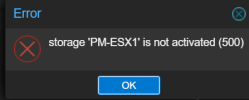
We have imported about 50 VMs with the import feature flawlessly. Now all of a sudden, we are getting (500) errors for 'Storage not activated'
1729083079833.png
I can see the VMs in the list, this pops up after I select 'Import' on a specific VM.
Any idea as to why?
 
  • Like
Reactions: allenbailey
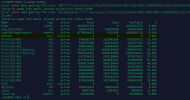
pvesm status shows 1729083788114.png

Which aligns with the error.
Running pvesm list storage yields 'failed to spawn fuse mount, process exited with status 65280'

I do not see any logs on the ESXi side

No changes in networking as far as I am aware.
 
  • Like
Reactions: allenbailey
  • Like
Reactions: allenbailey
Yep. I was consulting that post as well. I have already attempted the mgmt network reset on ESX to no avail. Ensured the SOAP settings were set to 0 to no avail. Just looking to try and figure out this issue as it doesn't appear all that prevalent however still a problem.
 
  • Like
Reactions: allenbailey
Just to add my own experience of the 'Storage not activated (500)' errors when attempting to import from an ESXI 6.7 Server --> Proxmox (9.1.5).

What I found confusing was that the process had worked correctly several times just a couple of weeks back. Now attempting the operation again yielded this error message and actually resulted in the ESXI box becomign unresponsive as more and more requests for 'Find By Inventory Path' were seemingly being executed.

I tried removing the ESXI storage, recreating it etc.

On my PVE host journal -f revealed the actual cause

pve esxi-folder-fuse[485012]: Error: error when getting file size: "ha-datacenter"/"120GB_ADATA_SSD_ISOS & SETUP"/"DOS/DOS.vmx"
file not found

(I'm sure someone else has flagged this in a previous post on the subject but I can't find it by backtracking at present) In essence the spaces and or & symbol seemed to be causing an issue for me. I renamed the Datastore in ESXI using only underscores and the problem seems to be resolved (currently 75% through importing a VM from ESXI)

TLDR --> Error 500 when attempting to import a VM directly from ESXI to Proxmox just might be cauised by one of your ESXI Datastores having a space or an & symbol in it's name. Renaming the Datastore might just fix things for you.