

Hi,
Before I used Proxmox in a HP EliteDesk G2 to host an Ubuntu server VM and pfSense for just trying. It worked smoothly and I found it interesting so I bought some old server hardware and wanted to have som NAS solution. It caused alot of headache as VM's became unresponsive after a few weeks. Rebooting the server it worked for a few weeks again.
I believe I have identified the problem to the consumer SSDs and especially the cheap Crucial BX500 disks. So I see this post as a post that might help others as well as giving me some inputs how I should layout the storage solution in Proxmox.
Therefore current hardware specification:
Motherboard: Asrock EP2C612-WS
CPUs: 2x Intel(R) Xeon(R) CPU E5-2650L v4 (14 cores/CPU)
RAM: 128 GB DDR4 EEC Memory
Disks:
2x Seagate IronWolf 4TB 5400rpm 256MB
2x Crucial BX500 SSD 1TB
1x Crucial BX500 SSD 240GB
1x Samsung SSD 840 EVO 250GB
Storage Setup:
The whole controller for the IronWolf disks are passthroughed as a PCI Device to a TrueNAS VM.
So they are administrated through TrueNAS and are set up as mirrored ZFS.
2x Crucial BX500 SSD 1TB are setup as ZFS Mirrored in Proxmox named "ProxmoxStorage", for VM storage.
1x Crucial BX500 SSD 240GB & 1x Samsung SSD 840 EVO 250GB: are setup as ZFS Mirrored and this is where Proxmox is installed.
NAS_ISO is shared storage from TrueNAS for ISO Files for Proxmox.
Troubleshooting:
When the VM's became unresponsive it was impossible to even get out any information.
What I could see was messages like:
"INFO: task python3:2770 blocked for more than 120 seconds."
"INFO: task kworker/u32:3:232270 blocked for more than 120 seconds."
After some googling and found threads as:
My attention turned to my SSD Disks:
So I have terrible FSYNCS/SECOND and as I found out BX500 is just real crap for this.
I found a review with this picture that I think is showing the cause to the problem:
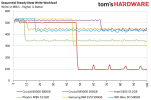
Source: https://www.tomshardware.com/reviews/crucial-bx500-ssd,5377-3.html
where it is obvious that the BX500 drive can't sustain the write speed.
I have therefore ordered 2x used Kingston DC500M 960 GB disks.
My plan is to exchange the 2x Crucial BX500 SSD 1TB for these DC500M disks.
Hopefully, I have found the root cause to my problems and will get rid of the problem.
But getting into this trouble I also realize that I constantly learn things regarding virtualization and it is as always with hobbies turning into a costly experience
So I thought that I should ask for some advices to how I should layout my storage.
Having 4x SSD Disks for Proxmox + VM Storage feels costly and I have not bought any replacements for the Proxmox OS disks, here I'm thinking of going cheaper and use 2x MX500 disks in mirrored ZFS configuration, or if it is possible to use the 2x DC500M disks for both Proxmox and VM storage in a mirrored ZFS setup.
I plan to setup Backup to some USB Disks as a first implementation.
I hope this post can help others having problems with VM's hanging after some uptime, and maybe some advices of how one should layout the storage as a hobby installation.
Before I used Proxmox in a HP EliteDesk G2 to host an Ubuntu server VM and pfSense for just trying. It worked smoothly and I found it interesting so I bought some old server hardware and wanted to have som NAS solution. It caused alot of headache as VM's became unresponsive after a few weeks. Rebooting the server it worked for a few weeks again.
I believe I have identified the problem to the consumer SSDs and especially the cheap Crucial BX500 disks. So I see this post as a post that might help others as well as giving me some inputs how I should layout the storage solution in Proxmox.
Therefore current hardware specification:
Motherboard: Asrock EP2C612-WS
CPUs: 2x Intel(R) Xeon(R) CPU E5-2650L v4 (14 cores/CPU)
RAM: 128 GB DDR4 EEC Memory
Disks:
2x Seagate IronWolf 4TB 5400rpm 256MB
2x Crucial BX500 SSD 1TB
1x Crucial BX500 SSD 240GB
1x Samsung SSD 840 EVO 250GB
Storage Setup:
The whole controller for the IronWolf disks are passthroughed as a PCI Device to a TrueNAS VM.
So they are administrated through TrueNAS and are set up as mirrored ZFS.
2x Crucial BX500 SSD 1TB are setup as ZFS Mirrored in Proxmox named "ProxmoxStorage", for VM storage.
1x Crucial BX500 SSD 240GB & 1x Samsung SSD 840 EVO 250GB: are setup as ZFS Mirrored and this is where Proxmox is installed.
NAS_ISO is shared storage from TrueNAS for ISO Files for Proxmox.
Troubleshooting:
When the VM's became unresponsive it was impossible to even get out any information.
What I could see was messages like:
"INFO: task python3:2770 blocked for more than 120 seconds."
"INFO: task kworker/u32:3:232270 blocked for more than 120 seconds."
After some googling and found threads as:

Out of the blue my server started hanging and I don't know why. When it hangs a few things happen:
1) The web GUI, ssh, and all remote access becomes totally unresponsive
2) All my VMs are hung as well
3) I can't interact with the machine, but the console will have errors that look like:
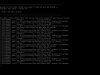
The first part transcribed, for better searchability:
I've found a number of other threads...
1) The web GUI, ssh, and all remote access becomes totally unresponsive
2) All my VMs are hung as well
3) I can't interact with the machine, but the console will have errors that look like:
The first part transcribed, for better searchability:
Code:
     INFO: task kworker/u256:5:279 blocked for more than 120 seconds.
Tainted: P           0     4.15.18-14-pve #1
"echo 0 > /proc/sys/kernel/hung_task_timeout_secs" disables this message.
...
I've found a number of other threads...
- altano
- Replies: 10
- Forum: Proxmox VE: Installation and configuration

Hi,
i am new to proxmox.
hw
intel xeon e3 v5 1235l
fujitsu 3417b2
4x 8tb ironwolf (zfs pool raidz1)
adata 6000 (vms and containers)
usb stick 3.0 (proxmox)
2x Samsung - DDR4 - 16 GB - DIMM 288-PIN - 2400 MHz
now i want to fill my pool with data.
i connected wd-red 8tb to mainboard, mount, cp, ...
i am new to proxmox.
hw
intel xeon e3 v5 1235l
fujitsu 3417b2
4x 8tb ironwolf (zfs pool raidz1)
adata 6000 (vms and containers)
usb stick 3.0 (proxmox)
2x Samsung - DDR4 - 16 GB - DIMM 288-PIN - 2400 MHz
now i want to fill my pool with data.
i connected wd-red 8tb to mainboard, mount, cp, ...
Code:
5801.178361] RIP: 0033:0x7f30c13fc970
[ 5801.178362] RSP: 002b:00007ffd5820ff28 EFLAGS: 00000246 ORIG_RAX: 0000000000000001
[ 5801.178364] RAX: ffffffffffffffda RBX: 0000000000020000 RCX: 00007f30c13fc970
[ 5801.178364] RDX: 0000000000020000 RSI: 000055dd2004f000 RDI: 0000000000000004
[...- mfg666
- Replies: 7
- Forum: Proxmox VE: Installation and configuration
Hello All,
I am real new to Proxmox and I am find some odd behavior that I can't explain:
I am running the system on an MVME drive and have 2 pools - first: 6x 240G SSD (ZFS RAID10) and the second 2x 1T SSD (ZFS Mirror)
the rest of the server is :
2x XEON E5-2680v4
128G ECC Mem
the pveperf gives me:
first: 6x 240G SSD (ZFS...
I am real new to Proxmox and I am find some odd behavior that I can't explain:
I am running the system on an MVME drive and have 2 pools - first: 6x 240G SSD (ZFS RAID10) and the second 2x 1T SSD (ZFS Mirror)
the rest of the server is :
2x XEON E5-2680v4
128G ECC Mem
the pveperf gives me:
CPU BOGOMIPS:      268919.28
REGEX/SECOND:      3175928
HD SIZE:           56.84 GB (/dev/mapper/pve-root)
BUFFERED READS:    1569.19 MB/sec
AVERAGE SEEK TIME: 0.05 ms
FSYNCS/SECOND:     310.44
DNS EXT:           23.97 ms
DNS INT:           6.96 ms (home)
first: 6x 240G SSD (ZFS...
- L.O.S
- Replies: 16
- Forum: Proxmox VE: Installation and configuration
My attention turned to my SSD Disks:
Code:
root@RUUBS:~# pvesm status
Name                  Type     Status           Total            Used       Available        %
NAS_ISO               cifs     active      2059730304        10226432      2049503872    0.50%
ProxmoxStorage     zfspool     active       942931968       518718808       424213160   55.01%
local                  dir     active       180755712         2548608       178207104    1.41%
local-zfs          zfspool     active       178207316              96       178207220    0.00%
Code:
root@RUUBS:~# pveperf /rpool
CPU BOGOMIPS:      123357.08
REGEX/SECOND:      2571720
HD SIZE:           169.95 GB (rpool)
FSYNCS/SECOND:     458.48
DNS EXT:           24.29 ms
DNS INT:           21.43 ms (home)
Code:
root@RUUBS:~# pveperf /ProxmoxStorage
CPU BOGOMIPS:      123357.08
REGEX/SECOND:      2574546
HD SIZE:           404.56 GB (ProxmoxStorage)
FSYNCS/SECOND:     0.02
DNS EXT:           24.78 ms
DNS INT:           20.62 ms (home)
So I have terrible FSYNCS/SECOND and as I found out BX500 is just real crap for this.
I found a review with this picture that I think is showing the cause to the problem:
Source: https://www.tomshardware.com/reviews/crucial-bx500-ssd,5377-3.html
where it is obvious that the BX500 drive can't sustain the write speed.
I have therefore ordered 2x used Kingston DC500M 960 GB disks.
My plan is to exchange the 2x Crucial BX500 SSD 1TB for these DC500M disks.
Hopefully, I have found the root cause to my problems and will get rid of the problem.
But getting into this trouble I also realize that I constantly learn things regarding virtualization and it is as always with hobbies turning into a costly experience
So I thought that I should ask for some advices to how I should layout my storage.
Having 4x SSD Disks for Proxmox + VM Storage feels costly and I have not bought any replacements for the Proxmox OS disks, here I'm thinking of going cheaper and use 2x MX500 disks in mirrored ZFS configuration, or if it is possible to use the 2x DC500M disks for both Proxmox and VM storage in a mirrored ZFS setup.
I plan to setup Backup to some USB Disks as a first implementation.
I hope this post can help others having problems with VM's hanging after some uptime, and maybe some advices of how one should layout the storage as a hobby installation.

