Hi,
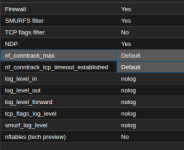
I have an issue where when I enable the Firewall on the Datacenter some VM traffic is blocked even when firewall is not enabled on the VM.
Just to clearify. This is how I reproduce the problem.
1. Connect to a specific VM using the console
2. Connect to a customer site using Cisco VPN client
Result:
The VPN connection is established after valid login.
3. Enable Firewall on the Datacenter in the tree inside Proxmox VE.
4. Check that Firewall is NOT enabled on the given VM (Also Output Policy traffic is set to ACCEPT on the VM and on the Datacenter. Also Forward Policy is set to ACCEPT on the Datacenter, also there are no rules in the Firewall section for the VM, and the Datacenter has normal management rules. Only allow rules are created.)
5. Connect to a customer site using Cisco VPN client
Result:
The VPN client cannot connect and never asks for credentials
6. Disable Firewall on the Datacenter in the tree inside Proxmox VE.
7. Connect to a customer site using Cisco VPN client
Result:
The VPN connection is established after valid login.
Software Versions:
Proxmox VE 9.2 including all updates from the Non-Subscription Repo last week.
VMs a re running on CEPH's.
Please feel free to ask for additional information.
Does anyone know what can be the cause of this problem? There might be more traffic that does not work, but this is very easy for me to test.
Best Regards
Brian
I have an issue where when I enable the Firewall on the Datacenter some VM traffic is blocked even when firewall is not enabled on the VM.
Just to clearify. This is how I reproduce the problem.
1. Connect to a specific VM using the console
2. Connect to a customer site using Cisco VPN client
Result:
The VPN connection is established after valid login.
3. Enable Firewall on the Datacenter in the tree inside Proxmox VE.
4. Check that Firewall is NOT enabled on the given VM (Also Output Policy traffic is set to ACCEPT on the VM and on the Datacenter. Also Forward Policy is set to ACCEPT on the Datacenter, also there are no rules in the Firewall section for the VM, and the Datacenter has normal management rules. Only allow rules are created.)
5. Connect to a customer site using Cisco VPN client
Result:
The VPN client cannot connect and never asks for credentials
6. Disable Firewall on the Datacenter in the tree inside Proxmox VE.
7. Connect to a customer site using Cisco VPN client
Result:
The VPN connection is established after valid login.
Software Versions:
Proxmox VE 9.2 including all updates from the Non-Subscription Repo last week.
VMs a re running on CEPH's.
Please feel free to ask for additional information.
Does anyone know what can be the cause of this problem? There might be more traffic that does not work, but this is very easy for me to test.
Best Regards
Brian