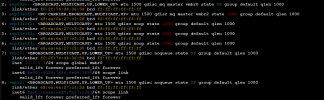
I have installed a Startech Quad Port 10G SFP+ NIC based on the intel XL710 chipset in my custom built rig. Currently having troubles with it. Borrowed a friends 10g NIC (sorry, i'm not familiar with what brand/chipset his NIC is) and with the exact same bridge setup, had NO issues. So it's definitely card and/or driver related from what I can tell. Proxmox recognizes the card with no issue. I can make a bridge with a port attached, give the the bridge an ip, and access proxmox UI from that ip. Sounds great right? I thought so too! Until it came time to attach a VM to that bridge. I have created new containers, new vm's, used old functioning vm's and containers, Attempted to use static and DHCP through containers and vm's. No matter what I do. Nothing attached to this bridge (which by all accounts, is fully functional, due to the fact that i can ping it from an external PC, I can go to prox ui, etc.) can get out. I'm leaning toward a driver problem. Has anybody had this issue? If so, what were the steps taken to resolve it?
System:
Asus Prime trx40-pro s Board
amd Threadripper 3960x
196GB G.skill ddr4 4000 (downclocked to 2666 because manufacturers lie)
Please let me know if anything else is required to troubleshoot this!
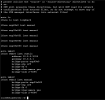
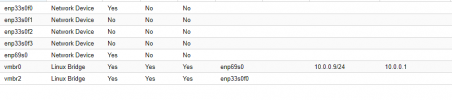
I have since removed the ip from the bridge to make sure no conflicts ensue for proper daily operation. But be sure. if i attach an ip to vmbr2. I CAN ping it from an external PC on the network.
Thank you for any light you can shed on the matter!!!
System:
Asus Prime trx40-pro s Board
amd Threadripper 3960x
196GB G.skill ddr4 4000 (downclocked to 2666 because manufacturers lie)
Please let me know if anything else is required to troubleshoot this!
I have since removed the ip from the bridge to make sure no conflicts ensue for proper daily operation. But be sure. if i attach an ip to vmbr2. I CAN ping it from an external PC on the network.
Thank you for any light you can shed on the matter!!!