Hello,
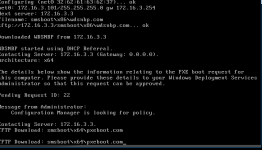
I have installed Proxmox 4.1 for test and I tried to boot a VM over PXE to install it and if the VM tries to boot from the PXE Server then I get the message TFTP Download smsboot\x64\pexebot.com and this loops and doesn't get further. See also Screenshot proxmox_bios.png. This boot attempt was tried with the Seabios Version.
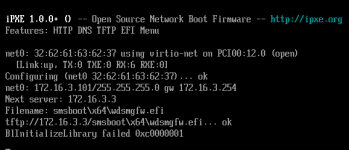
I also tried it with the UEFI Mode and there I get error after downloading the wdsmgfw.efi BlInitalizeLibrary failed 0xc0000001. See also Screenshot proxmox_uefi.png.
I tried it with the Virtio NIC and also with the Intel E1000 NIC.
If I do this with a VMware VM then everything is working with the PXE Boot and I have no errors.
Are there any solution to this?
Thanks for help in advance.
Regards
hitman22
I have installed Proxmox 4.1 for test and I tried to boot a VM over PXE to install it and if the VM tries to boot from the PXE Server then I get the message TFTP Download smsboot\x64\pexebot.com and this loops and doesn't get further. See also Screenshot proxmox_bios.png. This boot attempt was tried with the Seabios Version.
I also tried it with the UEFI Mode and there I get error after downloading the wdsmgfw.efi BlInitalizeLibrary failed 0xc0000001. See also Screenshot proxmox_uefi.png.
I tried it with the Virtio NIC and also with the Intel E1000 NIC.
If I do this with a VMware VM then everything is working with the PXE Boot and I have no errors.
Are there any solution to this?
Thanks for help in advance.
Regards
hitman22