VM no option to disck format qcow2

Dec 22, 2025
7
0
1
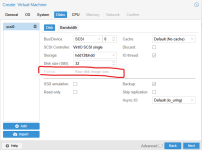
Hello now i install a PVE 9.1.1 in new Dell Server, i make a VM but no have option to change disk format, check the picture attach in this post, any have idea because no have optivion to create VM with other format disk optionsScreenshot 2025-12-22 133529.png
 
Why do you want QCOW2? What does cat /etc/pve/storage.cfg look like?
 
Storages like LVM-Thin or ZFS support snapshots too and tend to be faster. I don't know what you use though. Please share the information I asked for so I do.
 
Storages like LVM-Thin or ZFS support snapshots too and tend to be faster. I don't know what you use though. Please share the information I asked for so I do.
Why do you want QCOW2? What does cat /etc/pve/storage.cfg look like?
root@pvepapisa:~# cat /etc/pve/storage.cfg
dir: local
path /var/lib/vz
content iso,vztmpl,import,backup

lvmthin: local-lvm
thinpool data
vgname pve
content images,rootdir

lvmthin: storage
thinpool SSD
vgname SSD
content images,rootdir
nodes pvepapisa
 
I don't see hdd12tbhdd here. Please use code blocks when sahring logs/config files to preserve the formatting.
 
Hi,

This is normal.

Disk format options depend on the storage type.
  • LVM / ZFS / Ceph → only raw
  • Directory / NFS → qcow2 is available
Your storage only supports raw, so no other options are shown.

Check Datacenter → Storage to see the storage type.

