VM names disappear

jeffgott

New Member
Jan 12, 2026
20
2
3
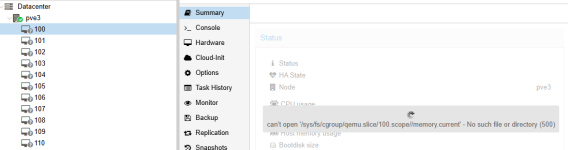
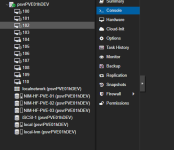
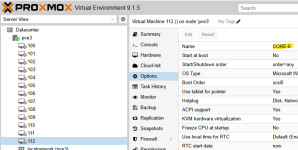
I have had the names of the VM's disappear several times now in Server View - but the names show up in Options for each VM. Several VM's are still running. I can change the view but none will show the names.

This is a standalone server - not part of a cluster - and has the latest updates.

I have been rebooting the Proxmox server to resolve the issue. I have restarted pvestatd and pveproxy as suggested on other threads but neither worked. Rebooting is not a good option. Any ideas what I should do?
1770556204121.png
 
Hi,
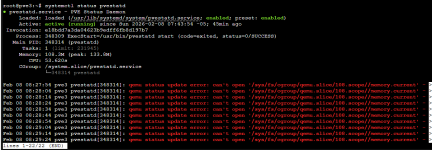
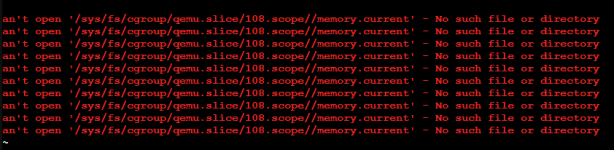
did you ever start the VM manually instead of via the qm start command or the UI? Otherwise, the process should be running inside the systemd scope.

In any case, a fix for this is already applied in git and will be part of the next qemu-server version. Most likely version 9.1.5, but it's not yet packaged.
 
Hi,
did you ever start the VM manually instead of via the qm start command or the UI? Otherwise, the process should be running inside the systemd scope.

In any case, a fix for this is already applied in git and will be part of the next qemu-server version. Most likely version 9.1.5, but it's not yet packaged.
I found out that Veeam was running a backup for that VM and something failed. It appears it left Proxmox in a state where it still thought the VM was running? Once I ran 'qm stop108', the names came back.
 
Maybe Veeam started the VM "manually" outside the systemd scope.
 
I don't see why you are using Veeam backup for Proxmox VM's. Use the in-house vzdump or PBS for VM backups.
 
You could downgrade to qemu-server=9.1.3 in the meantime or manually apply the fix (if you have experience with such things, services need to be restarted then).
 
Hi,


This usually happens when the Proxmox GUI or services don’t refresh the VM list properly, even though the VMs are still running.

You can try restarting Proxmox services instead of rebooting:
systemctl restart pve-cluster pvedaemon pvestatd pveproxy

Also check disk space and VM config files:
df -h
ls /etc/pve/qemu-server/

If it keeps happening, it could be related to pmxcfs or storage issues rather than the VMs themselves.
 
Hi,


This usually happens when the Proxmox GUI or services don’t refresh the VM list properly, even though the VMs are still running.

You can try restarting Proxmox services instead of rebooting:
systemctl restart pve-cluster pvedaemon pvestatd pveproxy

Also check disk space and VM config files:
df -h
ls /etc/pve/qemu-server/

If it keeps happening, it could be related to pmxcfs or storage issues rather than the VMs themselves.
I think I'm good for now. This only seems to happen during a Veeam backup. I will be looking at PBS soon.
 
  • Like
Reactions: gfngfn256