

VM fails to start

jsdellner

New Member
Feb 5, 2025
6
0
1
Hi all,

Preface, I have limited knowledge here so please bare with me.

I have a VM that has suddenly decided to not start. Below is the error I see in the task history of the vm and below that is the entries i see in the Nodes Syslog

As far as troubleshooting goes other than changing the VM to use less memory (thinking perhaps its a resource issues - which it doesnt appear to be) I have no real idea what else to try other than shutdown everything on the node, reboot the node and start again (ideally something i dont want to do).

Appriciate any input - if more information is needed explain it like I am five and I'll get that for you.

root@pve-atlas:~# pveversion -v
proxmox-ve: 7.4-1 (running kernel: 5.15.102-1-pve)
pve-manager: 7.4-3 (running version: 7.4-3/9002ab8a)
pve-kernel-5.15: 7.3-3
pve-kernel-5.15.102-1-pve: 5.15.102-1
pve-kernel-5.15.85-1-pve: 5.15.85-1
pve-kernel-5.15.83-1-pve: 5.15.83-1
pve-kernel-5.15.30-2-pve: 5.15.30-3
ceph-fuse: 15.2.16-pve1
corosync: 3.1.7-pve1
criu: 3.15-1+pve-1
glusterfs-client: 9.2-1
ifupdown2: 3.1.0-1+pmx3
ksm-control-daemon: 1.4-1
libjs-extjs: 7.0.0-1
libknet1: 1.24-pve2
libproxmox-acme-perl: 1.4.4
libproxmox-backup-qemu0: 1.3.1-1
libproxmox-rs-perl: 0.2.1
libpve-access-control: 7.4-2
libpve-apiclient-perl: 3.2-1
libpve-common-perl: 7.3-3
libpve-guest-common-perl: 4.2-4
libpve-http-server-perl: 4.2-1
libpve-rs-perl: 0.7.5
libpve-storage-perl: 7.4-2
libspice-server1: 0.14.3-2.1
lvm2: 2.03.11-2.1
lxc-pve: 5.0.2-2
lxcfs: 5.0.3-pve1
novnc-pve: 1.4.0-1
proxmox-backup-client: 2.3.3-1
proxmox-backup-file-restore: 2.3.3-1
proxmox-kernel-helper: 7.4-1
proxmox-mail-forward: 0.1.1-1
proxmox-mini-journalreader: 1.3-1
proxmox-offline-mirror-helper: 0.5.1-1
proxmox-widget-toolkit: 3.6.3
pve-cluster: 7.3-3
pve-container: 4.4-3
pve-docs: 7.4-2
pve-edk2-firmware: 3.20221111-2
pve-firewall: 4.3-1
pve-firmware: 3.6-4
pve-ha-manager: 3.6.0
pve-i18n: 2.11-1
pve-qemu-kvm: 7.2.0-8
pve-xtermjs: 4.16.0-1
qemu-server: 7.4-2
smartmontools: 7.2-pve3
spiceterm: 3.2-2
swtpm: 0.8.0~bpo11+3
vncterm: 1.7-1
zfsutils-linux: 2.1.9-pve1
root@pve-atlas:~#

TASK ERROR: start failed: command '/usr/bin/taskset --cpu-list --all-tasks 1,3,5,7,9,11,13,15,17,19,21,23,25,27,29,31 /usr/bin/kvm -id 30002 -name 'NiceDCV-Main,debug-threads=on' -no-shutdown -chardev 'socket,id=qmp,path=/var/run/qemu-server/30002.qmp,server=on,wait=off' -mon 'chardev=qmp,mode=control' -chardev 'socket,id=qmp-event,path=/var/run/qmeventd.sock,reconnect=5' -mon 'chardev=qmp-event,mode=control' -pidfile /var/run/qemu-server/30002.pid -daemonize -smbios 'type=1,uuid=98d99f3c-1bd0-49fe-8d99-8e621524d520' -smp '8,sockets=1,cores=8,maxcpus=8' -nodefaults -boot 'menu=on,strict=on,reboot-timeout=1000,splash=/usr/share/qemu-server/bootsplash.jpg' -vnc 'unix:/var/run/qemu-server/30002.vnc,password=on' -cpu 'host,+aes,kvm=off,+kvm_pv_eoi,+kvm_pv_unhalt,+pcid,+pdpe1gb,+spec-ctrl' -m 81920 -object 'memory-backend-ram,id=ram-node0,size=81920M' -numa 'node,nodeid=0,cpus=0-7,memdev=ram-node0' -object 'iothread,id=iothread-virtioscsi0' -object 'iothread,id=iothread-virtioscsi1' -readconfig /usr/share/qemu-server/pve-q35-4.0.cfg -device 'vmgenid,guid=4505f111-bcfa-458c-a84a-7dda368215d8' -device 'usb-tablet,id=tablet,bus=ehci.0,port=1' -device 'vfio-pci,host=0000:82:00.0,id=hostpci0.0,bus=ich9-pcie-port-1,addr=0x0.0,multifunction=on' -device 'vfio-pci,host=0000:82:00.1,id=hostpci0.1,bus=ich9-pcie-port-1,addr=0x0.1' -device 'VGA,id=vga,bus=pcie.0,addr=0x1' -iscsi 'initiator-name=iqn.1993-08.org.debian:01:3b4faca4b27b' -drive 'if=none,id=drive-ide2,media=cdrom,aio=io_uring' -device 'ide-cd,bus=ide.1,unit=0,drive=drive-ide2,id=ide2,bootindex=101' -device 'virtio-scsi-pci,id=virtioscsi0,bus=pci.3,addr=0x1,iothread=iothread-virtioscsi0' -drive 'file=/dev/zvol/configssd/vms/vm-30002-disk-0,if=none,id=drive-scsi0,format=raw,cache=none,aio=io_uring,detect-zeroes=on' -device 'scsi-hd,bus=virtioscsi0.0,channel=0,scsi-id=0,lun=0,drive=drive-scsi0,id=scsi0,rotation_rate=1,bootindex=100' -device 'virtio-scsi-pci,id=virtioscsi1,bus=pci.3,addr=0x2,iothread=iothread-virtioscsi1' -drive 'file=/dev/zvol/configssd/vms/vm-30002-disk-1,if=none,id=drive-scsi1,format=raw,cache=none,aio=io_uring,detect-zeroes=on' -device 'scsi-hd,bus=virtioscsi1.0,channel=0,scsi-id=0,lun=1,drive=drive-scsi1,id=scsi1,rotation_rate=1' -netdev 'type=tap,id=net0,ifname=tap30002i0,script=/var/lib/qemu-server/pve-bridge,downscript=/var/lib/qemu-server/pve-bridgedown,vhost=on,queues=4' -device 'virtio-net-pci,mac=F2:1A:25:67:52:E6,netdev=net0,bus=pci.0,addr=0x12,id=net0,vectors=10,mq=on,packed=on,rx_queue_size=1024,tx_queue_size=1024,bootindex=102,host_mtu=9000' -machine 'type=q35+pve0'' failed: got timeout

Feb 05 09:20:52 pve-atlas pvedaemon[390825]: start VM 30002: UPID:pve-atlas:0005F6A9:F294E350:67A31F64:qmstart:30002:root@pam:
Feb 05 09:20:52 pve-atlas pvedaemon[3960192]: <root@pam> starting task UPID:pve-atlas:0005F6A9:F294E350:67A31F64:qmstart:30002:root@pam:
Feb 05 09:20:52 pve-atlas systemd[1]: Started 30002.scope.
Feb 05 09:20:53 pve-atlas systemd-udevd[391049]: Using default interface naming scheme 'v247'.
Feb 05 09:20:53 pve-atlas systemd-udevd[391049]: ethtool: autonegotiation is unset or enabled, the speed and duplex are not writable.
Feb 05 09:20:53 pve-atlas kernel: device tap30002i0 entered promiscuous mode
Feb 05 09:20:53 pve-atlas kernel: vmbr1: port 8(tap30002i0) entered blocking state
Feb 05 09:20:53 pve-atlas kernel: vmbr1: port 8(tap30002i0) entered disabled state
Feb 05 09:20:53 pve-atlas kernel: vmbr1: port 8(tap30002i0) entered blocking state
Feb 05 09:20:53 pve-atlas kernel: vmbr1: port 8(tap30002i0) entered forwarding state
Feb 05 09:21:01 pve-atlas pvedaemon[3960192]: VM 30002 qmp command failed - VM 30002 qmp command 'query-proxmox-support' failed - got timeout
Feb 05 09:21:10 pve-atlas pvestatd[7259]: VM 30002 qmp command failed - VM 30002 qmp command 'query-proxmox-support' failed - unable to connect to VM 30002 qmp socket - timeout after 51 retries
Feb 05 09:21:11 pve-atlas pvestatd[7259]: status update time (8.625 seconds)
Feb 05 09:21:20 pve-atlas pvestatd[7259]: VM 30002 qmp command failed - VM 30002 qmp command 'query-proxmox-support' failed - unable to connect to VM 30002 qmp socket - timeout after 51 retries
Feb 05 09:21:20 pve-atlas pvestatd[7259]: status update time (8.621 seconds)
Feb 05 09:21:30 pve-atlas pvestatd[7259]: VM 30002 qmp command failed - VM 30002 qmp command 'query-proxmox-support' failed - unable to connect to VM 30002 qmp socket - timeout after 51 retries
Feb 05 09:21:31 pve-atlas pvestatd[7259]: status update time (8.696 seconds)
Feb 05 09:21:40 pve-atlas pvestatd[7259]: VM 30002 qmp command failed - VM 30002 qmp command 'query-proxmox-support' failed - unable to connect to VM 30002 qmp socket - timeout after 51 retries
Feb 05 09:21:41 pve-atlas pvestatd[7259]: status update time (8.683 seconds)
Feb 05 09:21:50 pve-atlas pvestatd[7259]: VM 30002 qmp command failed - VM 30002 qmp command 'query-proxmox-support' failed - unable to connect to VM 30002 qmp socket - timeout after 51 retries
Feb 05 09:21:50 pve-atlas pvestatd[7259]: status update time (8.691 seconds)
Feb 05 09:22:00 pve-atlas pvestatd[7259]: VM 30002 qmp command failed - VM 30002 qmp command 'query-proxmox-support' failed - unable to connect to VM 30002 qmp socket - timeout after 51 retries
Feb 05 09:22:01 pve-atlas pvestatd[7259]: status update time (8.752 seconds)
Feb 05 09:22:10 pve-atlas pvestatd[7259]: VM 30002 qmp command failed - VM 30002 qmp command 'query-proxmox-support' failed - unable to connect to VM 30002 qmp socket - timeout after 51 retries
Feb 05 09:22:11 pve-atlas pvestatd[7259]: status update time (8.689 seconds)
Feb 05 09:22:12 pve-atlas pvedaemon[390825]: start failed: command '/usr/bin/taskset --cpu-list --all-tasks 1,3,5,7,9,11,13,15,17,19,21,23,25,27,29,31 /usr/bin/kvm -id 30002 -name 'NiceDCV-Main,debug-threads=on' -no-shutdown -chardev 'socket,id=qmp,path=/var/run/qemu-server/30002.qmp,server=on,wait=off' -mon 'chardev=qmp,mode=control' -chardev 'socket,id=qmp-event,path=/var/run/qmeventd.sock,reconnect=5' -mon 'chardev=qmp-event,mode=control' -pidfile /var/run/qemu-server/30002.pid -daemonize -smbios 'type=1,uuid=98d99f3c-1bd0-49fe-8d99-8e621524d520' -smp '8,sockets=1,cores=8,maxcpus=8' -nodefaults -boot 'menu=on,strict=on,reboot-timeout=1000,splash=/usr/share/qemu-server/bootsplash.jpg' -vnc 'unix:/var/run/qemu-server/30002.vnc,password=on' -cpu 'host,+aes,kvm=off,+kvm_pv_eoi,+kvm_pv_unhalt,+pcid,+pdpe1gb,+spec-ctrl' -m 81920 -object 'memory-backend-ram,id=ram-node0,size=81920M' -numa 'node,nodeid=0,cpus=0-7,memdev=ram-node0' -object 'iothread,id=iothread-virtioscsi0' -object 'iothread,id=iothread-virtioscsi1' -readconfig /usr/share/qemu-server/pve-q35-4.0.cfg -device 'vmgenid,guid=4505f111-bcfa-458c-a84a-7dda368215d8' -device 'usb-tablet,id=tablet,bus=ehci.0,port=1' -device 'vfio-pci,host=0000:82:00.0,id=hostpci0.0,bus=ich9-pcie-port-1,addr=0x0.0,multifunction=on' -device 'vfio-pci,host=0000:82:00.1,id=hostpci0.1,bus=ich9-pcie-port-1,addr=0x0.1' -device 'VGA,id=vga,bus=pcie.0,addr=0x1' -iscsi 'initiator-name=iqn.1993-08.org.debian:01:3b4faca4b27b' -drive 'if=none,id=drive-ide2,media=cdrom,aio=io_uring' -device 'ide-cd,bus=ide.1,unit=0,drive=drive-ide2,id=ide2,bootindex=101' -device 'virtio-scsi-pci,id=virtioscsi0,bus=pci.3,addr=0x1,iothread=iothread-virtioscsi0' -drive 'file=/dev/zvol/configssd/vms/vm-30002-disk-0,if=none,id=drive-scsi0,format=raw,cache=none,aio=io_uring,detect-zeroes=on' -device 'scsi-hd,bus=virtioscsi0.0,channel=0,scsi-id=0,lun=0,drive=drive-scsi0,id=scsi0,rotation_rate=1,bootindex=100' -device 'virtio-scsi-pci,id=virtioscsi1,bus=pci.3,addr=0x2,iothread=iothread-virtioscsi1' -drive 'file=/dev/zvol/configssd/vms/vm-30002-disk-1,if=none,id=drive-scsi1,format=raw,cache=none,aio=io_uring,detect-zeroes=on' -device 'scsi-hd,bus=virtioscsi1.0,channel=0,scsi-id=0,lun=1,drive=drive-scsi1,id=scsi1,rotation_rate=1' -netdev 'type=tap,id=net0,ifname=tap30002i0,script=/var/lib/qemu-server/pve-bridge,downscript=/var/lib/qemu-server/pve-bridgedown,vhost=on,queues=4' -device 'virtio-net-pci,mac=F2:1A:25:67:52:E6,netdev=net0,bus=pci.0,addr=0x12,id=net0,vectors=10,mq=on,packed=on,rx_queue_size=1024,tx_queue_size=1024,bootindex=102,host_mtu=9000' -machine 'type=q35+pve0'' failed: got timeout
 
Hi,
please upgrade to a current version and see if the issue persists. Proxmox VE 7 is end of life since July:
https://pve.proxmox.com/wiki/Upgrade_from_7_to_8
https://pve.proxmox.com/wiki/FAQ

You can specify a custom timeout when starting the VM with qm start <ID> --timeout <seconds>
Thank you for the response.

The start with timeout didn't work, but I tried reducing the system memory down to 16gb and the VM started, however, this doesnt really make sense as the node has plenty of free memory.

Im now struggling to shutdown the VM - when i send the shutdown I get this error - TASK ERROR: VM quit/powerdown failed - got timeout

I wanted to try shutting down the VM and increasing memory allocation - maybe something has locked resources?
 
Thank you for the response.

The start with timeout didn't work, but I tried reducing the system memory down to 16gb and the VM started, however, this doesnt really make sense as the node has plenty of free memory.
But below, you state that the VM is now running? So how did you start it then?

Im now struggling to shutdown the VM - when i send the shutdown I get this error - TASK ERROR: VM quit/powerdown failed - got timeout

I wanted to try shutting down the VM and increasing memory allocation - maybe something has locked resources?
You can always shut down from within the VM itself and if the guest is unresponsive, using Stop instead of Shutdown from outside the VM as a last resort.
 
But below, you state that the VM is now running? So how did you start it then?
I reduced the memory allocation from 80GB down to 32GB, the nodes has more than enough free resource to allow 80GB but the server only boots when i set the memory allocation low.

I just stopped the Vm and increase from 32 to 64 GB, same error.

Is there any chance somethig could have taken memory and not freed it?
 
What kind of start timeout did you specify? If you use passthrough it might be necessary that all memory is allocated right away for DMA, that can take a long time. Proxmox VE 8 has better defaults for the start timeout with PCI passthrough.
 
What kind of start timeout did you specify? If you use passthrough it might be necessary that all memory is allocated right away for DMA, that can take a long time. Proxmox VE 8 has better defaults for the start timeout with PCI passthrough.
qm start ID --timeout 60

Sorry but Im not sure what you mean by passthrough.

It still doesnt make sense that even with 64gb of memory allocated to the VM the host node has plenty of free resource.

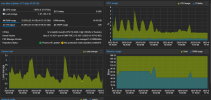
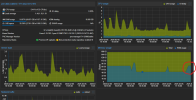
Below is the resource view of the host resources with the VM NOT running and below that with the VM running with 32GB

1738750790705.png1738751176836.png
 
qm start ID --timeout 60
That's likely too little. I'd try 300.

Sorry but Im not sure what you mean by passthrough.
Code:
-device 'vfio-pci,host=0000:82:00.1,id=hostpci0.1,bus=ich9-pcie-port-1,addr=0x0.1'
you pass through a device from the host to the VM.

It still doesnt make sense that even with 64gb of memory allocated to the VM the host node has plenty of free resource.
The issue is not that there are not enough resources, but that it takes too long to reserve/allocate the memory for the VM instance.
 
That's likely too little. I'd try 300.
Hi apologies for my lack of understanding.

Below is the logs from timeout at 300 and 600 - same behavior.

Feb 06 08:02:27 pve-atlas pvedaemon[2795467]: <root@pam> starting task UPID:pve-atlas:002B3D2C:F3118B2E:67A45E83:vncproxy:30002:root@pam:
Feb 06 08:02:27 pve-atlas pvedaemon[2833708]: starting vnc proxy UPID:pve-atlas:002B3D2C:F3118B2E:67A45E83:vncproxy:30002:root@pam:
Feb 06 08:02:32 pve-atlas qm[2833797]: VM 30002 qmp command failed - VM 30002 qmp command 'set_password' failed - unable to connect to VM 30002 qmp socket - timeout after 51 retries
Feb 06 08:02:32 pve-atlas pvedaemon[2833708]: Failed to run vncproxy.
Feb 06 08:02:32 pve-atlas pvedaemon[2795467]: <root@pam> end task UPID:pve-atlas:002B3D2C:F3118B2E:67A45E83:vncproxy:30002:root@pam: Failed to run vncproxy.
Feb 06 08:02:36 pve-atlas pvestatd[7259]: VM 30002 qmp command failed - VM 30002 qmp command 'query-proxmox-support' failed - unable to connect to VM 30002 qmp socket - timeout after 51 retries
Feb 06 08:02:36 pve-atlas pvestatd[7259]: status update time (8.802 seconds)
Feb 06 08:02:46 pve-atlas pvestatd[7259]: VM 30002 qmp command failed - VM 30002 qmp command 'query-proxmox-support' failed - unable to connect to VM 30002 qmp socket - timeout after 51 retries
Feb 06 08:02:47 pve-atlas pvestatd[7259]: status update time (8.655 seconds)
Feb 06 08:02:50 pve-atlas pvedaemon[308709]: VM 30002 qmp command failed - VM 30002 qmp command 'query-proxmox-support' failed - unable to connect to VM 30002 qmp socket - timeout after 51 retries
Feb 06 08:02:53 pve-atlas pvedaemon[308709]: <root@pam> starting task UPID:pve-atlas:002B5120:F31195A4:67A45E9D:vncshell::root@pam:
Feb 06 08:02:53 pve-atlas pvedaemon[2838816]: starting termproxy UPID:pve-atlas:002B5120:F31195A4:67A45E9D:vncshell::root@pam:
Feb 06 08:02:54 pve-atlas pvedaemon[2795467]: <root@pam> successful auth for user 'root@pam'
Feb 06 08:02:54 pve-atlas login[2838821]: pam_unix(login:session): session opened for user root(uid=0) by root(uid=0)
Feb 06 08:02:54 pve-atlas systemd-logind[6150]: New session 47558 of user root.
Feb 06 08:02:54 pve-atlas systemd[1]: Started Session 47558 of user root.
Feb 06 08:02:54 pve-atlas login[2838827]: ROOT LOGIN on '/dev/pts/8'
Feb 06 08:02:55 pve-atlas systemd[1]: session-47558.scope: Succeeded.
Feb 06 08:02:55 pve-atlas systemd-logind[6150]: Session 47558 logged out. Waiting for processes to exit.
Feb 06 08:02:55 pve-atlas systemd-logind[6150]: Removed session 47558.
Feb 06 08:02:56 pve-atlas pvedaemon[308709]: <root@pam> end task UPID:pve-atlas:002B5120:F31195A4:67A45E9D:vncshell::root@pam: OK
Feb 06 08:02:56 pve-atlas pvestatd[7259]: VM 30002 qmp command failed - VM 30002 qmp command 'query-proxmox-support' failed - unable to connect to VM 30002 qmp socket - timeout after 51 retries
Feb 06 08:02:57 pve-atlas pvestatd[7259]: status update time (8.655 seconds)
Feb 06 08:03:05 pve-atlas pvedaemon[3183438]: worker exit
Feb 06 08:03:05 pve-atlas pvedaemon[7385]: worker 3183438 finished
Feb 06 08:03:05 pve-atlas pvedaemon[7385]: starting 1 worker(s)
Feb 06 08:03:05 pve-atlas pvedaemon[7385]: worker 2840821 started
Feb 06 08:03:06 pve-atlas pvestatd[7259]: VM 30002 qmp command failed - VM 30002 qmp command 'query-proxmox-support' failed - unable to connect to VM 30002 qmp socket - timeout after 51 retries
Feb 06 08:03:06 pve-atlas pvestatd[7259]: status update time (8.720 seconds)
Feb 06 08:03:16 pve-atlas pvestatd[7259]: VM 30002 qmp command failed - VM 30002 qmp command 'query-proxmox-support' failed - unable to connect to VM 30002 qmp socket - timeout after 51 retries
Feb 06 08:03:17 pve-atlas pvestatd[7259]: status update time (8.646 seconds)
Feb 06 08:03:26 pve-atlas pvestatd[7259]: VM 30002 qmp command failed - VM 30002 qmp command 'query-proxmox-support' failed - unable to connect to VM 30002 qmp socket - timeout after 51 retries
Feb 06 08:03:27 pve-atlas pvestatd[7259]: status update time (8.646 seconds)
Feb 06 08:03:36 pve-atlas pvestatd[7259]: VM 30002 qmp command failed - VM 30002 qmp command 'query-proxmox-support' failed - unable to connect to VM 30002 qmp socket - timeout after 51 retries
Feb 06 08:03:36 pve-atlas pvestatd[7259]: status update time (8.676 seconds)
Feb 06 08:03:46 pve-atlas pvestatd[7259]: VM 30002 qmp command failed - VM 30002 qmp command 'query-proxmox-support' failed - unable to connect to VM 30002 qmp socket - timeout after 51 retries
Feb 06 08:03:47 pve-atlas pvestatd[7259]: status update time (8.678 seconds)
Feb 06 08:03:56 pve-atlas pvestatd[7259]: VM 30002 qmp command failed - VM 30002 qmp command 'query-proxmox-support' failed - unable to connect to VM 30002 qmp socket - timeout after 51 retries
Feb 06 08:03:57 pve-atlas pvestatd[7259]: status update time (8.683 seconds)
Feb 06 08:04:06 pve-atlas pvestatd[7259]: VM 30002 qmp command failed - VM 30002 qmp command 'query-proxmox-support' failed - unable to connect to VM 30002 qmp socket - timeout after 51 retries
Feb 06 08:04:06 pve-atlas pvestatd[7259]: status update time (8.677 seconds)
Feb 06 08:04:16 pve-atlas pvestatd[7259]: VM 30002 qmp command failed - VM 30002 qmp command 'query-proxmox-support' failed - unable to connect to VM 30002 qmp socket - timeout after 51 retries
Feb 06 08:04:17 pve-atlas pvestatd[7259]: status update time (8.662 seconds)
Feb 06 08:04:26 pve-atlas pvestatd[7259]: VM 30002 qmp command failed - VM 30002 qmp command 'query-proxmox-support' failed - unable to connect to VM 30002 qmp socket - timeout after 51 retries
Feb 06 08:04:27 pve-atlas pvestatd[7259]: status update time (8.713 seconds)
Feb 06 08:04:36 pve-atlas pvestatd[7259]: VM 30002 qmp command failed - VM 30002 qmp command 'query-proxmox-support' failed - unable to connect to VM 30002 qmp socket - timeout after 51 retries
Feb 06 08:04:36 pve-atlas pvestatd[7259]: status update time (8.674 seconds)
Feb 06 08:04:39 pve-atlas kernel: vfio-pci 0000:82:00.0: vfio_ecap_init: hiding ecap 0x1e@0x258
Feb 06 08:04:39 pve-atlas kernel: vfio-pci 0000:82:00.0: vfio_ecap_init: hiding ecap 0x19@0x900
Feb 06 08:04:39 pve-atlas kernel: vfio-pci 0000:82:00.0: vfio_ecap_init: hiding ecap 0x26@0xc1c
Feb 06 08:04:39 pve-atlas kernel: vfio-pci 0000:82:00.0: vfio_ecap_init: hiding ecap 0x27@0xd00
Feb 06 08:04:39 pve-atlas kernel: vfio-pci 0000:82:00.0: vfio_ecap_init: hiding ecap 0x25@0xe00
Feb 06 08:04:39 pve-atlas kernel: vfio-pci 0000:82:00.1: vfio_ecap_init: hiding ecap 0x25@0x160
Feb 06 08:04:40 pve-atlas kernel: vmbr1: port 8(tap30002i0) entered disabled state
Feb 06 08:04:40 pve-atlas kernel: zd96: p1
Feb 06 08:04:40 pve-atlas kernel: zd384: p1 p2 p3
Feb 06 08:04:41 pve-atlas pvestatd[7259]: VM 30002 qmp command failed - VM 30002 not running
Feb 06 08:04:42 pve-atlas qm[2830260]: <root@pam> end task UPID:pve-atlas:002B3099:F3118424:67A45E71:qmstart:30002:root@pam: unable to read tail (got 0 bytes)
Feb 06 08:04:42 pve-atlas systemd[1]: session-47557.scope: Succeeded.
Feb 06 08:04:42 pve-atlas systemd-logind[6150]: Removed session 47557.
Feb 06 08:04:47 pve-atlas systemd[1]: 30002.scope: Succeeded.
Feb 06 08:04:47 pve-atlas systemd[1]: 30002.scope: Consumed 2min 34.460s CPU time.
Feb 06 08:05:13 pve-atlas pvedaemon[308709]: <root@pam> update VM 30002: -balloon 0 -delete shares -memory 32768
Feb 06 08:05:13 pve-atlas pvedaemon[308709]: cannot delete 'shares' - not set in current configuration!
 
Code:
Feb 06 08:04:39 pve-atlas kernel: vfio-pci 0000:82:00.0: vfio_ecap_init: hiding ecap 0x1e@0x258
Feb 06 08:04:39 pve-atlas kernel: vfio-pci 0000:82:00.0: vfio_ecap_init: hiding ecap 0x19@0x900
Feb 06 08:04:39 pve-atlas kernel: vfio-pci 0000:82:00.0: vfio_ecap_init: hiding ecap 0x26@0xc1c
Feb 06 08:04:39 pve-atlas kernel: vfio-pci 0000:82:00.0: vfio_ecap_init: hiding ecap 0x27@0xd00
Feb 06 08:04:39 pve-atlas kernel: vfio-pci 0000:82:00.0: vfio_ecap_init: hiding ecap 0x25@0xe00
Feb 06 08:04:39 pve-atlas kernel: vfio-pci 0000:82:00.1: vfio_ecap_init: hiding ecap 0x25@0x160
Feb 06 08:04:40 pve-atlas kernel: vmbr1: port 8(tap30002i0) entered disabled state
Feb 06 08:04:40 pve-atlas kernel:  zd96: p1
Feb 06 08:04:40 pve-atlas kernel:  zd384: p1 p2 p3
Feb 06 08:04:41 pve-atlas pvestatd[7259]: VM 30002 qmp command failed - VM 30002 not running
Feb 06 08:04:42 pve-atlas qm[2830260]: <root@pam> end task UPID:pve-atlas:002B3099:F3118424:67A45E71:qmstart:30002:root@pam: unable to read tail (got 0 bytes)
Seems like it might be an issue with the passthrough. Please try to start it without passthrough to see if that is the case. What kind of device are you passing through? Maybe also upgrade to a current version and see if the issue persists. Could very well be that it's fixed in a more recent kernel.
 
Im assuming that this is the passthrough device.

1738835898965.png

Which, again purely guessing here, is the nvidia GPU.

1738835941370.png

I will try and find a window to shutdown and test this.
 
@jsdellner @fiona Hi! I have the same problem, my version is also 7.4-1, this problem has troubled me for a week, I found that when you use 'qm showcmd vmid > vmid.sh' in the background shell, and then delete the 'daemonize' parameter, you can start the vm normally.
 
Code:
Feb 06 08:04:39 pve-atlas kernel: vfio-pci 0000:82:00.0: vfio_ecap_init: hiding ecap 0x1e@0x258
Feb 06 08:04:39 pve-atlas kernel: vfio-pci 0000:82:00.0: vfio_ecap_init: hiding ecap 0x19@0x900
Feb 06 08:04:39 pve-atlas kernel: vfio-pci 0000:82:00.0: vfio_ecap_init: hiding ecap 0x26@0xc1c
Feb 06 08:04:39 pve-atlas kernel: vfio-pci 0000:82:00.0: vfio_ecap_init: hiding ecap 0x27@0xd00
Feb 06 08:04:39 pve-atlas kernel: vfio-pci 0000:82:00.0: vfio_ecap_init: hiding ecap 0x25@0xe00
Feb 06 08:04:39 pve-atlas kernel: vfio-pci 0000:82:00.1: vfio_ecap_init: hiding ecap 0x25@0x160
Feb 06 08:04:40 pve-atlas kernel: vmbr1: port 8(tap30002i0) entered disabled state
Feb 06 08:04:40 pve-atlas kernel:  zd96: p1
Feb 06 08:04:40 pve-atlas kernel:  zd384: p1 p2 p3
Feb 06 08:04:41 pve-atlas pvestatd[7259]: VM 30002 qmp command failed - VM 30002 not running
Feb 06 08:04:42 pve-atlas qm[2830260]: <root@pam> end task UPID:pve-atlas:002B3099:F3118424:67A45E71:qmstart:30002:root@pam: unable to read tail (got 0 bytes)
Seems like it might be an issue with the passthrough. Please try to start it without passthrough to see if that is the case. What kind of device are you passing through? Maybe also upgrade to a current version and see if the issue persists. Could very well be that it's fixed in a more recent kernel.
It is normal to start the VM without passthrough.
 
Upgrading might solve the problem, but I'd rather know what happened in between. Isn't that interesting?
 
Upgrading might solve the problem, but I'd rather know what happened in between. Isn't that interesting?
Well, in principle yes, but if the issue is already fixed in current versions it's not worth putting in much effort to find out IMHO (there's already enough work to do ;)). If the issue is still present with current versions, it certainly is worth investigating.
 
Well, in principle yes, but if the issue is already fixed in current versions it's not worth putting in much effort to find out IMHO (there's already enough work to do ;)). If the issue is still present with current versions, it certainly is worth investigating.
You are right, I checked the PVE roadmap and found the fix for this issue in Proxmox VE 8.1. Submit as follows:
Code:
commit 95f1de689e3c898382f8fcc721b024718a0c910a
Author: Friedrich Weber <f.weber@proxmox.com>
Date:   Fri Oct 6 14:15:33 2023 +0200

    vm start: set higher timeout if using PCI passthrough
    
    The default VM startup timeout is `max(30, VM memory in GiB)` seconds.
    Multiple reports in the forum [0] [1] and the bug tracker [2] suggest
    this is too short when using PCI passthrough with a large amount of VM
    memory, since QEMU needs to map the whole memory during startup (see
    comment #2 in [2]). As a result, VM startup fails with "got timeout".
    
    To work around this, set a larger default timeout if at least one PCI
    device is passed through. The question remains how to choose an
    appropriate timeout. Users reported the following startup times:
    
    ref | RAM | time  | ratio (s/GiB)
    ---------------------------------
    [1] | 60G |  135s |  2.25
    [1] | 70G |  157s |  2.24
    [1] | 80G |  277s |  3.46
    [2] | 65G |  213s |  3.28
    [2] | 96G | >290s | >3.02
    
    The data does not really indicate any simple (e.g. linear)
    relationship between RAM and startup time (even data from the same
    source). However, to keep the heuristic simple, assume linear growth
    and multiply the default timeout by 4 if at least one `hostpci[n]`
    option is present, obtaining `4 * max(30, VM memory in GiB)`. This
    covers all cases above, and should still leave some headroom.
    
    [0]: https://forum.proxmox.com/threads/83765/post-552071
    [1]: https://forum.proxmox.com/threads/126398/post-592826
    [2]: https://bugzilla.proxmox.com/show_bug.cgi?id=3502
    
    Suggested-by: Fiona Ebner <f.ebner@proxmox.com>
    Signed-off-by: Friedrich Weber <f.weber@proxmox.com>

diff --git a/PVE/QemuServer/Helpers.pm b/PVE/QemuServer/Helpers.pm
index 8817427a..0afb6317 100644
--- a/PVE/QemuServer/Helpers.pm
+++ b/PVE/QemuServer/Helpers.pm
@@ -152,6 +152,13 @@ sub config_aware_timeout {
        $timeout = int($memory/1024);
     }
 
+    # When using PCI passthrough, users reported much higher startup times,
+    # growing with the amount of memory configured. Constant factor chosen
+    # based on user reports.
+    if (grep(/^hostpci[0-9]+$/, keys %$config)) {
+       $timeout *= 4;
+    }
+
     if ($is_suspended && $timeout < 300) {
        $timeout = 300;
     }

Thanks to the PVE team for their hard work, I have to praise them, it's great!:)

