

VM disappeared!

josuloku

New Member
Jan 23, 2023
5
0
1
HELLO, when I remove a node from the cluster, I can no longer list the VMs of that node.

If I see the storage of those VM's as LVM (/dev/sda) but I don't know how to mount them in another vm to recover the data.
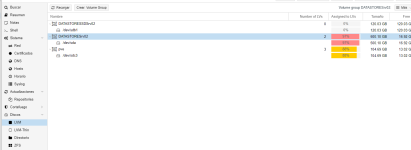
1674467157058.png

Is there a manual about it?

When listing the machines with QM list or PCT list does not show anything

Thank you!!
 
The manual explicitly warns to move VMs off a node before removing it. Restoring it from backups might be the easiest way to fix it.
Maybe you can disconnect the removed node from the cluster, convince it that it does not need a quorum, and make a backup of the VM to a removable drive?
Maybe if you recreate an empty VM (if you remember the configuration), you might be able to copy the data from the old drive to the virtual disk(s), by attaching the old physical drive to one of the (working) nodes of your cluster?
 
The manual explicitly warns to move VMs off a node before removing it. Restoring it from backups might be the easiest way to fix it.
Maybe you can disconnect the removed node from the cluster, convince it that it does not need a quorum, and make a backup of the VM to a removable drive?
Maybe if you recreate an empty VM (if you remember the configuration), you might be able to copy the data from the old drive to the virtual disk(s), by attaching the old physical drive to one of the (working) nodes of your cluster?
Thks for all

The idea was just to add that disk to another virtual machine, but I don't see how.

No, I don't have a backup of that VM
 
Hi,
can you still see the VMs disk when you run lvs? Is the LVM present in the storage configuration (Datacenter > Storage in the UI)? If not, add it.

The folder /etc/pve/nodes/<deleted node>/qemu-server was/is the one containing the VM's configuration file.

If it does exist, just move the configuration to the remaining node.

If it doesn't exist anymore, you need to create a new VM with the same settings and without any disks, but using the same ID as the disk has. Then run qm rescan --vmid <ID>. After that, the disk will show up as an unused disk for the VM and can be attached in the UI.
 
Luckily there is this thread, I had two clustered machines that began to do strange things, first of all none got the clusters to update, I tried everything with DNS, Repositories ... and they started to reboot, probably because of some synchronization error, both clusters had different versions.

I decided to separate them following the instructions of the official documentation (taking into account the risks involved). The first cluster was fine but the second one the VMs disappeared and all the hard disks appeared in RAW format. I was able to verify that when I created a new VM with the number qm that belonged to it, I could reconnect the disks. So I booted a Linux Live installation and from there I was able to recover the data.