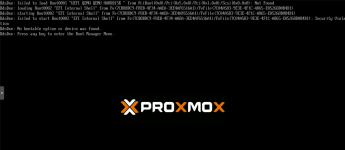
VM created from raw disk won't boot off scsi0

kenchilada

New Member
Sep 23, 2024
9
0
1
Trying to move a few Windows VMs from TrueNAS Scale. Created VM in proxmox with an LVM scsi0, then used dd to copy raw zvol over...

Bash:
 dd if=/dev/zvol/antares/Neptune-b26xb bs=1M status=progress |ssh root@192.168.1.5 'dd of=/dev/pve/vm-101-disk-0 bs=1M'

Start VM, proxmox does not recognize scsi0 as bootable.

What am I missing?

Thanks!

 
Output of qm config:

Code:
agent: 0
boot: order=scsi0;ide2
cores: 4
cpu: x86-64-v2-AES
ide2: none,media=cdrom
memory: 8192
meta: creation-qemu=9.0.2,ctime=1729608982
name: neptune-win11
net0: virtio=00:a0:98:76:86:c1,bridge=vmbr0,firewall=1
numa: 0
ostype: l26
scsi0: local-lvm:vm-101-disk-0,iothread=1,size=102G
scsihw: virtio-scsi-single
smbios1: uuid=a49a140e-e25f-4b5d-af53-52e59165b55c
sockets: 1
vmgenid: 93fb59df-5263-45c4-b289-6d8a62242f40
 
Just realized the main issue... the original VM was booting UEFI and I was using the wrong BIOS.

After changing BIOS I get a little farther...

by.png
 
Added a UEFI disk, set my imported raw disk as second disk scsi0, set boot order.

Still bumbling my way through it, now stuck here...

Screenshot_3.png
 
Started over.

Created a new VM, bios type UEFI, created a UEFI disk, created a TPM disk, created a scsi0 LVM disk. Used dd to copy raw image into scsi0.

Still stuck. Booting Win11 ISO recovery tools, I am not able to see disk with diskpart and bcdedit is empty.

I hate UEFI.
 
Do you have the qemu guest tools installed inside the Windows VM? It is required otherwise Windows has no driver for virtio-scsi. If not you could try one of the other SCSI options or SATA.

I had virtio-win installed and thought that was enough.

But... I moved the disk to a SATA device and it started right up, thanks for your help!!!