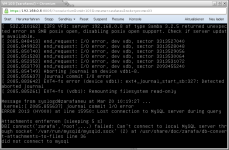
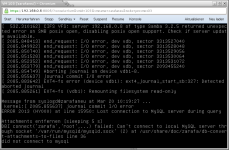
VM crash if CPU Socket is > 1 Filesystem corrupted

Sep 28, 2011
34
1
28
Hello,

I've tried to add more Sockets and Cores to an VM with Debian 7.2 insde.
The Configuration with 1 Socket and 4 cores, the system runs stable for over 6 months.
Now I've tried to change the Configuration to 2 Sokets and each with 4 Cores.
A week after this Change, the VM hangs, crashes and the root filesystem get corrupted.
I've no idea what is the problem. Bug?
Any ideas?

Server is a HP DL380 G7 2x Xeon E5645 with HT -> 24 Thread and 64 GB Ram

thanks for help,
s.gruner

pveversion -v:
running kernel: 2.6.32-22-pve
proxmox-ve-2.6.32: 3.0-107
pve-kernel-2.6.32-22-pve: 2.6.32-107
pve-kernel-2.6.32-20-pve: 2.6.32-100
pve-kernel-2.6.32-16-pve: 2.6.32-82
pve-kernel-2.6.32-19-pve: 2.6.32-93
lvm2: 2.02.95-pve3
clvm: 2.02.95-pve3
corosync-pve: 1.4.5-1
openais-pve: 1.1.4-3
libqb0: 0.11.1-2
redhat-cluster-pve: 3.2.0-2
resource-agents-pve: 3.9.2-4
fence-agents-pve: 4.0.0-1
pve-cluster: 3.0-4
qemu-server: 3.0-20
pve-firmware: 1.0-23
libpve-common-perl: 3.0-4
libpve-access-control: 3.0-4
libpve-storage-perl: 3.0-8
vncterm: 1.1-4
vzctl: 4.0-1pve3
vzprocps: 2.0.11-2
vzquota: 3.1-2
pve-qemu-kvm: 1.4-13
ksm-control-daemon: 1.1-1
 
Last edited:
first, upgrade to latest 3.2

and I do not think that the corrupted file system is related to the CPU count. check your storage hardware and memory.
 
hi,

i try to get this symptoms in an extra test vm with the setting I need.
here is the config of the vm:

bootdisk: scsi0
cores: 4
ide2: none,media=cdrom
keyboard: de
memory: 32768
name: xxxxxxxxxxx
net0: e1000=8E:01:7A:47:FC:A6,bridge=vmbr0
ostype: l26
scsi0: storage:103/vm-103-disk-1.qcow2,format=qcow2,size=100G
scsi1: storage:103/vm-103-disk-2.qcow2,format=qcow2,size=2000G
sockets: 1


Options:

start at boot: no
startorder: order=any
OS Type: Linux 3.X/2.6 Kernel
boot order: cd-rom, Disk'scsi0'
use tablet for pointer: yes
acpi support: yes
scsi controller type: default(lsi)
KCM hardware virtualization: yes
cpu units: 1000
freeze cpu at startup: no
use local time for RTC: no
TRC start date: now

the system runs over a week under heavy load.
Suddenly the system crashes. I've found only one thing in the syslog of the system that could be a reason:

...
Mar 19 16:58:16 zarafaneu kernel: [24412.660694] sd 2:0:1:0: [sdb] Result: hostbyte=DID_OK driverbyte=DRIVER_SENSE
Mar 19 16:58:16 zarafaneu kernel: [24412.660701] sd 2:0:1:0: [sdb] Sense Key : Illegal Request [current]
Mar 19 16:58:16 zarafaneu kernel: [24412.660706] sd 2:0:1:0: [sdb] Add. Sense: Invalid field in cdb
Mar 19 16:58:16 zarafaneu kernel: [24412.660712] sd 2:0:1:0: [sdb] CDB: Write(10): 2a 00 01 94 18 00 00 04 00 00
Mar 19 16:58:16 zarafaneu kernel: [24412.660746] end_request: I/O error, dev sdb, sector 26482688
Mar 19 16:58:16 zarafaneu kernel: [24412.661493] Buffer I/O error on device sdb1, logical block 3310080
Mar 19 16:58:16 zarafaneu kernel: [24412.662251] Buffer I/O error on device sdb1, logical block 3310081
Mar 19 16:58:16 zarafaneu kernel: [24412.663016] Buffer I/O error on device sdb1, logical block 3310082
...
...
Mar 19 16:58:16 zarafaneu kernel: [24412.664623] Buffer I/O error on device sdb1, logical block 3310206
Mar 19 16:58:16 zarafaneu kernel: [24412.664623] Buffer I/O error on device sdb1, logical block 3310207
Mar 19 16:58:16 zarafaneu kernel: [24412.664623] EXT4-fs warning (device sdb1): ext4_end_bio:250: I/O error writing to inode 74448937 (offset 7946108928 size 524288 starting block 3310464)
Mar 19 16:58:16 zarafaneu kernel: [24412.784707] sd 2:0:1:0: [sdb] Unhandled error code
Mar 19 16:58:16 zarafaneu kernel: [24412.784708] sd 2:0:1:0: [sdb] Result: hostbyte=DID_SOFT_ERROR driverbyte=DRIVER_OK
Mar 19 16:58:16 zarafaneu kernel: [24412.784711] sd 2:0:1:0: [sdb] CDB: Write(10): 2a 00 01 94 24 00 00 04 00 00
Mar 19 16:58:16 zarafaneu kernel: [24412.784716] end_request: I/O error, dev sdb, sector 26485760
Mar 19 16:58:16 zarafaneu kernel: [24412.785559] Buffer I/O error on device sdb1, logical block 3310464
Mar 19 16:58:16 zarafaneu kernel: [24412.786316] Buffer I/O error on device sdb1, logical block 3310465
Mar 19 16:58:16 zarafaneu kernel: [24412.787066] Buffer I/O error on device sdb1, logical block 3310466
...


The hardware of the Host itself is monitored by HP iLo and reports a good health status for all hardware components; this couldn't be the reason.
The problem appears on two different hosts with two different VM's. The other 18 VM's (on three hosts) run normally at the moment.

The errors are not exact reproducible but appears suddenly and random.
Could it be possible that the "SCSI-Controller-Type" default(LSI) is the reason? I've read there are a few Bugs with this controller, but not exact which one.

i try virtio for hdd now; is it neccessary to change the "SCSI Controller Type" Option to "VIRTIO" too?


EDIT: I've tested with virtio hdd and virtio controller. the VM crashed after 30 min (like all the other times ...)
MitVirtio.png

the guest System is Debian wheezy with 3.2 kernel. It crashes all the time in any test-vm with debian as guest. virtio doesn't work with the build-in kernel modules? any ideas?

thanks for help
s.gruner
 
Last edited:
...

The errors are not exact reproducible but appears suddenly and random.
Could it be possible that the "SCSI-Controller-Type" default(LSI) is the reason? I've read there are a few Bugs with this controller, but not exact which one.

this is not widely used. I recommend to use always virtio.

i try virtio for hdd now; is it neccessary to change the "SCSI Controller Type" Option to "VIRTIO" too?
..

No, if you choose virtio the scsi controller is not used. please note, virtio is not virtio-scsi.
 
EDIT: I've tested with virtio hdd and virtio controller. the VM crashed after 30 min (like all the other times ...)
MitVirtio.png

the guest System is Debian wheezy with 3.2 kernel. It crashes all the time in any test-vm with debian as guest. virtio doesn't work with the build-in kernel modules? any ideas?

doesn't work !
other ideas?
 
doesn't work !
other ideas?

did you upgraded your host to latest stable?
post your pveversion -v

and please post details about the hardware used to store your qcow2 files.
(harddisks, raid controller, raid level, cache settings, filesystem used).

debian wheezy is known to work rock stable on KVM.
 
hi tom,
i can't simply upgrade the whole server, because there are running 8 productive VMs on this server.

proxmox-ve-2.6.32: 3.1-109 (running kernel: 2.6.32-23-pve)
pve-manager: 3.1-3 (running version: 3.1-3/dc0e9b0e)
pve-kernel-2.6.32-20-pve: 2.6.32-100
pve-kernel-2.6.32-23-pve: 2.6.32-109
lvm2: 2.02.98-pve4
clvm: 2.02.98-pve4
corosync-pve: 1.4.5-1
openais-pve: 1.1.4-3
libqb0: 0.11.1-2
redhat-cluster-pve: 3.2.0-2
resource-agents-pve: 3.9.2-4
fence-agents-pve: 4.0.0-1
pve-cluster: 3.0-7
qemu-server: 3.1-1
pve-firmware: 1.0-23
libpve-common-perl: 3.0-6
libpve-access-control: 3.0-6
libpve-storage-perl: 3.0-10
pve-libspice-server1: 0.12.4-1
vncterm: 1.1-4
vzctl: 4.0-1pve3
vzprocps: 2.0.11-2
vzquota: 3.1-2
pve-qemu-kvm: 1.4-17
ksm-control-daemon: 1.1-1
glusterfs-client: 3.4.0-2


the Hardware is a HP DL380 G7 2x Xeon E5645 with HT -> 24 Thread and 64 GB Ram
lspci -> 04:00.0 RAID bus controller: Hewlett-Packard Company Smart Array G6 controllers (rev 01)

The RAID Controller has an 512MB cache (enabled). The server is equipped with 16x HP 10kSAS 600GB.
the first RAID Lv1 with two drives -> root system with lvm (proxmox installation)
the second RAID Lv5 with 14 drives -> storage mount on /mnt/storage (storage for the VM images)

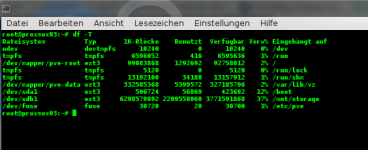
filesystem types (df -T):
dfT.png

hope these information are helpfull

kind regards
s.gruner
 
Hi,

after many many test, eventually we found the "problem".

The default proxmox-installation create a lvm system with ext3 partitions.
now I've found the information, that the max file-size in ext3 is 2TB (http://de.wikipedia.org/wiki/Ext3)

The size of the hdd of my test-vm is 1500GB. I wrote data on the hdd until the drive is "full".
Where are the infomation or data locate on the filesystem, if I take snapshot of the VM?

I suppose, the information of the changes are stored in the hdd-image. Is this correct?
(my 1500GB hdd-image have a real-size of exact 2,0TB in the proxmox-filesystem after snapshot)

If this is true, proxmox should use ext4. this supports file-size up to 16 TB.
Is it possible to install proxmox from the downloaded iso with ext4?

could this be my problem?

greetings
s.gruner