

VM becomes unresponsive during Veeam backup
- Thread starter sudomaster.ljs
- Start date
You are using an out of date browser. It may not display this or other websites correctly.
You should upgrade or use an alternative browser.
You should upgrade or use an alternative browser.
Issue was fixed for me with the following:
C:\Program Files\Veeam\Plugins\PVE\Service
Edit appsettings.json
VmbApiPreReadQueueDepth - change from 32 to 4, restart services
C:\Program Files\Veeam\Plugins\PVE\Service
Edit appsettings.json
VmbApiPreReadQueueDepth - change from 32 to 4, restart services
We have fixed this issue by creating a seperate volume on our storage cluster for Veeam snapshots.
Now Veeam will not write its snapshots to the local disk of Proxmox anymore, but to our NVMe storage cluster (during backups)
Now Veeam will not write its snapshots to the local disk of Proxmox anymore, but to our NVMe storage cluster (during backups)

Hello, might I ask what led you to this particular setting?Issue was fixed for me with the following:
C:\Program Files\Veeam\Plugins\PVE\Service
Edit appsettings.json
VmbApiPreReadQueueDepth - change from 32 to 4, restart services
That sounds interesting.
We use many more Veeam products and features.Just asking - why dont use the Proxmox Backup Server ?
VSPC, Cloud Connect etc.
Proxmox Backup Server is not able to give us all features we need in our multi-tenant private cloud.
Veeam support suggested this - seems to work for me and the VM is still performant during backupsHello, might I ask what led you to this particular setting?
That sounds interesting.

PBS does not have immutable backups to S3, nor replication, and also missing some windows integrations such as SQL db processingJust asking - why dont use the Proxmox Backup Server ?
Tried out both workarounds and unfortunately neither solved the issue for our cluster. Some slight speedup was seen, VM does not completely freeze (can be reachable via SSH) and it gives out around ~2-8MB/s write speed when running dd and is reachable during backup but anyways the performance is quite unacceptable when backup is running.
Workaround1:
Tested with Veeam Appliance:
C:\Program Files\Veeam\Plugins\PVE\Service
Edit appsettings.json
VmbApiPreReadQueueDepth - change from 32 to 4, restart services
=> Did not work as expected, performance slightly got better (from kilobytes to megabytes write/read speed, SSH session to VM did not completely die).
--
Workaround2:
https://helpcenter.veeam.com/archive/vbproxmoxve/1/userguide/server_add_storage.html
-> Tried with local storage and NFS storage, no effect on performance when backup is running. Had "VmbApiPreReadQueueDepth - change from 32 to 4" modification in place during this test too.
--
Workaround3:
Running backups via NBD mode still gives the best performance on our tests, 1x host on the cluster contains mostly VMs that I dont have need to backup => Veeam proxy is located on that host and other proxies have been disabled. Running it like this does not affect the VM write / read speed in any way and processing rate is almost same as with Hotadd.
Edit:
--- forgot to mention these:
1. On what storages are the disk images of the affected VMs? Ceph? iscsi? etc.
-- Ceph.
-- We also have iSCSI Blockstorage (Dell Powerstore). If VM that gets backed up is moved to this block storage => it does not have any issues with Hotadd backup via Veeam Proxy.
2. Where are Veeam backups for this VM being stored? On which storage?
-- Dell Datadomain configured on Veeam B&R. Veeam Proxy handles this data transfer with Veeam B&R server.
Workaround1:
Tested with Veeam Appliance:
C:\Program Files\Veeam\Plugins\PVE\Service
Edit appsettings.json
VmbApiPreReadQueueDepth - change from 32 to 4, restart services
=> Did not work as expected, performance slightly got better (from kilobytes to megabytes write/read speed, SSH session to VM did not completely die).
--
Workaround2:
https://helpcenter.veeam.com/archive/vbproxmoxve/1/userguide/server_add_storage.html
-> Tried with local storage and NFS storage, no effect on performance when backup is running. Had "VmbApiPreReadQueueDepth - change from 32 to 4" modification in place during this test too.
--
Workaround3:
Running backups via NBD mode still gives the best performance on our tests, 1x host on the cluster contains mostly VMs that I dont have need to backup => Veeam proxy is located on that host and other proxies have been disabled. Running it like this does not affect the VM write / read speed in any way and processing rate is almost same as with Hotadd.
Edit:
--- forgot to mention these:
1. On what storages are the disk images of the affected VMs? Ceph? iscsi? etc.
-- Ceph.
-- We also have iSCSI Blockstorage (Dell Powerstore). If VM that gets backed up is moved to this block storage => it does not have any issues with Hotadd backup via Veeam Proxy.
2. Where are Veeam backups for this VM being stored? On which storage?
-- Dell Datadomain configured on Veeam B&R. Veeam Proxy handles this data transfer with Veeam B&R server.
Last edited:
I have some progress with Veeam and CEPH on my behalf. On backed up VM - which is located on CEPH storage, I changed following settings and tried backups after (one by one and tried everything out):
----
TEST1:
We upgraded Proxmox VE from 9.2.5 to 9.2.10 today with Enterprise repository packages. Tested out after the upgrade => still same issues with Veeam backups.
----
TEST2:
Changed Machine hardware version: Latest -> 10.2 = No effect on speed, VM still hangs during backup.
----
TEST3:
Changed SCSI Controller Type from VMware PVSCSI to VirtIO SCSI Single (as the machines have been migrated from VMware, some options still have not been changed). => No effect on speed, VM still hangs during backup.
----
TEST4:
Changed Hard Disk (scsi0) options:
Enabled IO Thread
Enabled SSD Emulation
=> Now we did notice some improvement, VM no longer hangs during backup. Tested out DD write speed when backup was been taken, we now get around 30MB/s performance and machine is operational.
~# dd if=/dev/zero of=/root/dd-test.img bs=1M count=16384 oflag=direct status=progress
120586240 bytes (121 MB, 115 MiB) copied, 4 s, 30.0 MB/s^C
124+0 records in
124+0 records out
130023424 bytes (130 MB, 124 MiB) copied, 4.3577 s, 29.8 MB/s
This is still kind of slow when compared to normal operations, varies from between 500MB/s - 1000MB/s (with 8 SSDs on each host, 10Gbps dedicated network for CEPH ~ 60 VMs on production on this cluster):
~# dd if=/dev/zero of=/root/dd-test.img bs=1M count=16384 oflag=direct status=progress
4579131392 bytes (4.6 GB, 4.3 GiB) copied, 7 s, 654 MB/s^C
4505+0 records in
4505+0 records out
4723834880 bytes (4.7 GB, 4.4 GiB) copied, 7.28532 s, 648 MB/s
TEST5:
----
Enabled KRDB on CEPH Storage volume => shutdown VM and restarted.
After enabling KRDB, now I am getting around 120MB/s write speed during backup operations - which is significant increase on speed.
Processing rate for Veeam also seems faster when using Hotadd => from roughly 200MB/s to 400MB/s processing rate on single VM with just 1 hard drive.
During backup:
~# dd if=/dev/zero of=/root/dd-test.img bs=1M count=16384 oflag=direct status=progress
9366929408 bytes (9.4 GB, 8.7 GiB) copied, 81 s, 116 MB/s
Before backup:
~# dd if=/dev/zero of=/root/dd-test.img bs=1M count=16384 oflag=direct status=progress
1861222400 bytes (1.9 GB, 1.7 GiB) copied, 3 s, 620 MB/s^C
1910+0 records in
1910+0 records out
2002780160 bytes (2.0 GB, 1.9 GiB) copied, 3.22388 s, 621 MB/s
KRBD setting is global anyways on that datastore, once I shutdown and start the VM on Ceph storage it will start using that instead of typical librbd with Ceph.
--
I still have these modification in place, I will now revert them and test more with KRBD enabled on Ceph storage.
Modification1: (Veeam): VmbApiPreReadQueueDepth - change from 32 to 4, restart services
Modification2: https://helpcenter.veeam.com/archive/vbproxmoxve/1/userguide/server_add_storage.html (Local SSD)
----
TEST1:
We upgraded Proxmox VE from 9.2.5 to 9.2.10 today with Enterprise repository packages. Tested out after the upgrade => still same issues with Veeam backups.
----
TEST2:
Changed Machine hardware version: Latest -> 10.2 = No effect on speed, VM still hangs during backup.
----
TEST3:
Changed SCSI Controller Type from VMware PVSCSI to VirtIO SCSI Single (as the machines have been migrated from VMware, some options still have not been changed). => No effect on speed, VM still hangs during backup.
----
TEST4:
Changed Hard Disk (scsi0) options:
Enabled IO Thread
Enabled SSD Emulation
=> Now we did notice some improvement, VM no longer hangs during backup. Tested out DD write speed when backup was been taken, we now get around 30MB/s performance and machine is operational.
~# dd if=/dev/zero of=/root/dd-test.img bs=1M count=16384 oflag=direct status=progress
120586240 bytes (121 MB, 115 MiB) copied, 4 s, 30.0 MB/s^C
124+0 records in
124+0 records out
130023424 bytes (130 MB, 124 MiB) copied, 4.3577 s, 29.8 MB/s
This is still kind of slow when compared to normal operations, varies from between 500MB/s - 1000MB/s (with 8 SSDs on each host, 10Gbps dedicated network for CEPH ~ 60 VMs on production on this cluster):
~# dd if=/dev/zero of=/root/dd-test.img bs=1M count=16384 oflag=direct status=progress
4579131392 bytes (4.6 GB, 4.3 GiB) copied, 7 s, 654 MB/s^C
4505+0 records in
4505+0 records out
4723834880 bytes (4.7 GB, 4.4 GiB) copied, 7.28532 s, 648 MB/s
TEST5:
----
Enabled KRDB on CEPH Storage volume => shutdown VM and restarted.
After enabling KRDB, now I am getting around 120MB/s write speed during backup operations - which is significant increase on speed.
Processing rate for Veeam also seems faster when using Hotadd => from roughly 200MB/s to 400MB/s processing rate on single VM with just 1 hard drive.
During backup:
~# dd if=/dev/zero of=/root/dd-test.img bs=1M count=16384 oflag=direct status=progress
9366929408 bytes (9.4 GB, 8.7 GiB) copied, 81 s, 116 MB/s
Before backup:
~# dd if=/dev/zero of=/root/dd-test.img bs=1M count=16384 oflag=direct status=progress
1861222400 bytes (1.9 GB, 1.7 GiB) copied, 3 s, 620 MB/s^C
1910+0 records in
1910+0 records out
2002780160 bytes (2.0 GB, 1.9 GiB) copied, 3.22388 s, 621 MB/s
KRBD setting is global anyways on that datastore, once I shutdown and start the VM on Ceph storage it will start using that instead of typical librbd with Ceph.
--
I still have these modification in place, I will now revert them and test more with KRBD enabled on Ceph storage.
Modification1: (Veeam): VmbApiPreReadQueueDepth - change from 32 to 4, restart services
Modification2: https://helpcenter.veeam.com/archive/vbproxmoxve/1/userguide/server_add_storage.html (Local SSD)
Rolled back the changes on Veeam settings, now I am running CEPH as backup cache on Veeam - default option (largest storage available).
Performance got even better after the changes, roughly 150MB/s - 400 MB/s when testing it out while backup was running (Ceph is just faster than our other storage that I had there in place).
~# dd if=/dev/zero of=/root/dd-test.img bs=1M count=16384 oflag=direct status=progress
8387559424 bytes (8.4 GB, 7.8 GiB) copied, 22 s, 381 MB/s^C
8112+0 records in
8112+0 records out
8506048512 bytes (8.5 GB, 7.9 GiB) copied, 22.6787 s, 375 MB/s
When KRBD is enabled on Ceph Storage => performance is good and throughput with Veeam backup has switched to Target (as it should be in our environment).
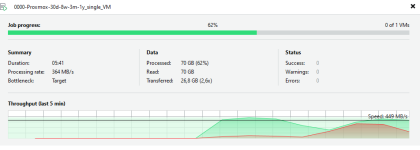
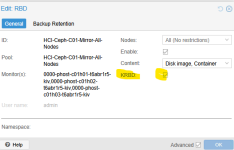
Note, after enabling KBRD - you need to shutdown VM or live-migrate it to other host to enable it (no downtime needed, just migrate it).
--
So in conclusion, I would say without knowing better that the bottleneck when using Veeam backup with Hotadd is librbd and problem with that started after Proxmox VE 9.2.3 version and you can get rid of this problem just by enabling KRBD on Storage settings.
Hopefully someone else comes to the same conclusion - at least this was the solution for us.
Performance got even better after the changes, roughly 150MB/s - 400 MB/s when testing it out while backup was running (Ceph is just faster than our other storage that I had there in place).
~# dd if=/dev/zero of=/root/dd-test.img bs=1M count=16384 oflag=direct status=progress
8387559424 bytes (8.4 GB, 7.8 GiB) copied, 22 s, 381 MB/s^C
8112+0 records in
8112+0 records out
8506048512 bytes (8.5 GB, 7.9 GiB) copied, 22.6787 s, 375 MB/s
When KRBD is enabled on Ceph Storage => performance is good and throughput with Veeam backup has switched to Target (as it should be in our environment).
Note, after enabling KBRD - you need to shutdown VM or live-migrate it to other host to enable it (no downtime needed, just migrate it).
--
So in conclusion, I would say without knowing better that the bottleneck when using Veeam backup with Hotadd is librbd and problem with that started after Proxmox VE 9.2.3 version and you can get rid of this problem just by enabling KRBD on Storage settings.
Hopefully someone else comes to the same conclusion - at least this was the solution for us.
We have the same issue, with 3 vms in our case, we use ceph, proxmox version 9.1.1 and 8.4, and for veeam We have the repositorys in another vm and console apart, we use cross-reference shcheme
We have the same issue, with 3 vms in our case, we use ceph, proxmox version 9.1.1 and 8.4, and for veeam We have the repositorys in another vm and console apart, we use cross-reference shcheme, and ocurs all the year with differents vms, in the first months in middle months and now, onlye check in anohter forums or web pages the problem maybe have a solution with the scosi controller and check i/o threadI also am having this issue and posted in Veeam forum, have a ticket open but they dont seem to have any real suggestions yet-
1) ceph
2) separate veeam repository on its own hardware
3) I have this set to ceph as well, i am unsure if i have enough local storage to store snapshots as the local storage is just the OS drive
I have one cluster on 9.2.3 that i havent upgraded yet and all is OK, on my test cluster it is upgraded to 9.2.6 which seems to have the issue with crashing VMs, so it may be the case that there was a change between the two different versions (or even ceph 20.2.1->20.2.2)
My test cluster is running on enterprise SATA SSDs so i think this issue is not slow IOPS on HDDs, i think there was a change in proxmox packages or the ceph update from 20.2.1->2
I try the test 4, but don't work, the vm still hang up, after the change, and i have a question is necesary update proxmox to do to work thath configuration ? We have the 9.1.1 so I don't know if is the version the problem or anotherI have some progress with Veeam and CEPH on my behalf. On backed up VM - which is located on CEPH storage, I changed following settings and tried backups after (one by one and tried everything out):
----
TEST1:
We upgraded Proxmox VE from 9.2.5 to 9.2.10 today with Enterprise repository packages. Tested out after the upgrade => still same issues with Veeam backups.
----
TEST2:
Changed Machine hardware version: Latest -> 10.2 = No effect on speed, VM still hangs during backup.
----
TEST3:
Changed SCSI Controller Type from VMware PVSCSI to VirtIO SCSI Single (as the machines have been migrated from VMware, some options still have not been changed). => No effect on speed, VM still hangs during backup.
----
TEST4:
Changed Hard Disk (scsi0) options:
Enabled IO Thread
Enabled SSD Emulation
=> Now we did notice some improvement, VM no longer hangs during backup. Tested out DD write speed when backup was been taken, we now get around 30MB/s performance and machine is operational.
~# dd if=/dev/zero of=/root/dd-test.img bs=1M count=16384 oflag=direct status=progress
120586240 bytes (121 MB, 115 MiB) copied, 4 s, 30.0 MB/s^C
124+0 records in
124+0 records out
130023424 bytes (130 MB, 124 MiB) copied, 4.3577 s, 29.8 MB/s
This is still kind of slow when compared to normal operations, varies from between 500MB/s - 1000MB/s (with 8 SSDs on each host, 10Gbps dedicated network for CEPH ~ 60 VMs on production on this cluster):
~# dd if=/dev/zero of=/root/dd-test.img bs=1M count=16384 oflag=direct status=progress
4579131392 bytes (4.6 GB, 4.3 GiB) copied, 7 s, 654 MB/s^C
4505+0 records in
4505+0 records out
4723834880 bytes (4.7 GB, 4.4 GiB) copied, 7.28532 s, 648 MB/s
TEST5:
----
Enabled KRDB on CEPH Storage volume => shutdown VM and restarted.
After enabling KRDB, now I am getting around 120MB/s write speed during backup operations - which is significant increase on speed.
Processing rate for Veeam also seems faster when using Hotadd => from roughly 200MB/s to 400MB/s processing rate on single VM with just 1 hard drive.
During backup:
~# dd if=/dev/zero of=/root/dd-test.img bs=1M count=16384 oflag=direct status=progress
9366929408 bytes (9.4 GB, 8.7 GiB) copied, 81 s, 116 MB/s
Before backup:
~# dd if=/dev/zero of=/root/dd-test.img bs=1M count=16384 oflag=direct status=progress
1861222400 bytes (1.9 GB, 1.7 GiB) copied, 3 s, 620 MB/s^C
1910+0 records in
1910+0 records out
2002780160 bytes (2.0 GB, 1.9 GiB) copied, 3.22388 s, 621 MB/s
KRBD setting is global anyways on that datastore, once I shutdown and start the VM on Ceph storage it will start using that instead of typical librbd with Ceph.
--
I still have these modification in place, I will now revert them and test more with KRBD enabled on Ceph storage.
Modification1: (Veeam): VmbApiPreReadQueueDepth - change from 32 to 4, restart services
Modification2: https://helpcenter.veeam.com/archive/vbproxmoxve/1/userguide/server_add_storage.html (Local SSD)
We can't do test 5 because our environment is production
The Hot-Add vs NBD results are probably the most useful clue here. If NBD keeps the VM responsive while Hot-Add drives I/O down to ~100 KB/s and causes soft lockups/RCU stalls, I’d be looking very closely at the Hot-Add path between Veeam, QEMU and Ceph rather than blaming Ceph performance in general.
The fact that the same VM behaves normally on iSCSI and that even SSD-backed Ceph shows the problem also makes the “HDDs are simply too slow” explanation less convincing.
For production VMs, I’d definitely keep the NBD workaround until Veeam gets to the bottom of the Hot-Add issue. And if any of these incidents have resulted in filesystem/database corruption, make a copy of the affected VM data before attempting repairs. For MySQL workloads in particular, Stellar Repair for MySQL can be useful when you need to recover or repair a damaged MySQL database after an incident like this.
Hopefully Veeam and Proxmox can narrow down exactly what Hot-Add is doing to the RBD I/O path. The reproduction you've documented here should give them plenty to work with.
The fact that the same VM behaves normally on iSCSI and that even SSD-backed Ceph shows the problem also makes the “HDDs are simply too slow” explanation less convincing.
For production VMs, I’d definitely keep the NBD workaround until Veeam gets to the bottom of the Hot-Add issue. And if any of these incidents have resulted in filesystem/database corruption, make a copy of the affected VM data before attempting repairs. For MySQL workloads in particular, Stellar Repair for MySQL can be useful when you need to recover or repair a damaged MySQL database after an incident like this.
Hopefully Veeam and Proxmox can narrow down exactly what Hot-Add is doing to the RBD I/O path. The reproduction you've documented here should give them plenty to work with.
You can still do Test 5, a reboot of the VM is not necessary. Live migrating a VM to a different host is enough.I try the test 4, but don't work, the vm still hang up, after the change, and i have a question is necesary update proxmox to do to work thath configuration ? We have the 9.1.1 so I don't know if is the version the problem or another
We can't do test 5 because our environment is production
Here is my experience: these hangs were already occurring with Proxmox 9.1 and Veeam 12.3.xx whenever a VM was being backed up.
I noticed this because I have monitoring software that polls every 5 minutes; however, once the backup finished, the VM would return to normal operation without major issues.
I didn't investigate too deeply because I now use PBS; within Proxmox, it is just as efficient as Veeam but offers better cluster integration.
In release 12.3.x, Veeam managed the specific node rather than the cluster; consequently, if I migrated the VM, Veeam couldn't find it and threw an error—whereas with PBS, this doesn't happen.
My criticism of Veeam is that the Worker is a "black box"—you can't modify options like the QEMU machine type (with Proxmox 8.4 everything was fine, but with 9.1 it was a nightmare, and VMs wouldn't restore properly—an issue eventually fixed by a plugin update). Everything is handled via the Veeam console, but in my opinion, being able to edit the VM's `.conf` file during the final confirmation stage would solve many problems. IMHO, of course.
I noticed this because I have monitoring software that polls every 5 minutes; however, once the backup finished, the VM would return to normal operation without major issues.
I didn't investigate too deeply because I now use PBS; within Proxmox, it is just as efficient as Veeam but offers better cluster integration.
In release 12.3.x, Veeam managed the specific node rather than the cluster; consequently, if I migrated the VM, Veeam couldn't find it and threw an error—whereas with PBS, this doesn't happen.
My criticism of Veeam is that the Worker is a "black box"—you can't modify options like the QEMU machine type (with Proxmox 8.4 everything was fine, but with 9.1 it was a nightmare, and VMs wouldn't restore properly—an issue eventually fixed by a plugin update). Everything is handled via the Veeam console, but in my opinion, being able to edit the VM's `.conf` file during the final confirmation stage would solve many problems. IMHO, of course.